 GB Flexible Benefits Payroll Integration
Purpose
After the Flexible Benefits annual (open) enrolment period is closed and all enrolment data has been confirmed by your benefits administrators and by the providers of your benefits plans, deductions and costs are processed via payroll. The following diagram illustrates the high level payroll process flow within
Flexible Benefits for Great Britain
(GB FlexBens).
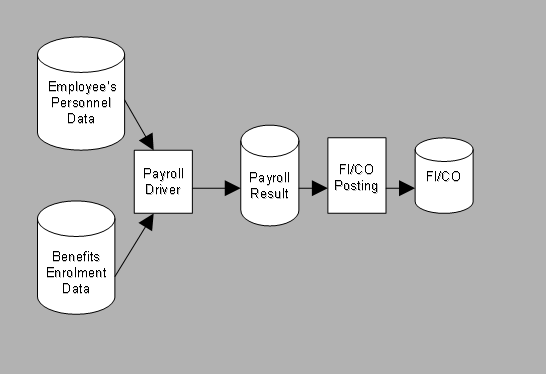
The payroll driver accesses both benefits enrolment data and employee’s payroll-related master data to calculate the actual benefits values and deductions. These values and deductions are stored in the payroll result database.
If you have installed the SAP
Financials/Controlling
(FI/CO), the FI/CO posting program then reads the benefits posting information from the payroll result and updates the FI/CO database.
Implementation Considerations
You must implement the payroll integration component of GB FlexBens if you wish to integrate your Flexible Benefits scheme with your
SAP Payroll GB
solution.
Integration
You achieve integration of GB FlexBens and your
SAP Payroll Great Britain
solution through customising in the
Payroll Great Britain
Implementation Guide (IMG). There are a number of distinct customising steps that you must carry out, in order to correctly pay employees who have enroled Flexible Benefits plans.
The relevant customising activities are located in the
Payroll Great Britain
IMG, under:

PayrollAccounting

Benefits
 . This section of the IMG is a combination of existing
International Benefits
IMG steps and new GB-specific steps, marked
(FLEX)
.

A summary of these new GB-specific configuration steps is given below:
Check Payroll Schema (FLEX)
In this first step, you check your payroll schema for GB FlexBens.

The standard schema G000 contains all the functions required for Flexible Benefits payroll processing.
Check Assignment to Wage Type Group (FLEX)
Secondly, you check the settings for assigning wage types to wage type groups. You check the existing assignments of wage types to wage type groups and change these existing assignments as required.

The wage type group FBN0 is provided for your use in GB FlexBens.
Assign Flexible Benefits Plan Wage Types for Benefits Plans (FLEX)
Thirdly, use this step to control which wage types store the employee's and the employer's contribution, for the following Flexible Benefits plans:
- Health Plans
- Insurance Plans
- Miscellaneous Plans (For example,Holiday Plans and Pension Plans)
You also use this step to maintain wage types for salary sacrifice Pension Plans.
Maintain Wage Types for P11D Cumulation Wage Types (FLEX)
Fourthly, assign your customer wage types to cumulation wages to determine which wage types should be processed for the P11D Form.
Assign Wage Types for Additional Funding Scheme (FLEX)
Finally, use this fifth IMG step to assign wage types for the GB FlexBens Additional Funding Scheme. You define the wage type that stores employee credits from the Additional Funding Scheme, and the wage type that stores the National Insurance Cost Neutrality amount. An employee must pay this neutrality amount in the Flexible Benefits system when he or she generates an employee credit in the Additional Funding Scheme.
Features
Payroll Schema
The payroll schema G000 is provided for you to process GB Flexible Benefits through payroll.
Payroll Function GFBNW
Payroll function
GFBNW
is necessary when you implement
Flexible Benefits for Great Britain
.
Via the operation of function
GFBNW
, wage types for the following are generated according to the respective Flexible Benefits plans:
- Employee credits/costs generated from Flexible Benefits plan
- The National Insurance Contribution neutrality amount for the Flexible Benefits plan
- The deferred taxation (P11D value)
- Post-flex salary
Function
GFBNW
is inserted into the GB payroll schema G000 as
inactive
. You must activate this function if you are implementing GB FlexBens.
Payroll function
GFBNW
recalculates the contributions paid by both employee and employer in a particular pay period according to your particular rules for each Flexible Benefits plan. It processes data stored in the
International Benefits
infotypes
Health Plans
(0167),
Insurance Plans
(0168) and
Miscellaneous Plans
(0377), as well as in table
V0
and gross payroll data.
Wage Type Cumulating
Where you offer benefits plans with annual limits which are checked via reference to the
Cumulative Results Table
(CRT), you must ensure that you maintain your cumulative wage types correctly.
The wage type table T512W must be customised to ensure that all processing, cumulation and evaluation classes are set up correctly, depending on whether the wage type is pre- or post-tax, and whether it is a contribution or deduction wage type.
You must also make sure that your GB FlexBens wage types are correctly attributed to the infotypes for which they are processed. You use table T512Z to check this.
Remuneration Statement
You run the
Rumuneration statements
report (RPCEDTG0) with the form name
GRFB
to generate remuneration statements for all employees participating in
Flexible Benefits for Great Britain
.