 GB Flexible Benefits Business Add-Ins
Definition
Business Add-Ins (BAdIs) are an SAP enhancement technique based on ABAP Objects. They can be inserted into the SAP System to accommodate user requirements too specific to be included in the standard delivery. Since specific industries often require special functions, SAP allows you to predefine these points in your software. Specific BAdIs have been developed in
Flexible Benefits for Great Britain
(GB FlexBens).

There are also a number of User Exits defined in GB FlexBens. For more information, see
Example
below.
Use
As with customer exits two different views are available:
- In the definition view , an application programmer predefines exit points in a source that allow specific industry sectors, partners, and customers to attach additional software without having to modify the original object.
- In the implementation view , the users of Business Add-Ins can customise the logic they need or use a standard solution if one is available.
SAP guarantees the upward compatibility of all Business Add-In interfaces. Release upgrades do not affect enhancement calls from within the standard software nor do they affect the validity of call interfaces. You do not have to register Business Add-Ins in SSCR.
The Business Add-In enhancement technique differentiates between enhancements that can only be implemented once and enhancements that can be used actively by any number of customers at the same time. In addition, Business Add-Ins can be defined according to filter values. This allows you to control add-in implementation and make it dependent on specific criteria (on a specific country value, for example).
All ABAP sources, screens, GUIs, and table interfaces created using this enhancement technique are defined in a manner that allow you to include your own enhancements in the standard. A single Business Add-In contains all of the interfaces necessary to implement a specific task.
Structure
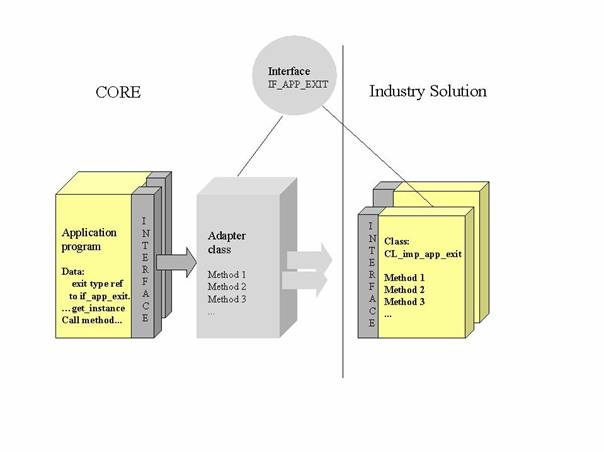
In order to enhance a program, a Business Add-In must first be defined. Application developers create an interface for the add-in. Enhancement management takes this interface and generates an adapter class for implementing it, thus opening a path for implementations created by partners or customers. Your developer then creates an instance of the adapter class in the application program and calls the corresponding method at the appropriate time.
Customers can find the enhancements present in their system in the IMG and in the component hierarchy. Whenever they want to use a Business Add-In, they must create their own implementation of the add-in. Customers must first implement methods and user interface enhancements, and then activate their implementations of the enhancement. The enhancement's active components are then called at runtime.
Normally, a Business Add-In contains an interface and other additional components such as function codes for menu enhancements. In some cases, Business Add-Ins also include enhancements for screens. The enhancement, interface, and associated classes generated all lie in the appropriate application development namespace. Business Add-In implementations lie in the respective namespaces of the people who created them.
Integration
In contrast to Customer Exits, Business Add-Ins no longer assume a two-level infrastructure (SAP and customer solutions), but instead allow for a multi-level system landscape (SAP, partner, and customer solutions, as well as country versions, industry solutions, and the like). Definitions and implementations of Business Add-Ins can be created at each level within such a system infrastructure.
Example
In
Flexible Benefits for Great Britain
(GB FlexBens), there are a number of Business Add-Ins available for you to use, as follows:
BAdI PFBN0001:NIC Cost Neutrality Calculation for Childcare Voucher Plan
BAdI PFBN0002:Taxation Deferred Item Wage Type for Childcare Voucher Plan
BAdI PFBN0003:Enhancement for GB FlexBens Holiday Buying/Selling Factor
BAdI PFBN0004:Enhancement for GB FlexBens Processing Dates Calculation

For more information on implementing these BAdIs, see the
Benefits Administration
IMG, under:

Toolset

Business Add-Ins for GB FlexBens
 .
.
For more information on how to use Business Add-Ins, access the SAP Library and choose:
mySAP TechnologyComponents
SAP Web ApplicationServer
ABAP Workbench (BC-DWB)
Changing the SAP Standard (BC)
Business Add-Ins
.
Alternatively, use this link to access the SAP library documentation on Business Add-Ins: