 Transferring Budgets
Use
In an area of responsibility, it is possible that the budget becomes tight for one project while the budget for another project is still adequate. Transfers enable you to make the budget for one project available to another project.
Course Prerequisites
The currency of the transfer must be permitted for both of the affected WBS elements. The WBS elements can belong to the same project, or to several projects.
Features
You can differentiate between:
Transfers between different WBS elements in the same period.
The sender and the recipient cannot belong to the same subtree.
Transfers between the same WBS element in different periods (also recourse or carryforward).
Transfers between different WBS elements in different years
You cannot execute transfers in all project statuses. The WBS elements between which you want to transfer budget must have a status that permits the business transaction
budget transfer
.
There are three different transfer transactions:
Budget Transfer Recipient
If the WBS element has a status that allows this business transaction, the WBS element can receive budget during a transfer.
Budget Transfer Sender
If the WBS element has a status that allows this business transaction, the WBS element can send budget during a transfer.
Budget Transfer (Transfer)
If the WBS element has a status that allows this business transaction, the WBS element can send and receive budget during a transfer.
The procedure for a transfer is the same as for a Supplement for a Project or a Return From a Project , except that you specify a sender or recipient WBS element (or year).
The system also maps any transfers between objects of lower hierarchy levels to the objects on higher hierarchy levels.
 Caution
If budgeting in the object currency , the following problems may occur with transfers:
The system only includes budget items in the relevant object currency in the
Entered Budget
. Transfers made in other currencies are
not
displayed as an
entered
value in objects from higher hierarchy levels.
The system includes all budget items in the
current budget
.

To display the budget line items for a WBS element, choose
Logistics
or
Accounting -> Project System -> Controlling -> Budgeting -> Original budget -> Change
.
The
Change Original Budget: Initial Screen
appears.
Enter the necessary data and choose
Continue
or
Original budget
.
Choose the WBS Element overview.
The
Change Budget: WBS Element Overview
screen appears.
Choose

Extras

Line item.


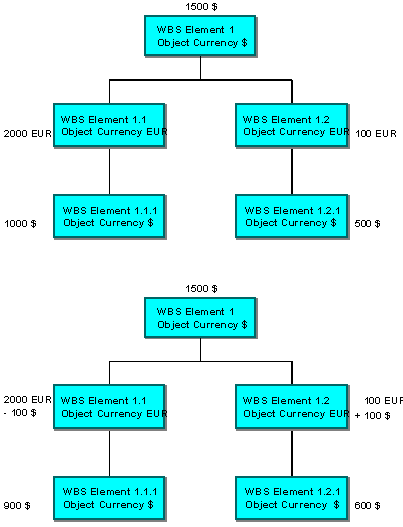
You entered the following budget values in a project structure plan with two subtrees and five objects with different object currencies.
You now make a transfer between two WBS elements of the lowest hierarchy level:
$100
from
WBS element
1.1.1
to
WBS element
1.2.1
. The current budget in the project structure plan is now composed as follows:
The
WBS elements 1.1
and
1.2
have the object currency
EUR
. The transferred
$100
is displayed in the line item report. The entered value of
WBS element 1.1
is still
2000 EUR
and the entered value of
WBS element
1.2
is still
100 EUR
, as the system only includes budget items entered in EUR.
Activities
To transfer budget, choose
Logistics
or
Accounting -> Project System -> Controlling -> Budgeting -> Transfer
.
On the
Transfer Budget: Initial Screen
, you can enter a
sender-
and
receiver year
and a default value text for a large number of similar transfers. You can also specify whether the overall values are to be included for the sender WBS element.
Enter the sender- and receiver WBS element, the amount and the currency for the transfer. The
sender year
,
receiver year
,
overall value
,
text
and
long text
fields contain the default values. You can use the
Detail
function to change these fields.