 Business Partner ( CRM ) - Customer/Vendor (FI AP/AR)
Use
If FI-AR (Accounting) orPSCD(FI-CA) integration is active in theCRMsystem (to check this in Customizing, choose

Customer Relationship Management Master Data

Business Partner
Business Agreement
Define Basic Settings
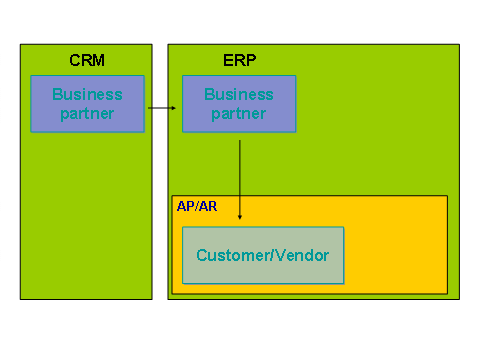
 ), a customer and/or vendor can be created automatically in ERP if a Business Partner is created with the role “Sold-To Party”.
Integration
The graphic below illustrates the process:
Replicating CRM Business Partner to FI-AP/AR
Prerequisites
You must first customize integration betweenCRMand Grants Management for Grantor (GM-GTR). To do this, go to Customizing and choose
Public Sector Management
Grants Management
Grants Management for Grantorand work the steps described below as appropriate.
For an overview of the customizing steps involved in implementing customer integration, choose
Integration with Accounts Receivable and Accounts Payable -> Customer/Vendor Integration
Customer Integration
Settings for Customer Integration.
For an overview of the customizing steps involved in implementing vendorintegration, choose I
ntegration with Accounts Receivable and Accounts Payable -> Customer/Vendor Integration
Vendor Integration
Settings for Vendor Integration.
In GM-GTR, it is possible to assign a template customer including the missing data (such as the company code). To do this, choose
Integration with Accounts Receivable and Accounts Payable
Customer/Vendor Integration
Customer Integration
Determine Template for Customer Account for Replication