 Accounting: Public Sector Collection and Disbursement
Use
Grantor Management (GM-GTR) provides a Financial Execution Interface (FEI) to the Public Sector Collection and Disbursement (PSCD) feature.
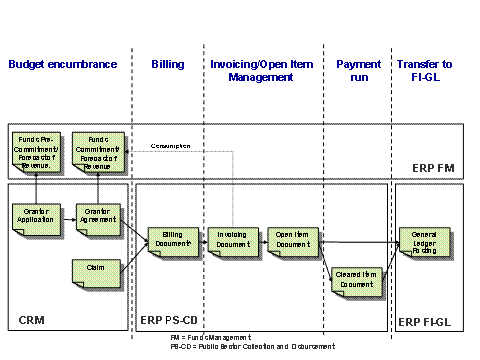
The graphic below illustrates the relevant document flow.
Document Flow: PSCD
Integration
Once an agreement/claim item achieves the status “Released”, creation of a Grantor (FI-CA) billing document is triggered in the ERP system. When the billing document item document has been created in ERP, this information is transferred toCRM. The billing document number is displayed in the transaction history section of the agreement/claim.
Prerequisites
Before using the features described below, you need to carry out the following Customizing:
Standard FI-GL configuration
Standard PSCD configuration
GM- GTR -specific Customizing:
Dummy main subtransactions and the posting lock key can be defined in Customizing under
Public Sector Management -> Grants Management -> Grantor Management -> Integration with Public Sector Collections and Disbursements -> Define Invoicing Parameters.
Features
Billing
This GM- GTR Billing document can be displayed with the transaction FMCAGTRINVBILL_DISP (Display Grantor Billing Document ( PSCD )). Access this from the menu by choosing
Accounting
-> Public Sector Management -> Grants Management -> Grantor Management -> Integration with Public Sector Collections and Disbursements -> Display Grantor Billing Document.
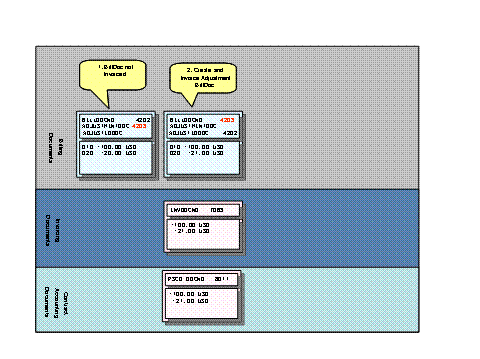
If the amount of an agreement/claim is changed and the GM- GTR billing document is not invoiced, a new GM- GTR billing document is created and the old document is flagged as obsolete. Only the latest GM- GTR billing document is considered for the invoicing. The graphic below illustrates this.
-
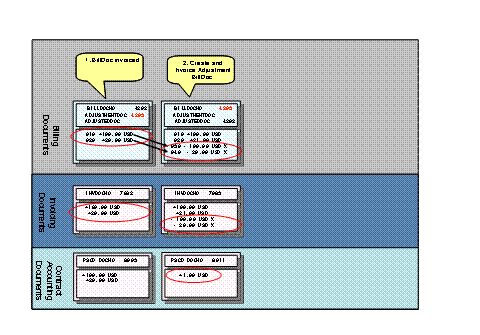
If the GM- GTR billing document is still invoiced, a new adjustment GM- GTR billing document is created and the adjustment Information is stored on the document header. During invoicing, a new invoicing document is created with a reference to the predecessor invoicing documents.
-
Invoicing (creation of open items)
After an open item document has successfully been created in ERP, this information is transferred to CRM . The PSCD open item document number is displayed in the transaction history section and the open item (ERP) amount in the agreement/claim is adapted.
 Note
Note
The invoicing function
Automatic Account Maintenance
is not supported from GM- GTR .
If the
Multiple Payment Recipients
scenario is active, the GM-GTRbilling document must be invoiced with the transaction FMCAGTRINV_S (PSCDSingle Invoicing Run (Multiple BP Recipients)) or FMCAGTRINV_M (PSCDMass Invoicing Run (Multiple BP Recipients)). Access this from the menu by choosing

Accounting

Public Sector Management
Grants Management
Grantor Management
Integration with Public Sector Collections and Disbursements (PSCD)àPSCDSingle Invoicing Run (Multiple BP Recipients)or Accounting
Public Sector Management
Grants Management
Grantor Management
Integration with Public Sector Collections and Disbursements (PSCD)àPSCDMass Invoicing Run (Multiple BP Recipients)
 .
.
After an open item document has been successfully created in ERP, this information must be transferred to CRM by scheduling the report RFGTR_NOTIFICATION.
Payment (clearing of open items)
After an open item document has successfully been cleared in ERP, this information is transferred to CRM . The clearing document number is displayed in the transaction history section and the open item (ERP) amount and the cleared item (ERP) amount in the agreement/claim are adapted.
If the Multiple Payment Recipients scenario is active, this information must be transferred to CRM . You do this by scheduling the report RFGTR_NOTIFICATION.
For more information, read the PSCD documentation.