Migrating Catalog Content
When organizations transition from a standalone SAP Datasphere setup to a SAP Business Data Cloud setup, catalog content is automatically migrated from SAP Datasphere to SAP Business Data Cloud.
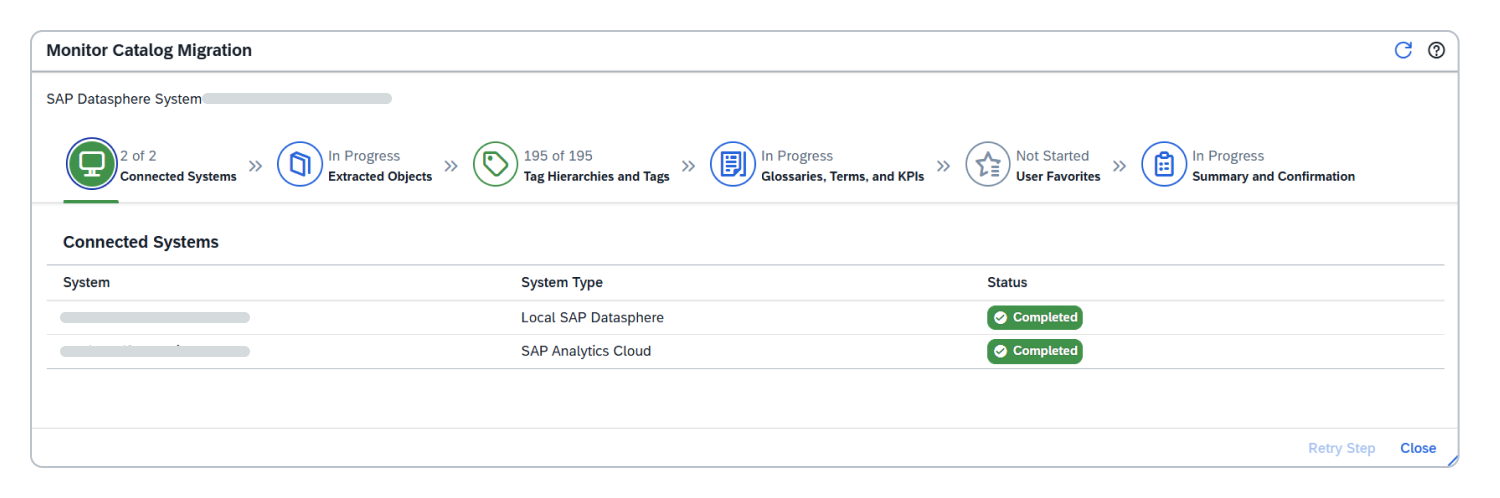
To monitor the migration progress and retry failed steps, go to SAP Datasphere and access the Metadata Extractions page. For the SAP Datasphere system, you can select Monitor Catalog Migration to open the Monitor Catalog Migration dialog.
|
Migration Step |
Description |
|---|---|
|
Connected Systems |
Displays the catalog connection status for source systems that are included in the catalog migration. This list consists of the SAP Datasphere system that is in the formation and SAP Analytics Cloud and BW (SAP Datasphere, SAP BW bridge or SAP BW∕4HANA) systems that are connected to the catalog via SAP Datasphere. |
|
Extracted Objects |
Displays the synchronization status and object totals for systems that are automatically synchronized during the catalog migration. For systems that you manually have to synchronize, the status is Check extraction.
The objects extracted to the catalog are based on the access permissions of the authorized user for the source system. |
|
Tag Hierarchies and Tags |
Displays the status and totals for migrating tag hierarchies and tags. |
|
Glossaries, Terms, and KPIs |
Displays the status and totals for migrating glossaries, terms, and KPIs. |
|
User Favorites |
Displays the status and totals for migrating user favorites. |
|
Summary and Confirmation |
Provides a final checkpoint where you review the migration outcome and confirm it. Before confirming the migration, check the migration summary logs and the object extractions for each system. If you are satisfied with the catalog migration, you can confirm the migration outcome. |