FNOL Creation
The outbound API enables the transfer of the first notice of loss (FNOL) data from Financial Services Accelerator into SAP Claims Management.
The integration enables the transfer of the first notice of loss (FNOL) data that are created in Financial Services Accelerator into Claims Management in S/4HANA (FS-CM). When you submit a claim request on the portal, the data are sent to a REST API hosted on SAP Cloud Integration, which performs the necessary data structure and value mappings before sending the request to SAP Claims Management. The synchronous communication to FS-CM is done in the background, so, in the meantime, you may seamlessly continue with your journey on the portal. When the response is returned from the SAP Cloud Integration service, you can see the response details, such as claim number, claim status or claim handler's data, in the Claims section of the My Account area.
Each request to Claims Management in SAP S/4HANA (FS-CM) is authenticated with OAuth and CSRF tokens, as well as with basic credentials, to ensure that your data is protected during transfer.
The integration package is generic and can easily be adapted to process any line of business.
Integration Flow
The integration flow (iFlow) is illustrated in the following diagram:
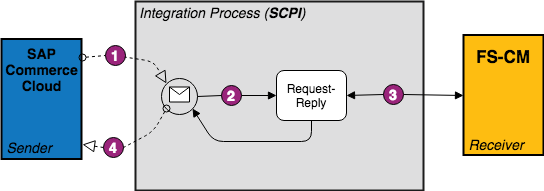
Legend
- Financial Services Accelerator submits the FNOL data to a REST API hosted on SAP Cloud Integration
- The integration flow on SAP Cloud Integration receives the data and does the necessary data value mappings and transformation
- The integration flow calls the service from FS-CM to create a claim and receives the claim number, together with the claim handler data, if it is available
- The Rest API returns the claim number, claim status, and the claim handler data in the success case, or an error message if the submission fails due to whatever reason
A complete iFlow together with the data value mappings and the integration guide can be found on the SAP API Business Hub, in the integration package "SAP Commerce Cloud, financial services accelerator integration with Claims Management in SAP S/4HANA".
Status of a Claim Request
For users, as well as for claim handlers, the status of a claim request is one of the key information regarding a claim. The workflow that is implemented in Financial Services Accelerator is shown in the following diagram:

Status Definition
- OPEN - A claim request has been created and a customer is working on it (filling in the data). The claim request has not been submitted yet. The customer can pause and later resume the claim request from My Account. The customer can also delete the claim request.
- SUBMITTED - A customer has submitted the claim request on the portal after filling in the data
- PROCESSING – The SAP Cloud Integration layer has successfully accepted the claim request and sent it over to the back-end system (e.g. FS-CM). The back-end system has successfully created the claim and sent back the information that claim has been created and that it is ready to be processed by a claim handler.
- ERROR- The SAP Cloud Integration layer failed to accept the claim request or to send it to a back-end system (e.g. no response from SAP Cloud Integration, network timeout, bad request etc.). The customer can delete such a claim request. He or she can call the tech support and the responsible admin can then change the status of a claim request in Backoffice.
- REJECTED - (business rejection) - The claim request has reached the target system (FS-CM). However, the request is incorrect and invalid in FS-CM (e.g. invalid conditions, invalid coverage, policy lapsed, missing data, etc.). It has been rejected as invalid by FS-CM and the information about the rejection is sent back to Financial Services Accelerator. The claim has not been created in FS-CM. As a result, the customer can resubmit the claim request, but cannot delete it on UI.
- CLOSED - Claim is processed by a back-end system, and the update is replicated to Financial Services Accelerator.
Note that when a claim request is accepted by a back-end system and a claim is created, the claim then goes through additional statuses. However, for this part of the integration flow these statuses are not relevant, and therefore not shown. They are received from the back-end system in subsequent calls.
For more information, see Claim Replication.
Document Upload
The Document Upload feature has been provided in the FNOL process as a part of the dynamic forms library in the Financial Services Accelerator when the financial_spa_integrations recipe is installed. This feature offers users the possibility to upload documents, which may provide additional information or evidence of the accident reported in the claim. Users can upload only PDF files that are up to 5MB in size, and the maximum number of files that can be uploaded is four. To verify that they have uploaded the right document, users can download the document and check. Users can also remove the uploaded document.
Once the claim is submitted, documents are created separately in Commerce Suite (instance of DocumentModel) and SAP Document Integration storage (SDI). For more information on the SDI repository strategy, see sapdocumentintegrationservices Extension.
Sample Data
The auto insurance is used as the illustration of integration possibilities between Financial Services Accelerator and SAP Claims Management (FS-CM).
Dependency Diagram

Before moving on to specific financial extensions that enable outbound API requests in Financial Services Accelerator, let us see which extensions from other modules are needed or are useful in enabling the integration with SAP Claims Management, or any other back-end system.
The most important are the extensions from Integration API module:
-
The odata2webservices extension exposes the business service as a REST-based web service. These services, or Integration Object definitions, are defined with the ImpEx files. In this integration scenario, it is the claim-outbound.impex file.
-
The integrationservices extension encapsulates the services that an API exposes
-
The apiregistryservices allows you to configure endpoint and credential details
-
The outboundservices extension allows monitoring for outbound Integration API requests
Apart from Integration APIs, the feature also requires extensions from yForms and Backoffice modules. The FNOL checkout uses yForms to collect data from the user and, as a result, xyformsfacades and xyformsservices extensions are needed for the integration. To create and edit the integration object, as well as to monitor requests, the Integration UI Tool perspective in Backoffice is used. For more information, see Collecting and Sending Different User Data.
Now let us focus on the relevant extensions within Financial Services Accelerator. When a user files a claim request on the portal (see the following figure), he fills in the information about the damaged object. In Financial Services Accelerator, we assume that the insured object is the same as the damaged object. However, this may not be the case in your custom project. The data model of Financial Services Accelerator has been extended to include the storage of information about the damaged object, as well as other item types and attributes that are relevant for the claim request, such as loss location, time and cause of loss. For more information, see section Changes to the Data Model of sapfscmintegrationfacades Extension.

Before all the data collected about the incident can be persisted to the database, they need to be transformed to a suitable format. This is done in the FSClaimRequestTransformer from the financialfacades extension, which parses the data collected in the FNOL checkout process and prepares it for persistence.
When we want to send the claim request to the SAP Claims Management, the information about the incident is one part of the overall data set that is needed for transfer. We also need to send the information about the policyholder and the relevant policy (or contract). These bits of information are retrieved directly from the database. All these item types and corresponding attributes are exposed in the integration object OutboundFSClaim and can be viewed in the impex file (claim-outbound.impex in the financialstore extension), or in the Integration UI Tool perspective in Backoffice. The integration object defines the structure of the payload that the endpoint accepts.
To quickly find the corresponding policy for which we want to create a claim, SAP Claims Management needs the following three attributes: incidentType, productCode, and contractId. Therefore, these attributes are put to the root of the payload. This is done in the FSCMClaimRequestDecorator from sapfscmintegrationfacades extension. The FSCMClaimRequestDecorator implements OutboundRequestDecorator from outboundservices extension. It also handles the authorization and cookie requests provided by the apiregistryservices extension.You can modify the decorator to include other specific header properties or parameters required by the target system.
{
  "productCode":"AUTO_ANNUALLY",
  "dateOfLoss":"/Date(1541545200000)/",
  "requestId":"7418851",
  "lossLocation":{
    "countryCode":"US",
     "region": "IL",
     "address":"222 Neverending St",
     "city":"Chicago",
     "postalCode":"6067",
     "detail:"My car was hit by another driver."
  },
  "incidentType":"AutoFire",
  "contractId":"Auto1",
  "timeOfLoss":"15:15:00",
  "causeOfLoss":"A car was going very fast when it slid into my lane.",
  "damagedObjects":[
     {
        "damagedObjectItems":[
           {
              "value":"BMW",
              "key":"make"
           },
           {
              "value":"528",
              "key":"model"
           },
           {
              "value":"123456",
              "key":"licenceNo"
           },
           {
              "value":"2011",
              "key":"year"
           },
           {
              "value":"$35000",
              "key":"vehicleValue"
           }
        ],
        "name":"CAR",
        "damagedObjectId":"00028152"
     }
  ]
}
The FSCMClaimSubmitFacade is responsible for sending the payload to SAP Claims Management. It also sets the claim status and claim number in accordance with the response received from the target system (FS-CM). If the data about a claim handler is received in the response, it also creates a dedicated claim handler in Financial Services Accelerator.
The following code example illustrates the sample response data.
<?xml version="1.0" encoding="UTF-8" standalone="no"?>
<C_InsurClm1stNotifTPTypeSet>
<C_InsurClm1stNotifTPType>
<requestId>7418851</requestId>
<contractId>BP2008-1</contractId>
<incidentType>AutoAccident</incidentType>
<productCode>AUTO_ANNUALLY</productCode>
<claimNumber>00000000000235136</claimNumber>
<dateOfLoss>2018-11-06T00:00:00</dateOfLoss>
<claimHandler>DOE</claimHandler>
<claimHandlerEmail>john.doe@sap.com</claimHandlerEmail>
<claimHandlerPhone>0610 661</claimHandlerPhone>
<claimHandlerFirstName>John</claimHandlerFirstName>
<claimHandlerLastName>Doe</claimHandlerLastName>
<errorMessage></errorMessage>
<claimStatus>Processing</claimStatus>
<messageStatus>Success</messageStatus>
</C_InsurClm1stNotifTPType>
</C_InsurClm1stNotifTPTypeSet>
You may monitor all the outbound requests in Backoffice.
Configuration Guide
Before you can explore the integration with SAP Claims Management, you need to configure the relevant systems. The complete configuration guide consists of three parts:
-
configuring Financial Services Accelerator
-
configuring the SAP Cloud Integration layer
-
configuring SAP Claims Management
The whole configuration guide is part of the integration package "SAP Commerce Cloud, financial services accelerator integration with Claims Management in SAP S/4HANA in SAP Cloud Integration" and is available at SAP API Business Hub.
For more information on how to configure just Financial Services Accelerator, see Establishing Communication with SAP Claims Management.
Modifying JSON Request
If you would like to change the structure of JSON request, the following things might need to be modified:
- FSCMClaimRequestDecorator - in case you want to enrich your outbound Integration API requests by modifying request headers and payloads; for example, you can add additional attributes to the root of JSON request
- FSClaimRequestTransformer - if additional set of data is collected from users, the parsing of this data and saving to the database would need to be done for these additional fields
- new item types created for additional set of data that are collected from users
- integration object (claim-outbound.impex) - this file should be modified in case more granular attributes need to be sent to FS-CM
For more information, see Configuring Integration Object and Collecting and Sending Different User Data.