 Creating Repayment Conditions for ABS/MBS
The general redemption schedule data
contains the following general data for the repayment of the bond:
General Data
Enter the issue currency.
The system displays the number of the redemption schedule.
Dates of Redemption Schedules
Select
Distribute Repayments
.On the right-hand side of the screen, choose the calculation method for the repayments. In the case of product types for which the CPR/PSA calculation methods are not activated, this step does not apply.
 Note
NoteThe PSA calculation method is relevant for bonds with an amortization exceeding 30 months. In such cases, it is assumed that the CPR value increases over the first 30 months but then remains constant thereafter.
End of the note.Enter the start date.
NoteTypically, publication of the redemption schedules starts before the first repayment date. To be able to portray this initial period without repayments, you can enter a start date that is not the same as the first repayment date. During the period between the start date and the date of the first repayment, the factor remains constant at 1.
End of the note.Enter the date of the first repayment.
Enter the date of the last repayment.
To simplify entering interest flows and repayment flows, you have the option of copying the dates from the interest condition and applying them for the repayment flows (using the
Int.Cond.Template
indicator). For each interest flow, the system creates a corresponding repayment flow with the following dates:Effective date of the repayment = (changed) calculation date of the interest flow
The effective date of the repayment flow is the start date of the next month in which the interest calculation date falls on the month-end date (since repayments are published on the first day of the month).
Payment date of the repayment = due date of the interest flow
If you do not want to use the interest condition as a template, you have to make the settings for the repayment condition (payment frequency and rounding rule) here.
NoteCPR and PSA calculation methods use repayment frequencies of a month.
End of the note.Payment Currency
Here you enter the payment currency if it differs from the issue currency.
Choose the
input type
for the redemption schedule. You can choose between the following input types:Enter Factors
Enter Current Nominal Values
Enter Repayments
Specify the number of relevant decimal points for the repayment factors.
Maturity Dates
This area is only activated if you do not use the
Int.Cond.Template
function.In this area, you specify the factory calendar as well as the correction rule for the maturity dates of the repayments.
See also: Date Determination Options for Interest Flows and Repayment Flows
ABS/MBS
In this area, you enter the initial values for calculating the repayments using the CPR/PSA calculation methods.
For the CPR calculation method, you need to enter the following values:
WAC Original
Weighted average interest of the bond at the time when the bond is issued.
Net Original
The estimated net interest revenue at the time when the bond is issued.
WAM Original
The weighted average time (in months) until the final maturity date of all loans.
Enter the
speed of advance repayments
.
For the PSA calculation method, you need to enter the following values:
WAC Original
Net Original
WAM Original
Repayment Speed Interval
This interval is used to identify the CPR/PSA value that you would like to use to calculate repayments.
If you use
Monthly
, the system uses the value CPR1 or PSA1 for the calculation.If you use
Quarterly
, the system applies the value CPR3 or PSA3.If you use
Semi-Annually
, the system applies the value CPR6 or PSA6.If you use
Annually
, the system applies the value CPR12 or PSA12.If you use
Life
, the system applies the value CPRL or PSAL.
Save your entries.
In the
Redemption Schedules
area, create the redemption schedule by choosing (
(Create
).The screen for entering the redemption schedule appears. Enter a short and a long description for the redemption schedule.
You use the following tabs for entering the redemption schedule:
ABS/MBS
For the CPR calculation method, enter the following values:
WAC
Net interest
WAM
CPR values
For the PSA calculation method, enter the following values:
WAC
Net interest
Age
WAM
PSA values
Redemption Schedule
In the
Condition Positions
area, first enter the interest condition. This is because the interest positions are included in the calculation of the repayment flows.Then choose
Create Repayments for Redemption Schedule
.The system now uses the data that you have entered to calculate the capital repayments as follows:
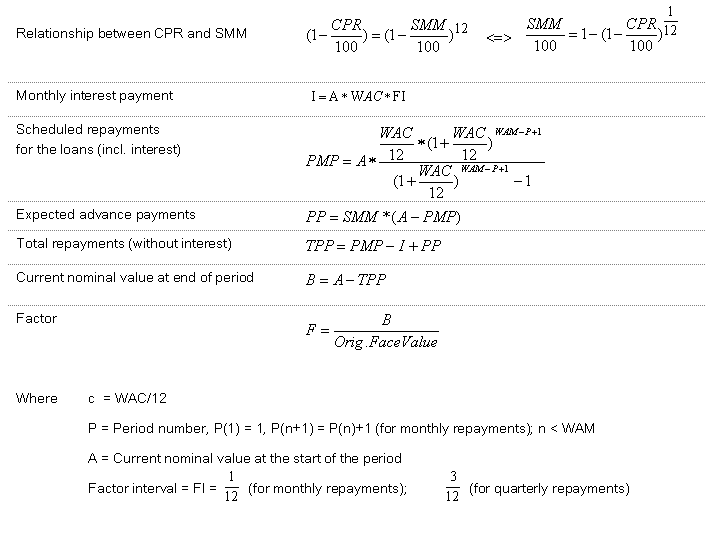
The redemption schedule contains the following columns:
Effective Date
Payment Date
Factor
Current Nominal Value
Nominal Value Reduction
Factor Status
Capital Repayment
Comment Field
NoteYou can make manual changes to the values calculated for the redemption schedule. Depending on the entry type selected, you can either change the factors, the current nominal value, or the capital repayment amounts.
End of the note.Save your entries.
In the
Date Preview
, you see the calculation dates and maturity dates for the capital repayments. NoteIf you have allowed factor increases in Customizing, a factor can also increase (that is, the nominal value increases during the term). This is the case, for example, when interest payments are capitalized. In such cases, no capital repayment occurs (that is, the capital repayment amount is zero).
End of the note.