 Receiving a Quality Certificate via EDI with Access to Data (QM-CA)
Use
In this EDI scenario, you receive and process:
The inspection results issued on a quality certificate (quality data) which can be transferred to an existing inspection lot, and
A quality certificate as a PDF file , if required
In general, a quality certificate is referenced to a delivery, inspection lot, or batch. Therefore, the transfer of the quality data on the certificate is not necessarily linked to a purchase order or delivery. Results of inspections that, from the recipient's point of view, were made externally, can also be sent to the recipient system for further processing.
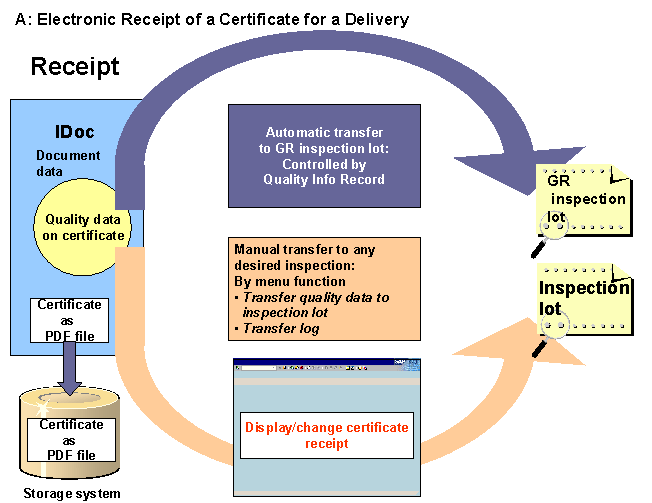
When transferring the quality data of a certificate with reference to a delivery or purchase order to the customer system, the data can be automatically uploaded to an inspection lot for a goods receipt (triggered by the goods receipt). Alternatively, you can use the functions for a certificate receipt , to transfer data to any other desired inspection lot. Using the latter function, you can transfer the quality data prior to a good receipt to a source inspection lot and valuate the goods already at an early stage.
When transferring the quality data of a certificate with reference to an inspection lot or a batch to the customer system, the data can be automatically uploaded from the IDoc to any desired inspection lot using
SAP Business Workflow
. For more information, see workflow documentation
Transfer Data from IDoc to Inspection Lot
.
The check of the digital signature ensures that the incoming certificate corresponds to the sent document. Then, the received certificate is stored via
SAP ArchiveLink
.
Prerequisites
Application: General
Function |
Prerequisite |
Remark |
Checking the digital signature |
The SSF-ID is created in the master data for the creditor under
The public key for the creditor is stored in your external security product under the SSF-ID. |
|
Identification and clear assignment of the quality data between the sender and the recipient system (characteristic mapping) |
In the
|
Characteristic mapping is necessary, if the characteristic descriptions are different in the sender and the recipient system. |
Transfer of the quality data on the certificate |
The
In the task list or material specification, you define that the results data origin is uploaded from the certificate. |
For more information, see the workflow documentation Transfer Data From IDoc to Inspection Lot . For more information about upload of quality data, when using a material specification, see Values for the Master Inspection Characteristic ; and when using a task list, see Functions in the Characteristic Overview . |
Application: Certificate for a Delivery
Function |
Prerequisite |
Remark |
Processing the inbound quality certificate for a delivery (PDF file) |
The delivery material, for which the quality certificate is sent, requires a certificate. The document data (
|
If no purchase order item could be assigned to the document data or the delivery material does not require a certificate, the incoming certificate is stored centrally and forwarded to the responsible party by
If the purchase order item is not given in the IDoc, you can assign the item using the customer enhancement
|
Uploading the quality data of a certificate to an inspection lot for a goods receipt |
On the
|
IDoc Interface
The following values are maintained in the partner profiles (inbound):
Field |
Value |
Message type |
QCERT |
Partner type |
LS |
Partner |
Logical system of the vendor |
Recipient port |
z.B. SUBSYSTEM |
Basic type |
QALITY02 |
Process code |
QCERT_IN |
Features
The following graphic illustrates the scenario for an incoming electronic certificate for a delivery with data transfer:
When an electronic certificate is received that is not related to a purchase order (e.g. a certificate for an inspection lot or batch), a workflow is started that allows data transfer to any desired inspection lot.