 Workflow Definition Details
Use
You use this workflow to pass an appraisal on for approval and follow-up processing.
Features
The following information might be useful with regard to the workflow definition for the workflow template PdvAppraisal . Please refer also to the definition in the system.
The workflow template comprises several other workflow templates (subflows).
The triggering event is defined in the main workflow.
Several alternative subflows might have been defined for the decision task.
The event that triggers the workflow is generated automatically when an appraisal is completed. For more information on the triggering event of the main workflow, see Workflow Template PdvAppraisal (PA-PD) .
Scenario
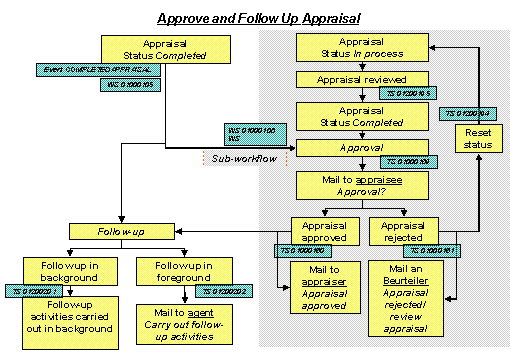
An appraiser carries out an appraisal, and completes this appraisal. The completion of the appraisal causes a new object of the object type BUS7026 (
Appraisal
) to be created, and generates the event COMPLETEDAPPRAISAL (Appraisal completed
) for this object type. This event triggers workflow template WS01000105 (Appraisal
). A multiple condition is used to determine the form of appraisal on which the appraisal is based.
 Note
Note
The workflow can be linked to various forms of appraisal by means of subworkflows. The approval process is only triggered if a suitable workflow template exists and has been defined as a sub-workflow.
If a suitable workflow template has not been defined for the form of appraisal in question, the workflow goes directly to follow-up processing (step 4).
If the form of appraisal
Regular appraisal (supervisor appraises employee
) is used for the appraisal, workflow template WS01000108 (Appraisal for Employee
) is started.
Note
Workflow template WS01000108 ( Appraisal for Employee ) can be used as a copy template for creating other workflow templates that can be linked to other forms of appraisal (reverse appraisals, business event appraisals, and so on).
Role 01000016 (
Appraisee
) is used to determine the appraisee. The appraisal is then sent to this person, along with decision task TS01000169 (Approve decision
).Depending on the appraisee’s decision, either standard task TS01000160 (
Approve appraisal
) or TS01000161 (Reject appraisal
) is executed. Role 01000017 (Appraiser
) is used to determine the appraiser, who is informed of the appraisee’s decision.Appraisal approved
Appraisal rejected
If the appraisal was approved, an e-mail is sent to the appraiser to inform him/her of this, and the sub-workflow is completed.
If the appraisal was rejected, standard task TS01200194 (
Reset Status of Appraisal
) is used to change the status of the appraisal back toIn process
. The appraiser is informed of this, and the appraisal is returned to the appraiser to be reviewed. NoteIf the status cannot be reset, the appraiser is informed that the appraisal has been rejected. This completes the sub-workflow and the main workflow.
End of the note.When standard task TS01200195 (
Change and Complete Appraisal
) is executed, this re-triggers decision task TS01000169 (Approve Decision
).If you have specified that appraisals should be followed-up, the follow-up activities in question are carried out; otherwise, the workflow is ended once the appraisal has been approved.
Follow up in background |
Follow up in foreground |
Standard task
TS01200201
(
|
Standard task
TS01200201
(
|
Note
The follow-up activities to be carried out (and how they are to be carried out) are determined by the appraisal model on which the appraisal is based.
Result
The workflow is completed.