Level of Detail Controls
Use
Certain file formats store level of detail (LOD). LOD is a way of displaying models with different numbers of polygons depending on how close they are to the camera. It can speed up the rendering time by limiting the number of polygons that need to be drawn when viewing models from either a distance or at a close range. There are two methods utilized by files to store LOD:
-
Explicit. Several different versions of each mesh are explicitly stored in the scene hierarchy. Each mesh corresponds to a different LOD. For example, OpenFlight files use this method to store LOD.
-
Dynamic. Meshes for each LOD are created dynamically and are not necessarily visible in the scene hierarchy. For example, U3D files store a continuous LOD.
LOD can be imported for files that store it, and then the Level of Detail slider can be used to view the model at any available LOD. The slider also displays the current LOD.
Features
|
Element |
Functional Description |
|---|---|
|
Level of Detail slider |
Shows your current LOD, and is used to display all the available LODs |
Example
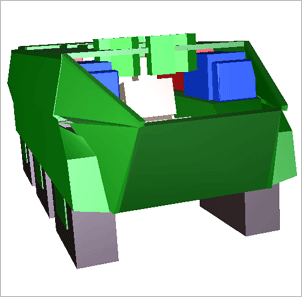
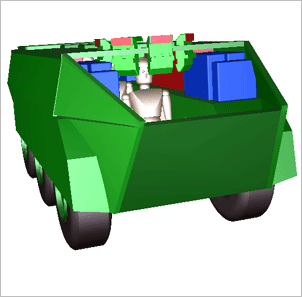
The following examples show the same model displayed in the first instance with a low LOD, and in the second instance with a high LOD; the difference is most significant between the wheels and the vehicle’s interior.