 Parameter Hierarchy
Use
You can use this function to represent the hierarchical dependency of any parameter objects . You can define the parameter hierarchy in any width and depth in Customizing.
Prerequisites
You have set up default parameter value determination .
Features
Assignment to Report Symbol Group
You assign a report symbol group to the parameter hierarchy in Customizing so that the system can determine default parameter values for data that is hierarchically interdependent.
By means of the report symbol group, the hierarchy is assigned the following:
The function module for default parameter value determination
In this way, symbols and repeating groups can be transferred from the structure file to the appropriate determination function for the default parameter values.
The relevant report application that is necessary for determining the key values
In the structure CVDDP , the following fields are relevant for the parameter hierarchy:
PARHIER |
Parameter hierarchy Specifies which hierarchy the data is assigned to. The field is necessary because the same objects can appear in a number of hierarchies. |
PAROBJ |
Parameter object |
PAROBJKEY |
Key of parameter object |
PAROBJPAR |
Parent parameter object for parameter object |
PAROBJPARKEY |
Key of parent parameter object |
LENRECD |
Maximum nesting depth of an environment |
You define the parameter hierarchy by specifying the parent parameter object for each parameter object. The following constellations are possible:
A parameter object is the parent parameter object for several parameter objects.
A parameter object has several parent parameter objects.
A parameter object is its own parent parameter object either directly or indirectly:
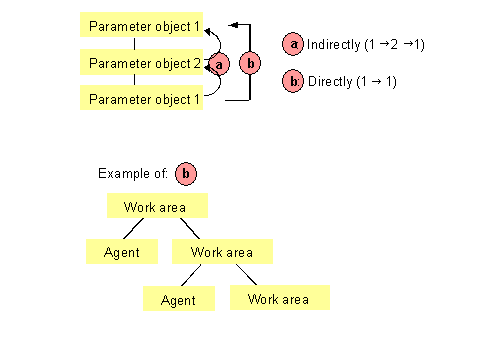
For example, in the
Industrial Hygiene and Safety
component, you can structure hierarchies between work areas that are directly assigned under one another.
Conversion on the Report Template
You can use a repeating group of the type
Parameter hierarchy
in the
Windows Wordprocessor Integration
(WWI) application to set up the output of multiple-value parameter objects within a parameter hierarchy on a report template (see
Example of a Parameter Hierarchy
).
The syntax analysis checks whether the nesting is correct and warns you of any nesting errors.
If a hierarchy contains a recursion, the corresponding symbol groups must be inserted in the layout again for each recursion level. There are no repeating groups for parameter objects that expand recursions themselves as the repeating group S:POSD does for compositions.
 Example
Report template for a parameter hierarchy with recursion:
<11BRG001(P,OBJTREE-HEAD;*)>
<11BRG002(P,OBJTREE-POS_B;*)>
<11BRG003(P,OBJTREE-HEAD;*)>
<11BRG004(P,OBJTREE-POS_B;*)>
<11BRG005(P,OBJTREE-HEAD;*)>
<11BRG006(P,OBJTREE-POS_B;*)>
A repeating group of the type
Parameter hierarchy
can be added at any node of the syntax graph (see
Repeating Groups
). The only exception here is the discrete repeating group, within which no other repeating groups can appear.