 Repeating Groups for Formulas
Use
This function enables you to output specific data of the individual items of a formula.
The formula data has the following structure:
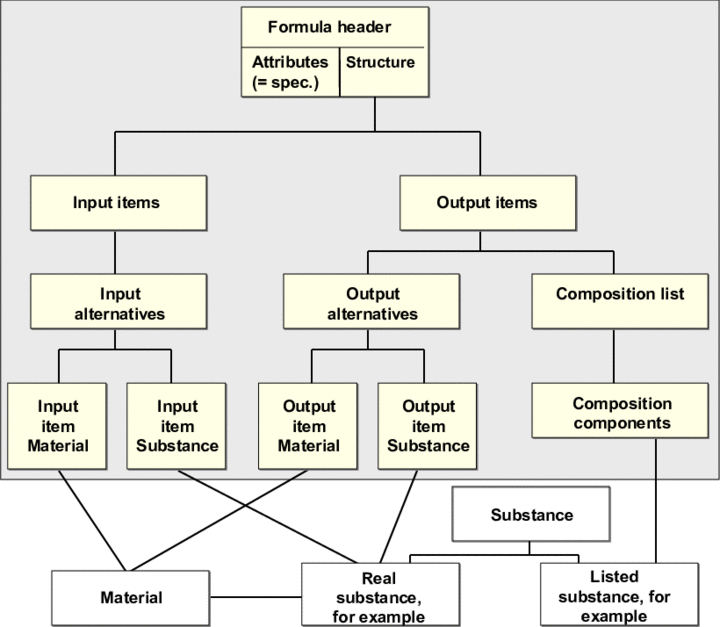
Structure of the Formula Data
The formula consists of a specification of the category Formula
and a structure definition that contains input and output items. The attributes of the formula are stored in Specification Management
:
Input Item:
Each input item has one or more input alternatives assigned to it and one of these input alternatives has the
Standard Alternative
indicator set for it. A component type is assigned as a role to each input item (for example, an active ingredient or catalyst).You can assign a substance item (such as a real substance) and a material item or several material group items to each input alternative. The material that is selected first when a material group item is created is the
default material
.
Output Item:
Each output item has one or more output alternatives assigned to it and one of these output alternatives has the Standard Alternative
indicator set for it. A component type is assigned as a role to each output item.
Furthermore, you can assign a composition list to each output item, as long as an output substance exists for this output item.
Output alternative
You can assign a substance item (such as a real substance) and a material item or several material group items to each output alternative. The material that is selected first when a material group item is created is the default material
.
Standard explosion
For the output alternatives, you can use the Standard Explosion
indicator to specify that the substance is exploded by default from the existing formula. (The indicator must be set for one output, in other words, if a material or substance is an output of several formulas, you may only set this indicator for the material or substance in one formula. If a substance has been assigned to a material, you may only set this indicator for the substance and the material in the same formula.)
Composition list
You can assign a composition type to the composition list. Each composition list has one or more composition components assigned to it and each composition component is assigned a listed substance.
Prerequisites
See the
Prerequisites
section under Document Template Layout Editing.You have performed the Customizing activity
Adapt Report Symbols for Recipe Management
in Customizing forBasic Data and Tools
.You can set up user exits for selecting objects in repeating groups in Customizing for
Basic Data and Tools
in the IMG activityManage User Exits
.
Repeating Groups
Repeating Group Formula (FORM)
The repeating group
formula
uses the current substance in the selection criteria to determine all formulas in which this substance occurs as an output substance (real substance of the output alternatives).When defining the repeating group, you can use the
Standard Explosion
indicator to specify that the substance is exploded by default using the existing formula: If you set the indicator, the system only takes formulas into account in which theStandard Explosion
indicator has been set. If you do not set the indicator, the system only takes formulas into account in which theStandard Explosion
indicator has not been set.The syntax depends on how the formula report is generated:
If you access the report by means of a formula (formula report), the formula data is output, as well as the data of the formulas that belong to the various input substances (real substances of the input alternatives) of this formula if necessary.
In this case, the repeating group
formula
has to be a slave group under the repeating groupinput substances
(LORS_IN
.If you access the report by means of a substance, the data is output for the formulas in which this substance occurs as an output substance.
In this case, the repeating group
formula
must be at the top level of the repeating groups for the formula data. The repeating groupformula
can either be at the top level of a series of nested repeating groups or below a component repeating group (S:POS, S:POSD).
Repeating Group Recursive Formula (FORMREC)
The repeating group
recursive formula
works like the repeating groupformula
but with the following difference: After the repeating grouprecursive formula
has found a formula, for all input substances of the formula, it automatically searches for those formulas in which these input substances occur as output substances. The search is canceled as soon as the system cannot find any more formulas or as soon as it finds formulas that already exist asparents
in the explosion hierarchy. This means that loops can be avoided.When defining repeating groups, you can specify the following parameters:
Recursion depth
Specifies the number of recursion levels the system uses to search for the formulas for the input substances.
Standard Explosion
indicatorSpecifies that the substance or material is exploded by default using the existing formula: If you set the indicator, the system only takes formulas into account in which the
Standard Explosion
indicator has been set. If you do not set the indicator, the system only takes formulas into account in which theStandard Explosion
indicator has not been set.Component type
Specifies which input substances with which component types (for example, active ingredient only) are to be output during the recursive search.
Standard Alternative
indicatorSpecifies that for the formulas that were found, the system only searches for more formulas in which the
Standard Alternative
indicator has been set for the input substances.
Repeating Group Input Substance (LORS_IN)
The repeating group
input substance
determines all the input items for the current formula in the selection criteria.When defining repeating groups, you can specify the following parameters:
Standard Alternative
indicatorSpecifies that the system only outputs the input substances for which the
Standard Alternative
indicator has been set.Component type
Specifies that the system only outputs input substances to which a particular role (for example, a basic material) has been assigned.
You can insert the repeating group input substance
at the top level of a series of nested groups or below a formula
or recursive formula
repeating group.
Repeating Group Input Material (LOM_IN)
You can insert the repeating group
input material
as a slave group of the repeating groupinput substance
at the same level as the repeating groupinput substance
. Therefore, the repeating groupinput material
is either below aformula
orrecursive formula
repeating group or at the highest level of a nested series.If the repeating group
input material
is below aninput substance
repeating group, it selects all input materials (group items) for the current input item.On the other hand, if the repeating group is not below an
input substance
repeating group, it selects all input material items for the current formula in the selection criteria.When defining repeating groups, you can set the
Default Material
indicator. This ensures that for each input alternative, the system only outputs the input material that is also the default material.
Repeating Group Output Substance (LORS_OUT)
The repeating group
output substance
determines all the output items for the current formula in the selection criteria.When defining repeating groups, you can specify the following parameters:
Standard Alternative
indicatorSpecifies that the system only outputs the output substances for which the
Standard Alternative
indicator has been set.Component type
Specifies that the system only outputs output substances to which a particular role (for example, a basic material) has been assigned.
You can insert the repeating group output substance
at the top level of a nested series or below a formula
or recursive formula
repeating group.
Repeating Group Output Material (LOM_OUT)
You can insert the repeating group
output material
as a slave group of the repeating groupoutput substance
at the same level as theoutput substance
repeating group. Therefore, the repeating groupoutput material
is either below aformula
orrecursive formula
repeating group or at the highest level of a nested series.If the repeating group
output material
is below anoutput substance
repeating group, it selects all output materials (group items) for the current output item.On the other hand, if the repeating group is not below an
output substance
repeating group, it selects all output material items for the current formula in the selection criteria.When defining repeating groups, you can set the
Default Material
indicator. This ensures that for each output alternative, the system only outputs the output material that is also the default material.
Repeating Group Composition (COMP)
The repeating group
Composition
determines the components for the output substance determined by the selection criteria.The repeating group
Composition
is a slave group of the repeating groupOutput Substances
.
User Exits
A user exit is created for each formula repeating group in Customizing for Basic Data and Tools
in the Customizing activity Manage User Exits
. The user exit is used to select objects in the repeating groups. One user exit category (GEN_FORMRG
, GEN_FORMRC
, GEN_LORSIN
, GEN_LOMIN
, GEN_LORSOUT
, GEN_LOMOUT
, GEN_COMP
), one user exit name, one user exit function module, and the reference function module (copy template) are entered for each user exit.
Syntax Graph
Each repeating group has a unique environment identifier (LENID
). For more information on the standard repeating groups (M
, D
, G
, and so on), see Repeating Groups.
The following environment identifiers and possible subsequent environment identifiers have been specified for the formula repeating groups.
Nesting of the Subsequent Formula Repeating Groups
LENID | Subsequent LENID |
|---|---|
FORM | LORSIN; LOMIN; LORSOUT; LOMOUT; M; D; G; P; EXIT |
FORMREC | LORSIN; LOMIN; LORSOUT; LOMOUT; M; D; G; P; EXIT |
LORSIN | FORM; FORMREC; LOMIN; M; D; G; P; EXIT |
LORSOUT | LOMOUT; S:COMP; M; D; G; P; EXIT |
LOMIN | FORM; FORMREC; M; D; G; P; EXIT |
LOMOUT | M; D; G; P; EXIT |
S:COMP | M; D; G; P; EXIT |
The following preceding environment identifiers can exist for the environment identifiers:
Nesting of the Preceding Formula Repeating Groups
Preceding LENID | LENID |
|---|---|
None; LORSIN; LOMIN; S:POS; S:POSD; EXIT; G; P | FRM |
None; LORSIN; LOMIN; S:POS; S:POSD; EXIT; G; P | FRMREC |
None; FRM; FRMREC; EXIT; G; P | LORSIN |
None; LORSIN; FRM; FRMREC; EXIT; G; P | LOMIN |
None; FRM; FRMREC; EXIT; G; P | LORSOUT |
None; LORSOUT; FRM; FRMREC; EXIT; G; P | LOMOUT |
LORSOUT; LORSOUT + EXIT; G; P | S:COMP |
The repeating group S:COMP
must always be preceded by a LORSOUT
repeating group. An EXIT
, G
, or P
group may exist between them.