 Label Determination Process
This section explains the process of label determination from a technical perspective, including all of the steps and conditions for static, dynamic, and customer-specific label determination.
The descriptions apply to label determination in Label Printing
(transaction CBGL_MP01
; see Label Printing) and for automatic print request generation (see Automatic Print Request Generation).
Features
Packaging Hierarchy Check
Step 1: The system determines the packaging layer that corresponds to the packaging unit given in the labeling scenario for the material to be labeled.
If you specified in
Label Printing
for the labeling scenario that the packaging hierarchy is to be expanded, the lower-level packaging layers from the packaging hierarchy of the material are also taken into account.For more information about specifying the packaging hierarchy for a material, see Specifying Packaging Hierarchies for a Material.
The following steps are carried out for each packaging layer determined
Step 2: The system determines the label categories for the packaging layer from the labeling specification in the material master.
The following steps are carried out for each label category determined
Step 3: If the label category is defined as customer-specific in Customizing for Global Label Management under
Specify Label Categories
(that is, theCustomer-Specific Label Category
orAdditional Determination of Customer-Specific Labels
checkbox is selected), the system checks whether a customer-specific label is defined for the specified customer and determined label category (see Customer-Specific Labels).If so, the report generation variant for this label is used. Further processing by the system depends on the setting of the checkbox in the Customizing activity
Specify Label Categories
.Step 4: If the label category is not defined as customer-specific or if only the
Additional Determination of Customer-Specific Labels
checkbox is selected, the packaging layer tab page of the label specification can contain several entries for the label category with different validity areas.The system sorts these entries according to their validity areas. During the remainder of the label determination process, it uses only those entries for which the validity area contains at least one of the countries specified in the labeling scenario.
If the
Customer-Specific Label Category
checkbox is selected, no further entries or data for the label category can exist for the material in the label specification. In this case, the system continues with step 14.If the
Additional Determination of Customer-Specific Labels
checkbox is selected, the label specification for the material contains further entries and data about the label category. In this case, the system continues with step 5.
The following steps are carried out for each of the remaining entries
Step 5: If the system matches the entry with a report generation variant in the label specification for the material, it uses this report generation variant and proceeds with step 14.
 Caution
Before the system can use this report generation variant, it must be assigned at least one object of the report application LABELSTOCK (see Defining Application Objects).
End of the caution.Step 6: If the system does not find a report generation variant for the entry, it determines the label size that is defined for the entry in the label specification for the material.
Step 7: The system checks whether the
Contains Transport Symbols
checkbox is selected for the label category in the Customizing activitySpecify Label Categories
.If the checkbox is selected, the system determines the transport symbols and the associated transport symbol groups from the dangerous goods data and the countries and modes of transport specified in the labeling scenario (see Determination of Transport Symbol Group).
Step 8: The system determines suitable label stocks from the label category, label size, transport symbol groups, and validity areas (see Label Stock Determination).
Step 9: The system determines suitable generation variants and combinations of generation variants from the label stocks, label category, and countries specified in the labeling scenario (see Generation Variant Determination).
Step 10: For each report generation variant found, the system checks whether the associated report template has been released.
From this point on, it uses only the report generation variants with released report templates.
Step 11: The system checks whether the
Contains Use Symbols
checkbox is selected for the label category in the Customizing activitySpecify Label Categories
.If the checkbox is selected, the system determines the use symbols from the specification. The system uses the number of use symbols found to restrict the number of suitable report generation variants for label determination (see Filtering of Generation Variants by Use Symbol).
Step 12: From the remaining report generation variants, the system determines those whose validity areas cover most of the countries in the labeling scenario (see Filtering of Generation Variants by Country).
Step 13: From the remaining report generation variants, the system determines those whose validity areas cover most of the regulations in the labeling scenario (see Filtering of Generation Variants by Regulation).
Step 14: Depending on the selected status check (see Status Check for Label Determination) in the labeling scenario, the system uses a label report (report body) or a label template (layout) as the basis for label generation.
Label Determination Process at a Glance
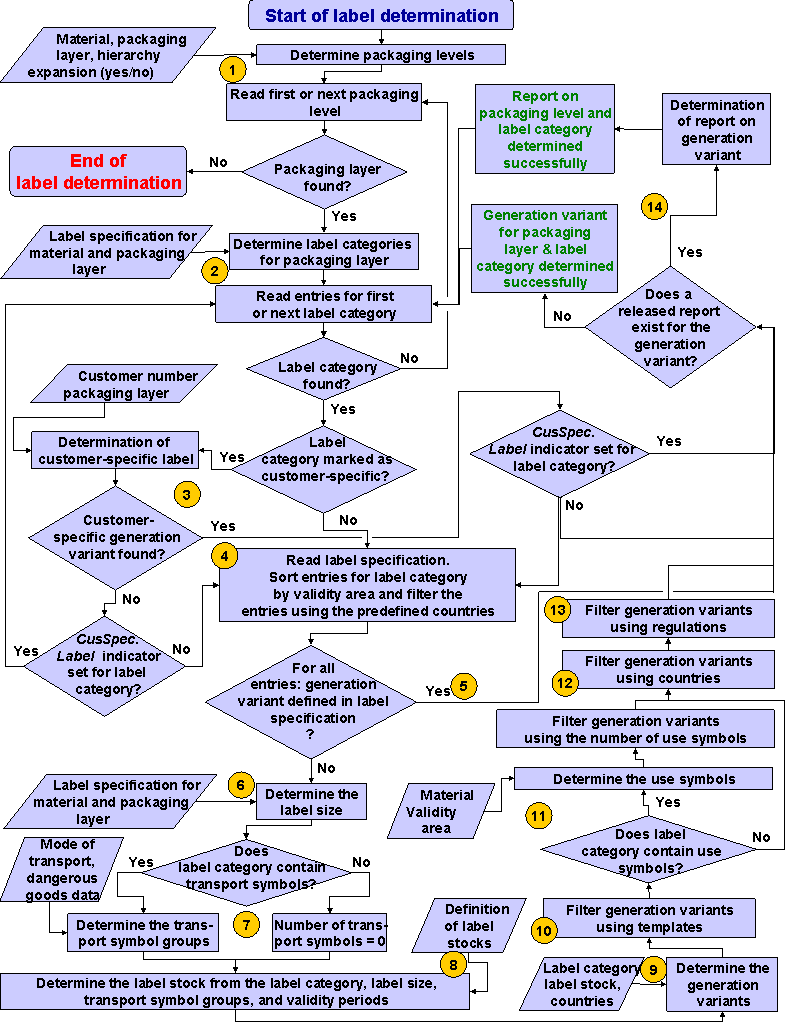
Label Determination Process in 14 Steps
Display of Labels Determined
The labels determined are displayed in the label tree in Label Printing
. You can choose and edit the required labels here.
For automatic print request generation, a print request is created for each label and displayed in the Print Information System
of the Labeling Workbench
.