Creating a Physical Info Object Class
Use
Now that you have created a logical IO class, you need to create a physical LOIO class. The process is largely the same as for logical IO classes.
Procedure
-
Right-click on the folder PHIO Classes to call up the context menu, and choose Create.
-
Create virtual and real LOIO classes, using the procedure you used for LOIO Classes.
To do this, you need instance attributes.
-
To use the standard instance attributes, open the Modeling Object Properties view on the tab page Instance Attributes
 Insert Standard Properties. To be able to do this, you have to be in change mode.
-
A list of all standard attributes opens. For the sake of simplicity, choose Select All.
Once you confirm your selection, the attributes are copied over.
-
Next, on the Standard Properties tab page, you have to enter a category for STORAGE_CATEGORY under Attribute Value. To do this, open the value help (F4). The table that opens lists all categories that are maintained in the system.
-
Copy over a category from the table by selecting it and choosing Copy.
-
Next, set the Exposed flag for STORAGE_CATEGORY.
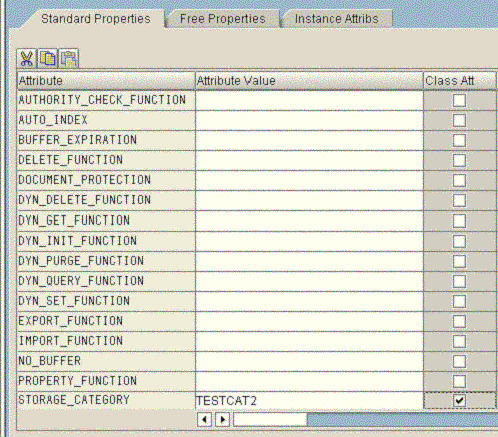
-
Now, create the tables in the same way as for LOIO Classes.