Creating a New Java Project
Use
You create a Java project in this step. Later, you will create the Java class in this project to implement your login module.
Procedure
Using the SAP NetWeaver Developer Studio:
-
From the menu path, choose
 File
File  New Project
 .
. -
In the dialog that appears, select Java Project and choose Next.
-
Specify MyLoginModuleProject as the Project name .
New Java Project Dialog Preview

-
-
Choose Finish.
The new project is created. The wizard opens the associated with the project perspective.
-
Select the name of the project and open the context menu. Choose
New Class. -
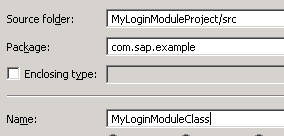
Choose the P ackage field for your login module class and enter com.sap. example for its name.
-
In the provided dialog, specify MyLoginModuleClass as the name of the class:
New Java Class Dialog Preview
-
Choose Finish .
Result
The Java class for the new login module is generated in the specified Java package.