Connection to the Interface
Use
You can access the BCS send functions by using the methods of the class CL_BCS. You do not need detailed knowledge of the internal structure of BCS for this. If you are nevertheless interested in the class model, refer to BCS Class Model.
The graphic below gives an overview of the public interfaces of BCS:
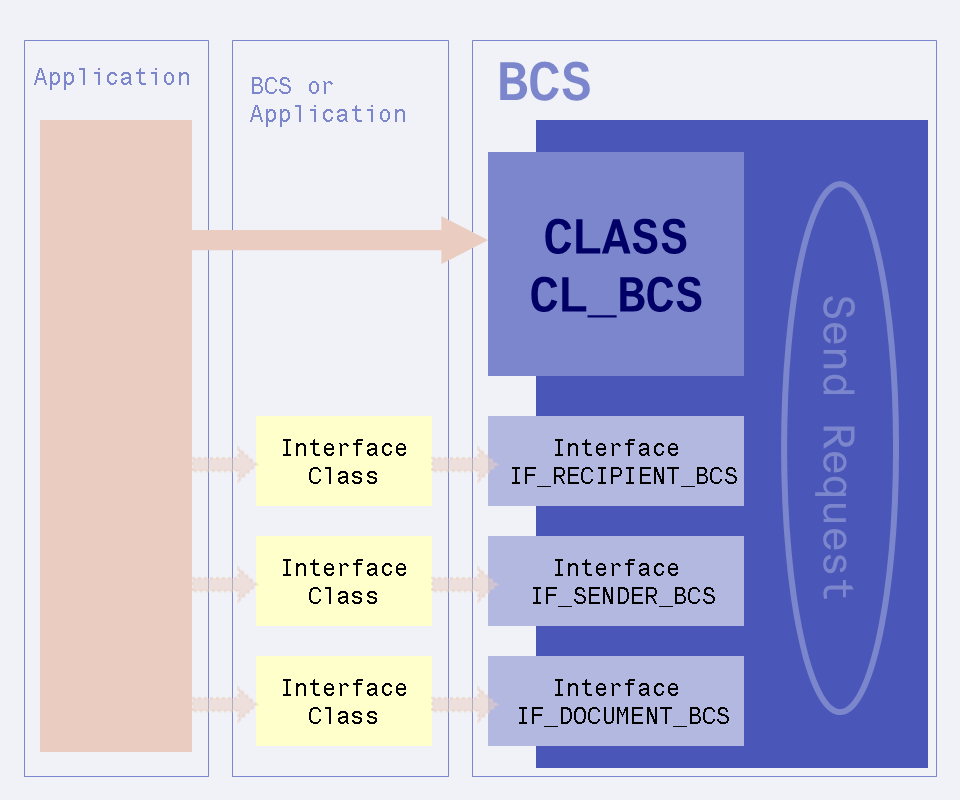
The class CL_BCS is the actual interface to the application. The application can create and send a send request using this interface. The interface classes are used to create senders, recipients, and objects that can be sent by BCS. These classes are provided by BCS for the document types and address types frequently used in the SAP System. If they do not suffice, the application must implement classes of its own.
Prerequisites
All object types that support the interface IF_DOCUMENT_BCS can be sent. The recipients and senders of documents must support the interface IF_RECIPIENT_BCS or IF_SENDER_BCS. BCS has implemented these interfaces for frequently used object types, recipient types and sender types, so you do not have to do anything else here. The objects sent can be related to the application. The objects must be implemented as business objects in the Business Object Repository for this.
Process
You can send a short message with one or more attachments to one or more recipients in one step by calling the method SHORT_MESSAGE of the class CL_BCS. The standard settings (move to outbox according to private office settings in SO12, request all status confirmations, request status confirmation as mail only in the event of error) are used in this. It is also possible to write a relationship to the application object directly.
The following process flow shows an example of how BCS can be called in several steps with example program lines.
-
Create a send request.
To do this, create an instance of the class CL_BCS with the method CREATE_PERSISTENT.

For more information on the methods of this class, see CL_BCS.
-
Create the object that is to be sent as a BCS document.
To do this, create an instance of a class that implements the interface IF_DOCUMENT_BCS, passing the object. With Business Workplace documents, create an instance of the class CL_DOCUMENT_BCS with the method CREATE_DOCUMENT, as in the example below for the document class RAW:

You can also add attachments with the method ADD_ATTACHMENT.
For more information about this step, see BCS Document.
-
Pass the object to the send request.
To do this, call the method SET_DOCUMENT of the class CL_BCS.

-
If the current user is not to appear as sender, you can set the sender.
To do this, create an instance of a class that implements the interface IF_SENDER_BCS, passing the sender (such as SAP user, organizational unit or even business object). In the example, the SAP user Brown is created as sender.

-
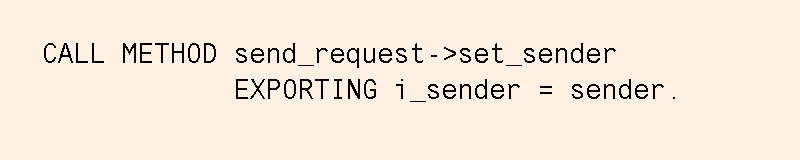
If the current user is not to appear as sender, you must pass the sender previously created to the send request.
To do this, call the method SET_SENDER of the class CL_BCS.
-
Create a recipient.
To do this, create an instance of a class that implements the interface IF_ RECIPIENT_BCS, passing the recipient. You have to do this for every recipient. If the document is to be moved to a Business Workplace folder, specify the folder as recipient. In this example, an e-mail address is created as recipient by an instance created using the static method CREATE_INTERNET_ADDRESS of the class CL_CAM_ADDRESS_BCS being passed.

-
Pass the recipients with the relevant send attributes (express, copy, blind copy, no forwarding) to the send request.
To do this, call the method SET_ RECIPIENT of the class CL_BCS. In the example, the express indicator is set for the recipient.

For more information about the addresses, see Senders and Recipients.
-
Send the object.
To do this, call the method SEND of the class CL_BCS for the send request.
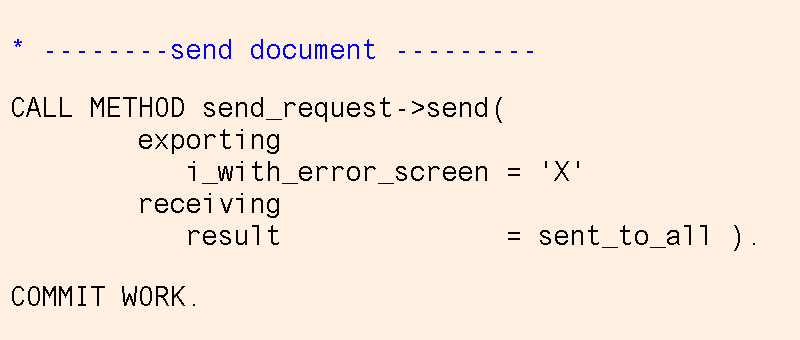
Alternatively, you can call the send screen if the users are to be able to specify recipients and send attributes. Sending is then initiated by the user.
To do this, call the method EDIT of the class CL_BCS for the send request, with which you can call the send screen as a dialog box or a full screen.

-
You must set a COMMIT WORK explicitly at an appropriate point.
Example Programs
Programs BCS_EXAMPLE_1 to 5 (send text to Internet address, on its own, with attachment, with note, and with recipient input in dialog)
Other Options
Relationship
To relate the application object to the object sent (the send request), use the method CREATE_LINK of the class CL_BCS. This enables the message to be displayed in the object's outbox using the
generic object services (Sent Documents service).
The relationship is also a prerequisite for status confirmation by event. For this, the application BOR object must also implement the (BOR) interface IFSNDSTAT2.
Note
To create a note for an object, use the method SET_NOTE of the class CL_BCS.