 Canceling Sales Prices
Use
You can cancel those sales prices that have been saved to the database as condition records. The changes that were made to the master records of other conditions when the sales prices were saved are reversed when the sales prices are canceled.
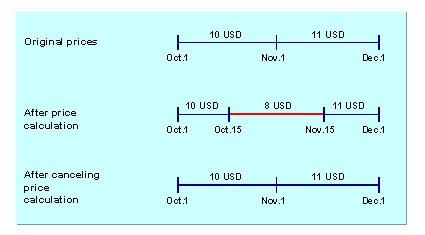
You would want to cancel a sales price if, for example, you noticed that incorrect data (such as incorrect validity dates or condition type condition records) was entered for the sales price calculation.
Prerequisites
To be able to cancel a sales price calculation, you must have saved the calculation in a pricing document.
Activities
Choose

Pricing

Pricing document
Change
 .
.
Select the pricing document for the calculation that you want to cancel.
Select the items in the document that you want to cancel and choose
Pricing document
Cancel prices
The canceled items are given the status
E
.
 Note
Note
You can also undo a cancellation again simply by saving the cancelled items once more. The status changes from
E
back to
C
.
Canceled items can also be deleted. This will ensure that these items are archived in the next archiving run.

If another price change has already overridden the change you want to cancel, you can no longer reverse your change. As in the example above, a condition record valid from October 1 to November 1 can no longer be canceled if - as in step 2 - a sales price calculation valid from October 15 to November 15 has been carried out.