Overview of SAP Tree Classes
Use
Simple Tree
The class CL_GUI_SIMPLE_TREE is the ABAP Objects wrapper for the simple tree.
Example program: SAPSIMPLE_TREE_CONTROL_DEMO:

Attributes
-
A node consists of a folder or leaf symbol and a text.
-
You cannot use checkboxes or additional icons.
-
You can only have one text for each node.
-
There is no heading.
Column Tree
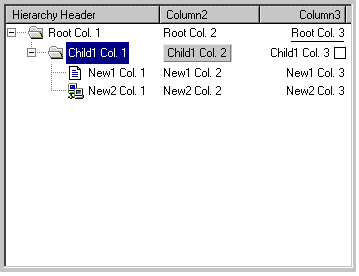
The class CL_GUI_COLUMN_TREE is the ABAP Objects wrapper for the column tree.
Example program: SAPCOLUMN_TREE_CONTROL_DEMO:
Attributes
-
A node consists of a folder or leaf symbol and a range of items.
-
The entries of a node are arranged in columns.
-
A COLUMN_TREE can contain two kinds of columns:
-
Columns in the hierarchy area: These columns are below the hierarchy heading. The hierarchy heading is the first heading from the left in the SAP Tree (in the example, 'Hierarchy Header'). There is normally only one column in the hierarchy area. In the example, it is the column with the name 'Column1', containing the entries 'Root Col.1', 'Child1 Col. 1' and so on.
-
Columns outside the hierarchy area: These columns have their own heading. The example contains two columns outside the hierarchy area, with the headings 'Column2' and 'Column3'.
-
-
Columns can have the following kinds of entries:
-
Text: Text, with optional icon
-
Checkbox: Checkbox with optional icon and text.
-
Pushbutton: Pushbutton with text and icon.
-
Link: Like text, but additionally, an event is triggered when the user clicks the link.
-
List Tree
The class CL_GUI_LIST_TREE is the ABAP Objects wrapper for the column tree.
Example program: SAPTLIST_TREE_CONTROL_DEMO:

Attributes
-
A node consists of a folder or leaf symbol and entries.
-
The entries are displayed from left to right.
-
Using non-proportional fonts and a fixed display width allows you to display data in tabular format, as in the example.
-
Columns can have the following kinds of entries:
-
Text: Text, with optional icon
-
Checkbox: Checkbox with optional icon and text.
-
Pushbutton: Pushbutton with text and icon.
-
Link: Like text, but additionally, an event is triggered when the user clicks the link.
-
-
There is a hierarchy heading and a list heading, under which all entries can be grouped. The program SAPTLIST_TREE_CONTROL_DEMO_HDR provides an example:
