Technical System Landscape
PDF-based Forms in ABAP Environment and Interactive Forms in Web Dynpro for ABAP
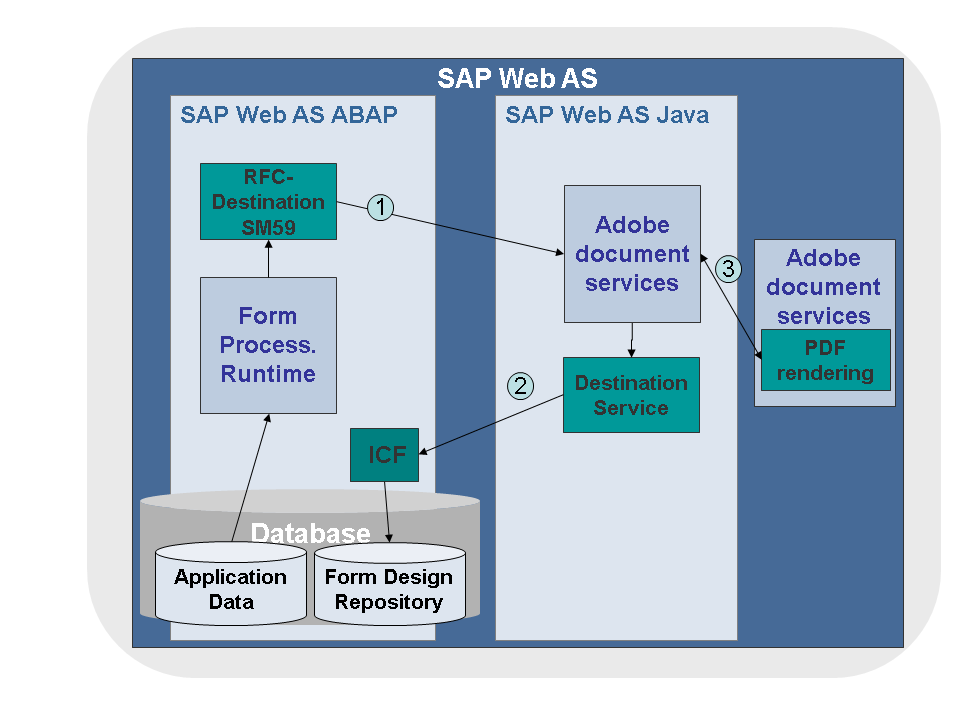
PDF-based forms created in the ABAP Workbench and forms created in Web Dynpro for ABAP use the Adobe document services in the J2EE Engine for processing. The figure below gives you an overview of the communication paths.
Communication path 1:
The Form Processing Runtime sends the application data of the form and a link to the form design (template of the form) to the Adobe document services using SOAP, through the RFC destination (SM59).
Communication path 2:
Before processing the form and creating a PDF file, the Adobe document services calls the form design, which is stored in the Form Design Repository of the ABAP Engine . Thus the Destination Service communicates with the Internet Communication Framework (ICF).
Communication path 3:
The Adobe document services are installed on the J2EE Engine and consist of two parts. The communication between these parts uses the IIOP service (IIOP port). In case of SSL it is the IIOP SSL port of the J2EE Engine. You only need to configure SSL on this communication path if your scenarios require a high level of security.
To configure SSL you have to make settings in the User Management and in Communication Destinations .
Interactive Forms in Web Dynpro for Java
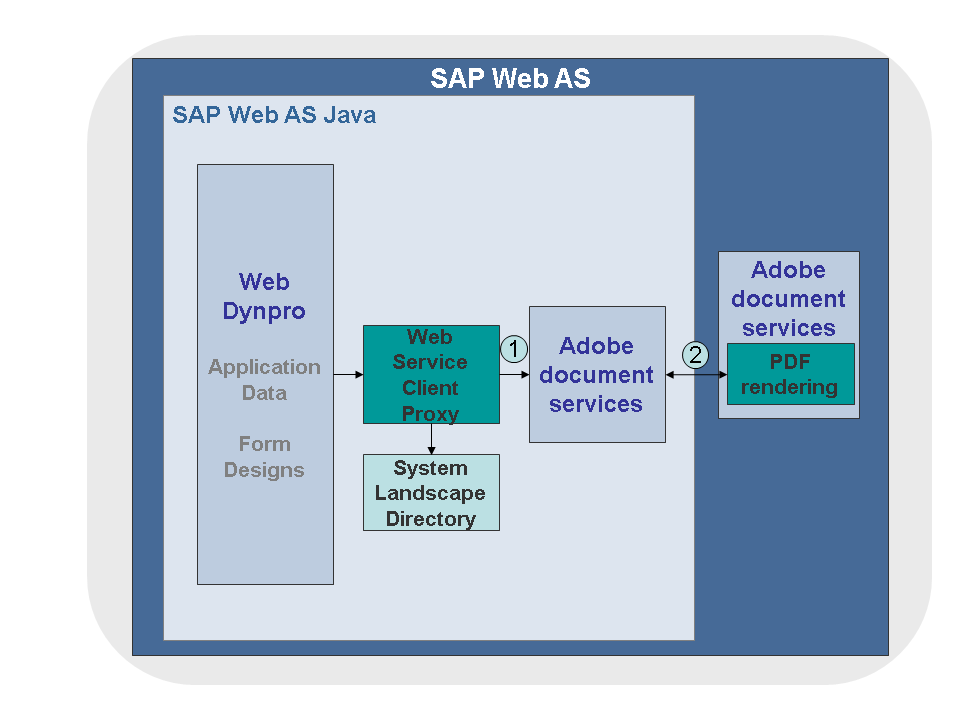
Interactive forms created with Web Dynpro in the SAP NetWeaver Developer Studio communicate with the Adobe document services in the J2EE Engine for processing. The figure below gives you an overview of the communication paths.
Communication path 1:
Communication between Web Dynpro and the Adobe document services uses a Web Service. You have the option of storing the URL of the Adobe document services in the System Landscape Directory (SLD).
Communication path 2:
The Adobe document services are installed on the J2EE Engine and consist of two parts. The communication between these parts uses the IIOP service (IIOP port). In case of SSL it is the IIOP SSL port of the J2EE Engine. You only need to configure SSL on this communication path if your scenarios require a high level of security.
See also:
Configuration of the Web Service SSL Connection in the Adobe Document Services Configuration Guide.