Enabling SMS Notifications

With microservices and SAP BTP Extensions integration, you can quickly and easily enable the sending of SMS messages to customers when business-relevant updates are detected.

Prerequisites

Make sure that you have all the required systems properly set up. For more information, see Setting Up the Systems.

Context

Sending of SMS notifications to customers is illustrated in the following diagram:
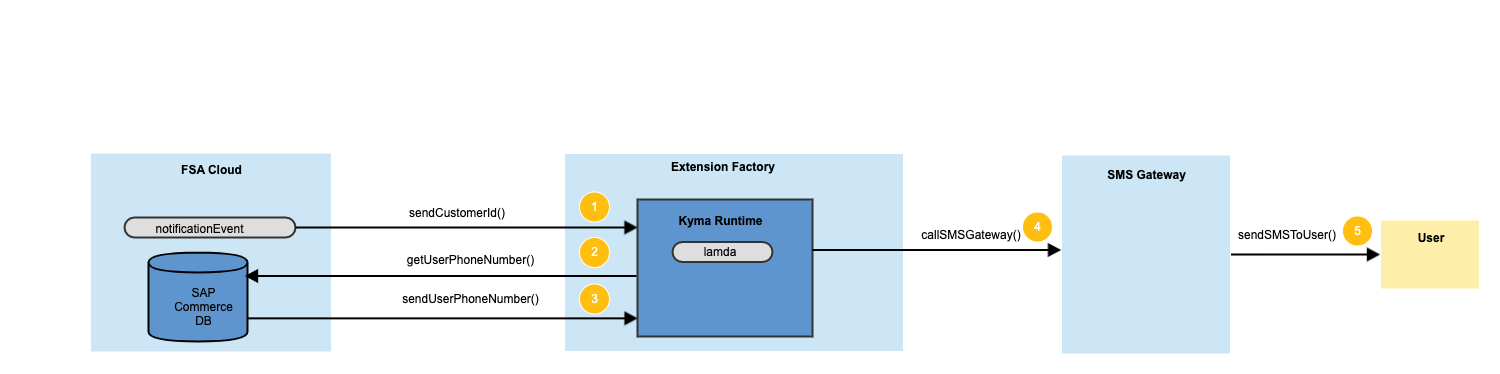
As can be seen from the diagram, the process involves several steps:
  1. Financial Services Accelerator triggers a notification event call to SAP BTP Extensions about a new message that has been created in the portal for a customer with the specified customer ID. The notification event in the example provided is activated when a policy application or a claim request is created, or a policy is issued.
  2. When SAP BTP Extensions that runs Kyma receives the call, the lambda function or microservice that handles SMS notifications, sends in return a web service call to SAP Commerce database with the request for the customer's phone number.
  3. If a customer has provided the phone number and his consent for SMS notifications, SAP Commerce sends the phone number from the database back to SAP Commerce. Otherwise, the action is aborted.
  4. In case a phone number has been received, SAP BTP Extensions, Kyma runtime calls the SMS Gateway.
  5. The SMS Gateway then sends the SMS notification to the customer.

Notification Events

The following notification events are enabled in Financial Services Accelerator:
  • Customer Registration
  • Contact an Agent
  • Order Confirmation
  • Claim Confirmation
  • Quote Referred
  • User Rejected
  • Order Pending
  • Document Received

For all these notification events (except for documents), the system creates a corresponding site message that a customer can preview in the Inbox section of the My Account area.

To enable the process for SMS notifications over SAP BTP Extensions , you must have all the systems properly set up. In addition to that, you must:
  • configure a notification event in Backoffice
  • register a lambda function in SAP BTP Extensions, Kyma runtime

Procedure

  1. Import the following configuration of the notification event into SAP Commerce:
    $destination_target = Default_Template
    
    INSERT_UPDATE EventConfiguration; eventClass[unique = true]; destinationTarget(id)[unique = true, default = $destination_target]; version[unique = true, default = 1]; exportFlag; priority(code); exportName; mappingType(code)[default = GENERIC]; description; extensionName
    ; de.hybris.platform.financialservices.events.FSSiteMessageEvent ; ; ; true ; HIGH ; notification.created ; ; "Notification Message Event" ; financialservices
    
    INSERT_UPDATE EventPropertyConfiguration; eventConfiguration(eventClass, destinationTarget(id[default = $destination_target]), version[default = 1])[unique = true]; propertyName[unique = true]; propertyMapping; title; description; required[default = true]; type[default = 'string']
    ; de.hybris.platform.financialservices.events.FSSiteMessageEvent ; customerId ; "event.customerModel.uid"        ; "Customer id"     ; Customer id                  ; ;
    ; de.hybris.platform.financialservices.events.FSSiteMessageEvent ; subject    ; "event.siteMessageModel.subject" ; "Message subject" ; Notification message subject ; ;
    ; de.hybris.platform.financialservices.events.FSSiteMessageEvent ; body       ; "event.siteMessageModel.body"    ; "Message body"    ; Notification message body    ; ;
    					
  2. Register a lambda function in SAP BTP Extensions, Kyma runtime
    const request = require('request');
     
    module.exports = {
        main: async function(event, context) {
            var customerUid = event.data.customerId;
            var url = `${process.env.GATEWAY_URL}/insurance/users/${customerUid}`;
            request.get({
                url: url,
            }, function(error, response, body) {
                if (error === null) {
                    var customer = JSON.parse(body);
                    if (customer && customer.contactInfos) {
                        var customer_phone_number = customer.contactInfos.filter(contactInfo => typeof contactInfo !== undefined).shift().phoneNumber;
                        request.post({
                            url: 'https://gatewayapi.com/rest/mtsms',
                            oauth: {
                                consumer_key: '{consumer_key}',
                                consumer_secret: '{consumer_secret}',
                            },
                            json: true,
                            body: {
                                message: event.data.content,
                                recipients: [{msisdn: customer_phone_number}],
                            },
                        }, function(err, r, body) {
                            console.log(err ? err : body);
                        });
                    }
                } else {
                    console.log(err ? err : body);
                }
            });
        }
    };						
    					

Results

Your customer receives an SMS notification.