SAP Web Dispatcher for Multiple Systems
Use
You can also set the SAP Web Dispatcher in front of multiple SAP and non-SAP Web Servers.
The Web Dispatcher then serves as the entry point for these systems and performs the following tasks:
-
From the URL the Web Dispatcher identifies the system the request was destined for.
-
The Web Dispatcher then performs load balancing for this system.
You do not have to set up, configure, and wait for a Web Dispatcher for each system; you use a common Web Dispatcher for all systems. This must then be configured for all connected systems.
Features
You can separate the requests using one of the various mechanisms, or a combination of mechanisms.
-
Access point (server name/port) of the Web Dispatcher
In the Web Dispatcher you can configure an access point for each connected system (combination of host name and port), and forward the requests to the relevant system according to its access point.
-
URL Prefix
You can define URL prefixes that represent the relationship to the required system. Requests starting with the URL prefix are forwarded to the application servers of this system.
-
Modified Request
You can use the modification handler, and define a rule in the Web Dispatcher that specifies the system to which the request is forwarded. To do this, you set the pseudo header field ~webdisp_target_sid.
System Selection Using the Web Dispatcher
For each incoming request the Web Dispatcher uses the configured citeria and the setting of wdisp/system_ <xx> to check which system the request can go to. If these criteria are met by more than one system, the behavior is determined by parameter wdisp/system_conflict_resolution:
-
wdisp/system_conflict_resolution = 0 (default setting).
The Web Dispatcher detects the ambiguity. If the ambiguity is detected at start time, the Web Dispatcher reports an error and does not start. If it is detected later, the Web Dispatcher reports an error.
-
wdisp/system_conflict_resolution = 1
The Web Dispatcher performs the system selection in the sequence of the wdisp/system_ <xx> parameters (using the parameter index <xx>). As soon as the first system that matches the inbound request is found, the request is sent to this system. This is “first match” semantics.
-
wdisp/system_conflict_resolution = 2
The Web Dispatcher performs load balancing for all application servers in the possible systems.
Administration Using the Web Admin Interface
If you have set up the Web Dispatcher for multiple systems, you can view the application servers, logon groups, and the URL mapping for each connected system in the Web administration interface. If there were two connected SAP systems, BCO and BIN, and an external system EXT, it would look like this:

Restrictions
Under certain conditions there may be conflicts in the session cookies. For stickiness to function, these session cookies must not overwrite each other.
Session cookies can overwrite each other if a user accesses multiple systems of the same type (ABAP, Java) from a browser, and these systems can be accessed using the same host name.
Example
The figure below shows an example configuration.
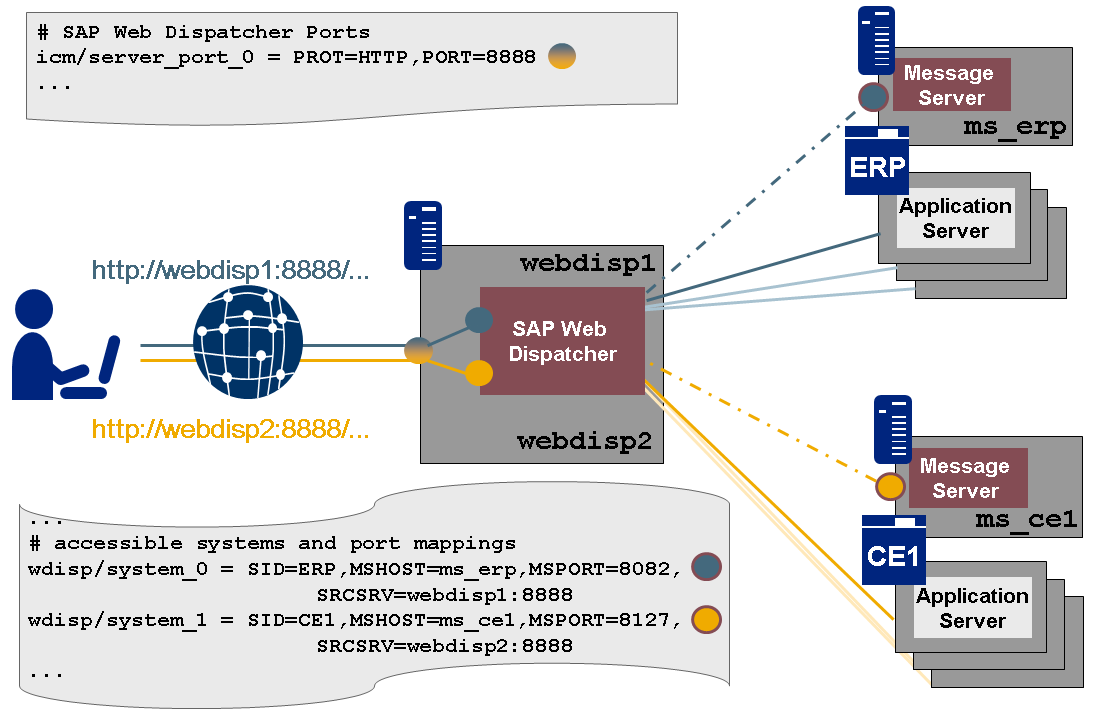
The Web Dispatcher host has two IP addesses (mapped to webdisp1 and webdisp2). You configure an access port and control the systems separately using the IP addresses.
icm/server_port_0 = PROT=HTTP, PORT=8888
Since the HOST option is omitted, the port is valid on all IP addresses.
You can then specify the system assignment as follows:
wdisp/system_0 = SID=ERP, MSHOST=ms_erp, MSPORT=8082, SRCSRV=webdisp1:8888
wdisp/system_1 = SID=CE1, MSHOST=ms_ce1, MSPORT=8127, SRCSRV=webdisp2:8888
You have now separated control of the systems, as shown in the figure:
-
All HTTP requests to webdisp1:8888 are forwarded to system ERP.
-
All HTTP requests to webdisp2:8888 are forwarded to system CE1.