Manual Explode Tool
Use
CAD operators typically design an assembly in a static assembled mode. However, illustrators often require an exploded view of the model and its parts. Exploding models clearly displays assemblies in a traditional illustration style.
The Manual Explode tool is used to quickly create exploded views from an assembly or selected parts of an assembly. The exploded parts can be linear, radial or both, and either snap or create keyframe animations of the parts moving into the final (exploded) position.
You can select the Manual Explode tool at any point in SAP 3D Visual Enterprise Author without prerequisites. The Tool Assistantcontains explosion tools that are available for selection with advanced settings, but using the Tool Assistant is not necessary to complete a basic manual explosion.
Features
The advanced settings available in the Tool Assistant are the following:
-
The order in which the objects explode
-
Settings to automatically group objects together
-
Advanced animation settings for explosions
-
Thrustline settings to link exploded objects together
Types of Explosions
There are two types of explosions:
Linear Explosion
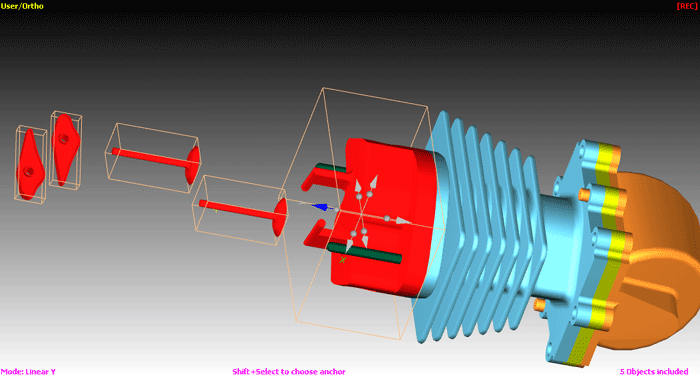
This type explodes a selected set of nodes along a specified explosion axis away from the anchor that you have specified. For example, if the explosion axis is z, parts are moved along the z axis with no movement in the z or y directions.
Radial Explosion
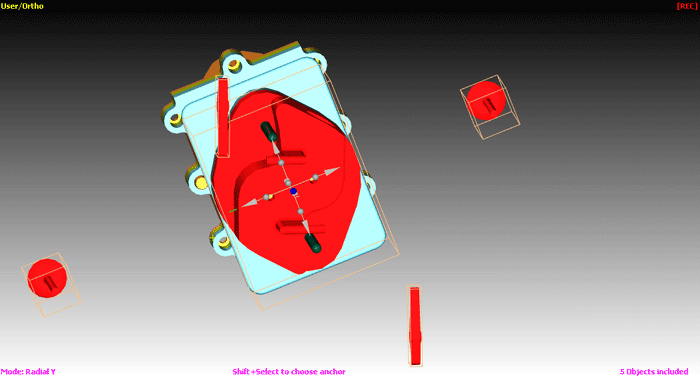
This type explodes a selected set of nodes away from a specified explosion axis. For example, if the explosion axis is z, parts are moved within the XY plane away from the z axis.