Product Manufacturing Information
Use
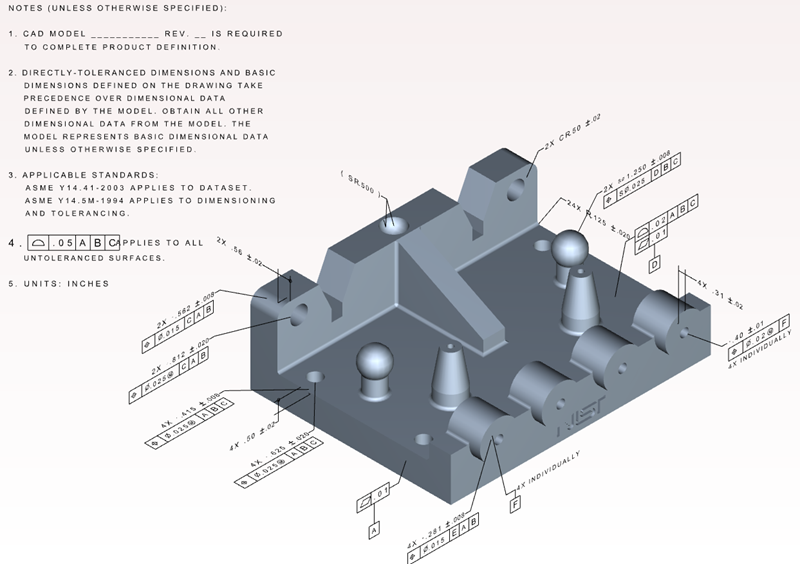
Product Manufacturing Information (PMI) is an implementation of the Digital Product Definition Data Practices, which establishes requirements for preparing, organizing, and interpreting three-dimensional digital product images. SAP 3D Visual Enterprise Author provides a way to render PMI data such as tolerances, dimensional data, and other markup annotations.
PMI is also known as FDT ( Functional Dimension and Tolerance) or GDT (Geometrical Dimension and Tolerance) and is used to covey design information for manufacturing. PMI includes 3D text annotations, different types of dimensions, surface finish, and tolerances. PMI along with model views (captures for CATIAV5) helps eliminate the need for 2D drawings for a 3D model. You can use PMI for other technical analysis; for example, quality inspection and simulation for various other purposes during the product life cycle.
SAP 3D Visual Enterprise Author automatically displays the PMI toolbar for files that contain PMI data. First import the PMI data contained within a file using the file import properties to view that data. You can then establish PMI settings through the Tool Assistant, and then select the various types of PMI markups to display.
The PMI markups are the following:
|
Markup |
Functional Description |
|---|---|
|
|
Text markups |
|
|
Special formatted text markups |
|
|
Measurements, tolerances, material data, and reference datum |
|
|
Detailed dimension line markups |
|
|
Special reference points or planes for measurement markups sometimes shown as a single letter enclosed within a box |
|
|
The roughness markups |
|
|
The “surface finish weld point” markups |
|
|
The center line of the markup |
|
|
The center of the markup |
|
|
Used to visually control PMI with custom symbols. |


Importing and Exporting PMI
-
CATIA 5 part and assembly files
-
NX part and assembly files
-
CREO Parametric part and assembly files
-
SolidWorks part files
-
JT part and assembly files
-
STEP part and assembly files
-
CREO Parametric Neutral part and assembly files
-
JT part and assembly files
-
STEP part and assembly files
Supported PMI Types
|
Type of PMI |
CATIA |
NX |
SolidWorks |
STEP |
CREO Parametric |
CREO Parametric Neutral |
JT |
|---|---|---|---|---|---|---|---|
|
Dimension |
Yes |
Yes |
Yes |
Yes |
Yes |
Yes |
Yes |
|
Tolerance |
Yes |
Yes |
Yes |
Yes |
Yes |
Yes |
Yes |
|
Weld |
Yes |
Yes |
Yes |
Yes |
No |
No |
Yes |
|
Roughness and Surface Finish |
Yes |
Yes |
Yes |
Yes |
Yes |
No |
Yes |
|
Text and Notes |
Yes |
Yes |
Yes |
Yes |
Yes |
Yes |
Yes |
|
Datum |
Yes |
Yes |
Yes |
Yes |
Yes |
Yes |
Yes |
|
Datum Targets |
Yes |
Yes |
Yes |
Yes |
Yes |
Yes |
Yes |
|
Center Line |
No |
Yes |
No |
No |
No |
No |
Yes |
|
Center Mark |
No |
Yes |
No |
No |
No |
No |
Yes |
|
Custom Symbol |
No |
Yes |
No |
No |
No |
No |
No |
Using PMI
Using PMI, you can do the following:
-
View and hide PMI markups.
-
Edit and delete markups.
-
Modify the PMI markup settings.
PMI Data Rules
Certain rules apply when viewing PMI data:
-
First, import the PMI data contained within a file to view that data.
-
If you’re using the SAP 3D Visual Enterprise Viewer to view models, PMI data is automatically displayed if it exists in the currentRH file.
-
Since .jt file PMI BoM data is derived from the BoM in the file itself when publishing to PDF documents, ensure that all object names in the Scene tree match object names in the PMI metadata. This exercise ensures that the assembly structure is maintained so that all objects and assemblies can be viewed using the BoM in the published PDF document.
Markup Naming Conventions
Markups within JT files must include certain text to ensure that the markup-related metadata can be displayed. The markup text strings are:
-
BoM: Only markups that include BOM in the name, and for which the associated metadata strings are over zero characters long, are displayed as metadata.
-
NOTES: Only markups that include NOTES in the name, and for which the associated metadata strings are over 100 characters are displayed as metadata.
-
NT: Only markups that include NT in the name, and for which the associated metadata strings are over 100 characters are displayed as metadata.
-
TITLE: Only markups that include TITLE in the name, and for which the associated metadata strings are over 50 characters are displayed as metadata.
-
TOLERANCE: Only markups that include TOLERANCE in the name, and for which the associated metadata strings are over zero characters long, are displayed as metadata.
Points
If a file contains points, you can use the Toggle Points on Top button on the PMI toolbar to ensure that the points remain on top. This option can be useful for points visualization in a large and complex scene.
This option set the points to the highest render order.