Element Mapping and Changes to XML Message
In the Customizing activity Configure Key Mapping, you can configure the required changes for XML messages on the element level and attribute level. Here you can define paths, conditions and fields for mapping every message type.
The options are explained in the following example using flight data:
<Order>
<BookingCode>2KY34R</BookingCode>
<Passenger>
<Name>Smith</Name>
<Address>123 Main St.</Address>
</Passenger>
<Flight>
<Date>04042004</Date>
<AirlineID>SX</AirlineID>
<FlightNumber>21</FlightNumber>
<From>ZRH</From>
<To>FRA</To>
</Flight>
<Flight>
<Date>04042004</Date>
<AirlineID>LH</AirlineID>
<FlightNumber>4025</FlightNumber>
<From>FRA</From>
<To>LAS</To>
</Flight>
<Flight>
<Date>04042004</Date>
<AirlineID>UA</AirlineID>
<FlightNumber>128</FlightNumber>
<From>LAS</From>
<To>SFO</To>
</Flight>
</Order>
The system changes flight numbers for the airline LH. The system does this by examining the message and starting it using the path Order → Flight.Next the system searches for the subordinate AirlineID elements with the value LH. For these subordinate elements, the system replaces the value 4025 for the element FlightNumber with a new value or a value read from UKMS.
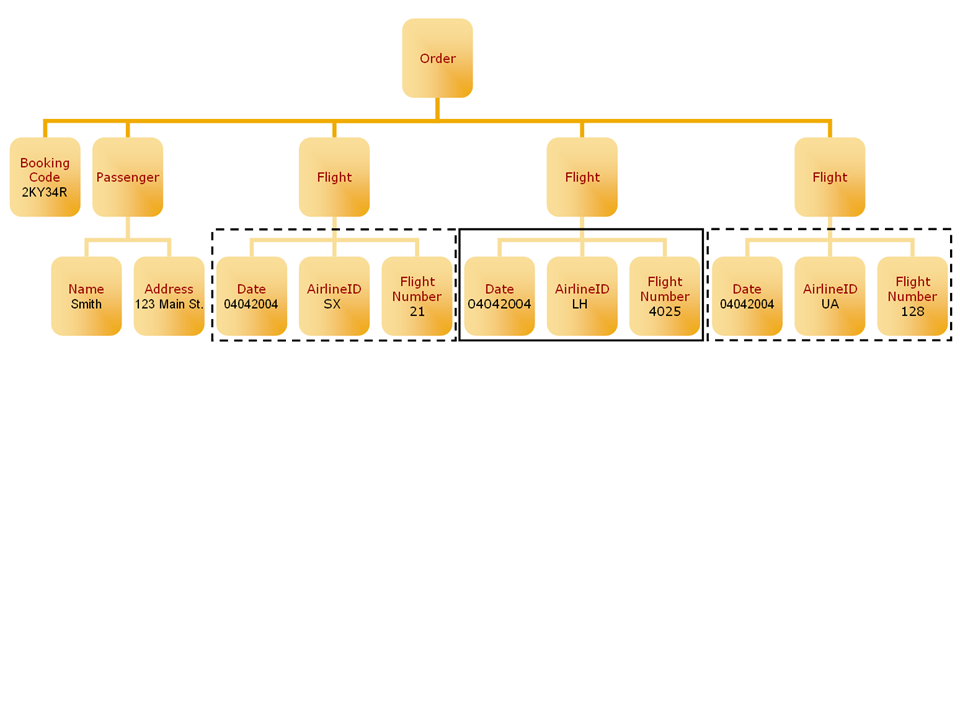
If attribute mapping is used, the above example looks as follows:
<Flight>
<Date>04042004</Date>
<FlightNumber AirlineID="LH">4025</FlightNumber>
<From>FRA</From>
<To>LAS</To>
</Flight>
In this case, for the element FlightNumber, you must define the condition AirlineID = LH as a condition for the attribute AirlineID.