 Comparison of Commodity Code Numbers
Use
This function allows you to maintain the lists of commodity codes (for example, US Schedule B codes) and import code numbers (for example, Harmonized Tariff Schedule codes) in the system.
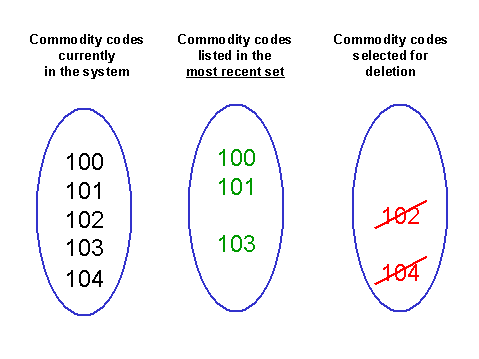
Periodically, some codes become obsolete with the customs authorities. This function identifies obsolete codes by comparing codes currently in the system with the set of codes designated by a keyword you enter. (See the graphic below.) This designated set of codes could be, for example, the most recent set of commodity codes you received from the customs authorities and loaded into the SAP System. From the comparison, the system creates a list of the codes that are not in the designated set. You then have the option of deleting the listed codes.
Prerequisites
To use this function, you must know the keyword assigned to the set of codes on which you want to base the comparison. (When you load a set of commodity codes or import code numbers, you can print the key you assigned to the set and keep it on file.) The system uses that keyword to retrieve the set of codes from its database.
Activities
To access this function from the SAP standard menu, choose

Logistics

Materials Management
 (or
(or
Sales and Distribution)
Foreign Trade/Customs
Service
Load/Comparison
the appropriate region
European Union
,
Asia - Japan
or
Country-
independent
Compare commodity codes
or
Compare import code numbers.