Syntax of Rule Hierarchy - Mapping Levels
You can establish a rule hierarchy, the order in which rules are applied, when defining the mapping.
A child rule is attached to a parent rule. It is only run if the parent rule has already been run. The child rule defines a particular process for a more restricted group of data than that covered by the parent rule. If an amount is processed by both rules, only the data generated by the child rule will be kept.
When processing an input row, Data Mapping checks for matching filters of all rules on the same level. For every matching rule, Data mapping will check every sublevel rule.
Below are two examples:
Example 1:

The Data Mapping table above will map Flow to Subitem with the following rules:
-
First rule (Level 0): all input values starting with “F” will be mapped by changing the “F” to “9”.
-
Subrule (Level 1): except “FX13” that will be mapped to "913".
-
-
Second rule (Level 0): Empty values will be mapped to “900”.
The Data Mapping table above will map the following input data to the following output data:
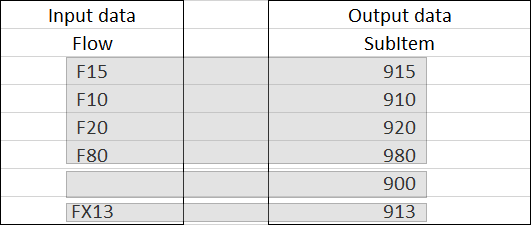
Click the Output data table elements for more information.
The first 4 rows:
-
Match the first rule "F.*" but don’t match the subrule "FX13" so the first rule generates "915", "910", "920", "980".
-
Do not match the second rule "{EMPTY}" so the second rule does not generate anything.
The 5th row:
-
Does not match the first rule "F.*".
-
Matches the second rule {EMPTY} so the second rule generates “900”.
The last row:
-
Matches the first rule "F.*" and matches the subrule "FX13" so the subrule generates “913”.
-
Does not match the second rule "{EMPTY}" so the second rule does not generate anything.
Example 2:

The Data Mapping table above will map Company to ConsolidationUnit with the following rules:
-
First rule (Level 0): all non-empty input values will be mapped to Consolidation unit with no transformation.
-
First subrule (Level 1): except the input values starting with “P”, which will be mapped by changing the first two characters to “SP”.
-
First subrule’s subrule (Level 2): except “PX01” that will be mapped to “X999”
-
-
Second subrule (Level 1): except the input values starting with “Q”, which will be mapped by changing the first two characters to “SQ”
-
-
Second rule (Level 0): empty values will be mapped to “X999”.
The Data Mapping table above will map the following input data to the following output data:

Click the Output data table elements for more information.
The first 3 rows:
-
Match the first rule “<>{Empty}”.
-
Do not match the first subrule “P.*”, so we skip the first subrule's subrule “PX01”.
-
Do not match the second subrule “Q.*”, so the first rule generates "S001", "S002", "S003".
-
-
Do not match the second rule “{Empty}”, so the second rule does not generate anything.
The 4th and 5th rows:
-
Match the first rule “<>{Empty}”
-
Match the first subrule “P.*”
-
Do not match the first subrule's subrule “PX01”, so the first subrule generates "SP01", "SP02".
-
-
Do not match the second subrule “Q.*”, so the second subrule does not generate anything.
-
-
Do not match the second rule “{Empty}”, so the second rule does not generate anything.
The 6th row:
-
Does not match the first rule “<>{Empty}”, so the first rule does not generate anything.
-
Matches the second rule “{Empty}”, so the second rule generates “X999”.
The last row:
-
Matches the first rule “<>{Empty}”
-
Matches the first subrule “P.*”
-
Matches the first subrule's subrule “PX01”, so the first subrule's subrule generates “X999”.
-
-
Does not match the second subrule “Q.*”, so the second subrule does not generate anything.
-
-
Does not match the second rule “{Empty}”, so the second rule does not generate anything.