Managing Users, Groups, and Roles
Use
Identity management enables you to create, modify, and delete users, groups, and roles with the user management engine (UME). This enables you to define these principals so you can then group them according to your access management strategy.
Prerequisites
To manage users, groups, or roles, you must be assigned a role that includes the relevant actions or combination of actions. For example, to assign roles to users, your role assignments must include UME actions that enable you to change both principals, roles and users, such as Manage_Roles and Manage_Users. The figure below summarizes the UME actions available by default in SAP NetWeaver Application Server (AS).
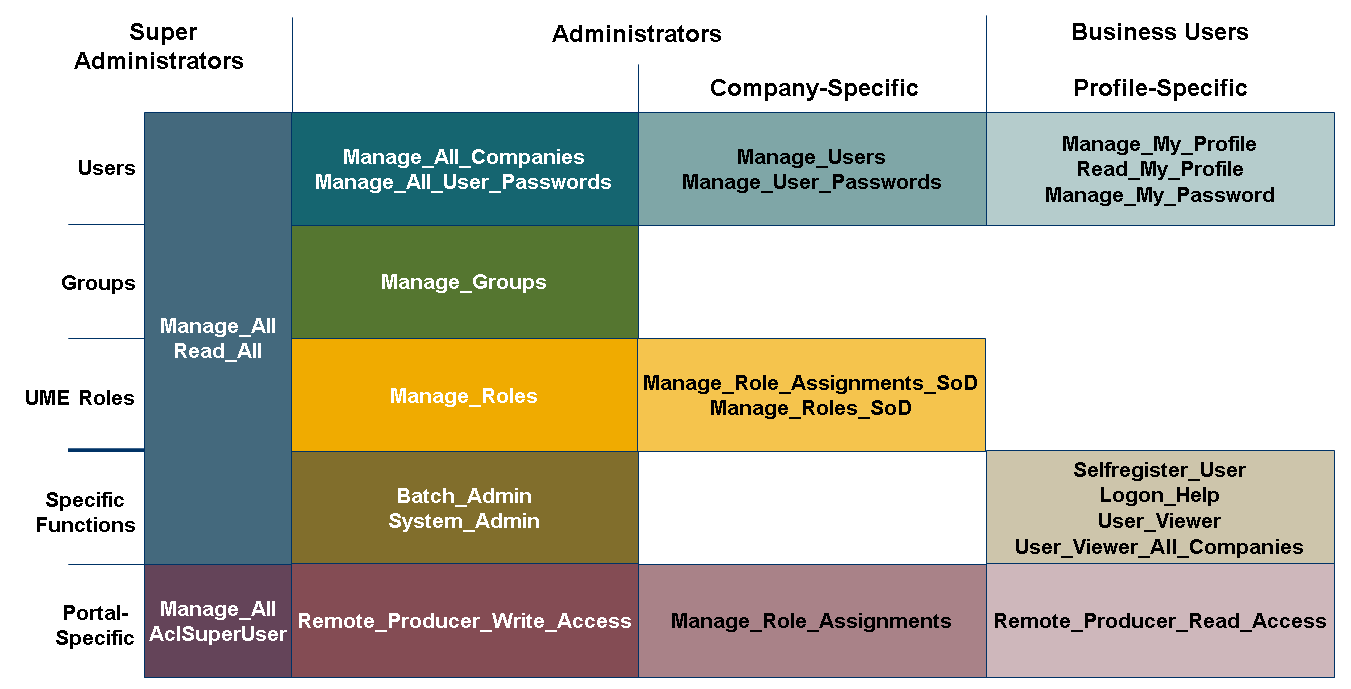
Along the top of the figure is a list of role archetypes. For example, if you are an overall administrator, under Administrators All is a list of actions appropriate to that role. The rows represent the different permission areas or principals for which the actions are relevant. For example, the top row of blocks lists actions relevant to working with users, from full access to read-access to only your own profile. The last two rows refer to specific functions, such as permission to access the import and export functions, or profile-specific actions. Some actions are subsets of other actions. For example, Manage_ My_ Profile includes Manage_ My_ Password.
For more information about these UME actions, see Standard UME Actions .
Standard UME roles include such actions. The UME role Administrator includes Manage_ All, which enables you to display and change everything. By default, administrator roles are only assigned to administrators.
Features
Integration With ABAP User Management
If your system is configured to use ABAP user management, PFCG roles from the ABAP system are displayed as groups in Identity Management. You cannot change or delete these groups using the AS Java tools. The only possible action is to assign UME roles to them. You can create new groups, which are then stored in the database of the AS Java and are not created as PFCG roles in the ABAP system.
For more information, see User Management of Application Server ABAP as Data Source .
Principal Locking
Identity management locks principals you are currently editing. Other users, who attempt to edit the user, group, or role you are editing, receive a warning that the principal is being edited by another user. The lock prevents multiple users from editing the same principal and accidentally overwriting each others' work.
The lock is session based.
-
If you open another browser window within the same session, for example, in Internet Explorer by typing CTRL + N , the lock does not apply. Both windows can simultaneously edit the same principal.
-
If you open another browser window in a new session, for example, by choosing the browser application from the Windows Start menu, even if you log on to the identity management application as the same user, you cannot simultaneously edit the same principal.
Search
Identity management enables you to search for principles.
-
Search for users, groups, or roles
Use the asterisk (*) as a wildcard. If you do not enter any text, the search function returns a list of all users, groups, actions, or roles, depending on the principal you chose.
-
Simple search for string in user ID or name
For more information, see Configuring Simple Search .
-
Advanced search for users using user attributes as search criteria
-
-
Search recursively for principals assigned to other principals
For more information, see Configuring Search Options for the UME .
Activities
Use the identity management application to create, edit, and delete users, groups, and roles on the AS Java.
-
For more information about how to start the identity management application, see Identity Management .
-
For more information about other general functions, see Administration of Users and Roles .
Deleting Users
If you delete a user, you are prompted to write a reason for deleting the user. This text is sent to the user in a notification e-mail, if you enabled e-mail notification.
You cannot delete a portal role. You can only delete the group, user, and user mapping assignments. To delete the role itself you must do that with the portal content tools.