 Special Payment Without Personnel Department (International)
Purpose
This process supports the payment of a discretionary bonus to an employee. After the process is run, the employee's master data is up to date. In addition to the employee, the
Manager
, and
Superior Manager
business roles are actively involved in performing the process. The HR administrator is only involved in the process if errors occur. The process is initiated by the manager.
The requesting manager enters a validity date, a reason, and an amount for the special payment.
The superior manager receives the special payment request for checking and can decide to approve or reject it.
The system automatically performs various checks:
If no error occurs, no further interactive step is required and no further processor is involved in the process. The data is sent directly to the back-end system and the employee's master data is updated.
If an error occurs, the approving manager receives a message with the request to forward the work item to an HR administrator.
The HR administrator checks and corrects the data and sends it to the back-end system.
This process is international. If you want to use the process for a specific country version (country grouping not equal to
99
), you must have maintained the appropriate wage types for this country grouping in the
Payment Reason
field in the form scenario.
Prerequisites
To be able to use these sample processes for test purposes, you must have performed the Customizing activities for
HR Administrative Services
as described in

Configuration of Forms/Processes

Sample Processes for HCM Processes and Forms
 .
.
Technical Objects for Implementing and Executing the Process
Object Type |
ID |
Name |
|---|---|---|
|
HR_PA_XX_SPECIAL_PAYMENT_2 |
Special Payment Without Personnel Department (International) |
|
WS61000078 |
Special Payment 2 (XX) |
|
SH08 |
Special Payment 2 (XX) |
|
ISR_IF_SH08 |
|
|
ISR_HRASR_SH08 |
|
|
S_HR_PA_XX_SPAYMENT_2 |
Special Payment 2 (XX) |
|
REQUEST |
Request |
APPROVE |
Approve |
|
PROCESS |
Process |
|
|
SFREEATTM |
General attachments |
|
SAP_PA |
Personnel Administration infotypes |
Process Flow
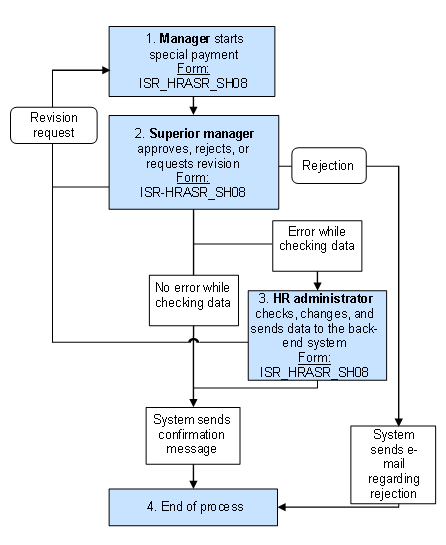
Manager starts special payment: Form: ISR_HRASR_SH08
The manager starts the
Special Payment (International)
process and enters the following data:Validity date
Payment reason
Amount
Superior manager approves, rejects, or requests revision: Form: ISR_HRASR_SH08
The special payment request appears in the superior manager's
universal worklist
. The superior manager has the following options:Request revision
In this case, the form is sent back to the requester.
Approve request
In this case, automatic checks are performed:
If no error occurs, the process is complete. The data is sent directly to the back-end system and the employee's master data is updated.
If an error occurs, the work item appears in the HR administrator's worklist (see step 3).
Reject request
In this case, the process is ended and the additional steps are not executed. The requesting manager and the employee receive an e-mail informing them about the rejection.
HR administrator checks, changes, and sends data to the back-end system: Form ISR_HRASR_SH08)
The form appears in the HR administrator's worklist, where the HR administrator analyzes and corrects it.
If all data is correct, the HR administrator sends it to the back-end system, where it is automatically saved.
The requesting manager and the employee receive an e-mail informing them about the special payment.
End of process