 Message Mapping Based on Form Scenarios
Use
With the help of this tool, you can replace non-applicable or non-specific system messages (for example: information, error messages, warnings, success messages, cancellation messages, and exit messages) with appropriate messages for each scenario. You make the required settings in Customizing for
HR Administrative Services
by choosing

Configuration of Forms/Processes

Configuration of Forms
Message Mapping Based on Form Scenarios.

You can find information on general (not form scenario-specific) message mapping under Message Mapping .
Just as in general message mapping, you have several options for message mapping based on form scenarios:
● Message mapping according to message type, message ID, and message number
● Message mapping according to error category and message type
If no specific discrepant message has been found for a certain form scenarios, then the system reads the setting for general message mapping. Since form scenarios are only used within
HR Administrative Services,
the context
HRASR
has been pre-defined and does not need to be entered explicitly.
The following graphic gives you an overview of how the individual customer and standard customizing settings are read through the system.
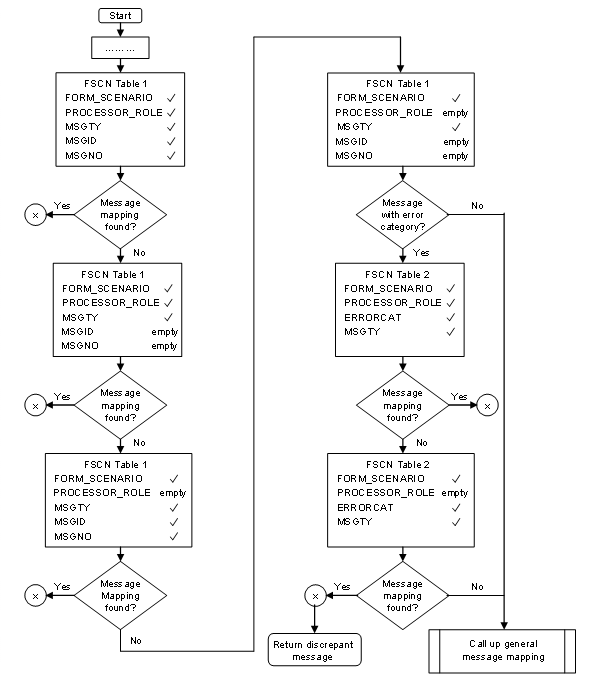
The table descriptions in the graphic should be read as follows:
FSCN table 1 stands for the table for the view V_T5ASRMSGMAPFS1
Message Mapping According to Message Type
FSCN table 2 stands for the table for the view V_T5ASRMSGMAPFS2
Message Mapping According to Error Category
 Example
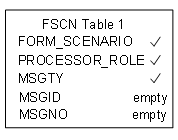
This excerpt from the flow chart should be read as follows:
The system reads the customer settings in the Customizing view V_T5ASRMSGMAPFS1 (
Message Mapping According to Message Type
) for the entered form scenario, processor role, and message type. No values are specified for message ID and message number.
■

This means that the message mapping for the value entered is read.
■
Empty
This means that the message mapping will be applied to every message ID and message number.