Defining Sum Lists
Use
You can use totals lists to generate lists that only display control- and overall totals.
Prerequisites
-
You are in the Basic List Line Structure screen in the Basic List screen sequence.
-
You have created the query G5 as shown in the section Defining Multiple Line Basic Lists.
Procedure
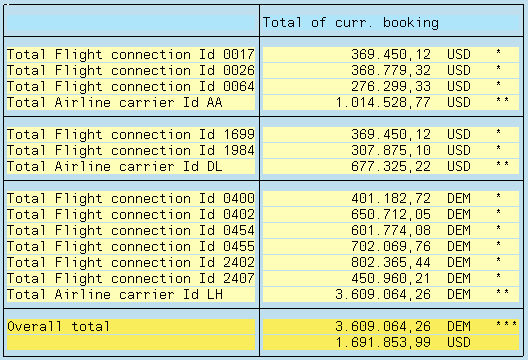
Use query G7 to generate a list, which contains the revenues, i.e. the total bookings, for each airline carrier and flight connection in this example.
-
Copy query G5 and give the copy the name G7.
-
Highlight the G7 query and click on the Change function.
-
Adjust the title and note.
-
Click on Basic List.
In the Basic List Line Structure screen, determine the sort sequence and the fields to be summed:

-
Use the
 function to go to the Control Levels screen.
 -
In the Control levels screen, specify that you want to output sub-totals for each airline carrier and each flight connection.
The column Total must be selected for this control level on the screen.
-
Select the Box column for the Airline Carrier ID.
-
Execute the query.
This definition generates the following list:
Just as in the example above, you can define a list where only the results of counter operations are displayed. You can also combine both types of lists.