Transporting Query Objects
Use
Query objects are transported in different ways according to the query area in which they were created.
In order to know which transport options are available, you must first understand how query objects are created.
-
Global area
Query objects are stored in the client-independent table AQGDB. They are connected to the Transport Organizer. For more information, see Transporting Global Area Objects.

-
Standard area
Query objects are stored in the client-specific table AQLDB. They are not connected to the Transport Organizer.
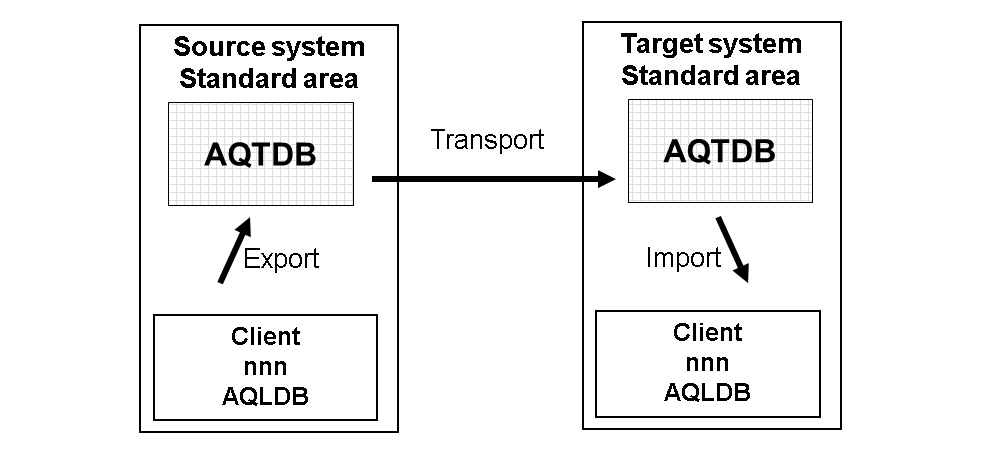
The query objects to be transported must be exported to the transport table AQTDB in the first step. In a second step, they are transported using the standard resources of the transport system. The third step takes place in the target system. The transported query objects are imported from the transport table into the relevant client-specific table AQLDB. For more information, see Overview of Query Transports and
In addition to these two cross-system transport options, the query transport tool offers two internal system copy processes:
-
Copying query objects between two clients of a system
Query objects that have been created in a client-specific area (standard area), can be copied to another standard area using the transport table AQTDB:

-
Copying query objects from the standard area to the global area of a system
Query objects that have been created in a client-specific area (standard area), can be copied to the global area of a system. Likewise, objects can be copied from the global area to one or more standard areas:
