Mobile Add-On for ERP Data Cache Purge Utility
Use the data cache purge utility to manage and purge packages associated with messages and the outbound message queue from SAP. The outbound message queue is the only way SAP communicates with the client device. Packages are the data attached to outbound messages. In this way, an administrator can send a message to multiple users while referencing only one data package, rather than an individual data package for each outbound message.
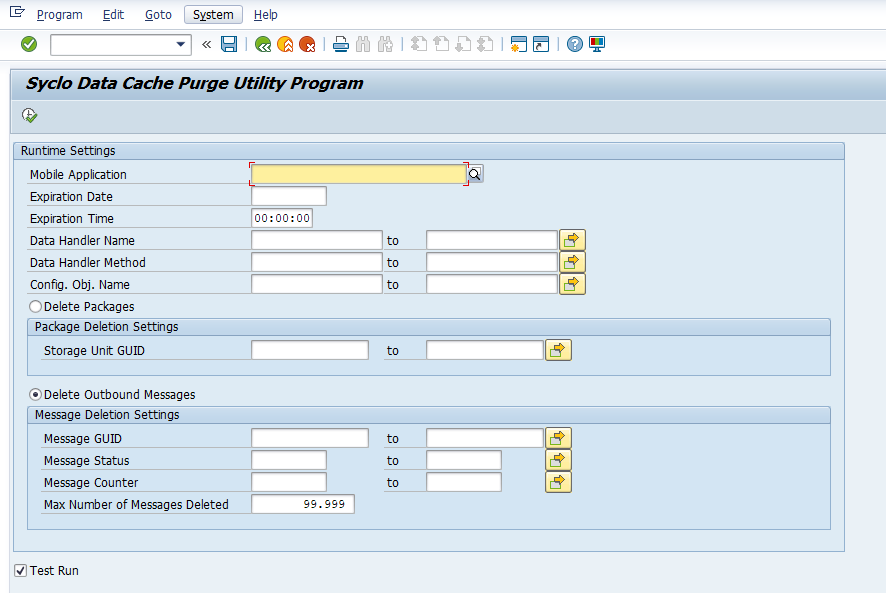
Runtime Settings
-
Mobile Application: Select the desired mobile application with which the outbound messages or packages are associated.
-
Expiration Date: Choose a date when the purge utility operation expires. When used with Expiration Time, the maximum expiration timestamp from which to purge messages from the cache. If an expiration date or time are provided, they are converted into a timestamp. The utility only deletes the messages where the expiration date or time is less than or equal to the provided timestamp. If a timestamp is not provided, deletion occurs without respect to the expiration timestamp of the messages.
-
Expiration Time: Choose a time when the purge utility operation expires. When used with Expiration Date, the maximum expiration timestamp from which to purge messages from the cache. If an expiration date or time are provided, they are converted into a timestamp. The utility only deletes the messages where the expiration date or time is less than or equal to the provided timestamp. If a timestamp is not provided, deletion occurs without respect to the expiration timestamp of the messages.
-
Data Handler Name: Select data handler names contained within the data cache to purge. Data handlers are responsible for messages within packages to purge. It limits the purge to the class handler responsible for handling the message.
-
Data Handler Method: Select data handler methods contained within the data cache to purge. Data handlers are responsible for messages within packages to purge. It limits the purge to the method of a class handler responsible for handling the message.
-
Configuration Object Name: Select configuration object names contained within the data cache to purge. Limits the purge to the configuration object that owns, or is the source of, the message.
Package Deletion Settings
Select the Delete Packages option to purge packages stored in SAP.
-
Storage Unit GUID: Each package is associated with a unique storage unit GUID
Message Deletion Settings
Select the Delete Outbound Messages option to purge outbound messages stored in SAP.
-
Message GUID: Each outbound message is associated with a unique message GUID
-
Message Status: Select message statuses contained within the data cache to purge. Use the following available message statuses:
-
NEW
-
SEND
-
RECEIVED
-
CANCEL
-
CONFIRMED
-
-
Message Counter: Select message counters contained within the data cache to purge.
Test Run
When you check the Test Run box, packages or messages are not purged upon execution. Rather, a list of the packages or records selected for purging appears. Then, you can determine that the purge parameters are correct. Once packages or records are purged, you cannot recover them.