ConfigPanel - EFI Assignment Settings
Enhancement Framework Implementation (EFI) source code plug-ins are implemented by the Mobile Add-On for ERP for each business object where you are implementing change detection. The source code plug-in is provided as an ABAP include file. Each exchange object is assigned to a plug-in to handle the actual change detection process. EFIs are typically available across multiple mobile applications running on the same system.
EFIs collect before and after images of data in an SAP object that has been created, modified, or deleted. The EFI then hands those images to the exchange object, which continues with the data processing. Therefore, you link the EFIs to the appropriate exchange objects.
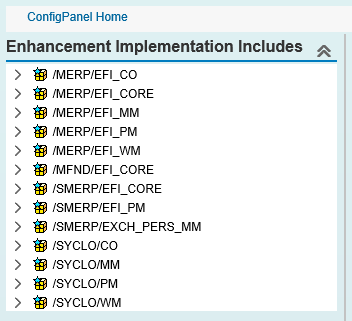
Enhancement Implementation Includes
The Enhancement Implementation Includes list is a tree of the include file list in the package. Click the arrow to the left of the first item to expand the list:
General Tab
Use the General tab to view and modify the general settings for a chosen EFI file.

- EFI Type: Select one of the following options for EFI type:
-
Standard EFI Include: Traditional way to implement EFI and configure the EFI assignments
-
EFI Event Handler Implement EFI using an ABAP class-based approach. If you select EFI Event Handler, you develop EFI implementation as a subclass of /SMFND/CL_CORE_EFI_EVENT_BASE. Available EFI event handler classes are displayed in the dropdown field. The EFI event handler approach provides a more robust functionality and is recommended for new EFI implementations.
-
-
EFI Include Name: Source code plug-in file name
-
Description: Short description of the EFI. The field is automatically filled in when you select the EFI Include Name and is not editable.
-
Package: Package where the EFI is located. This field is automatically filled in when you select the EFI Include Name and is not editable.
Assignment Tab
Use the Assignment tab to modify the EFI assignments.

-
EFI Info fields:
The general EFI information fields in this section are taken from information in the General tab and are not editable.
-
EFI Assignment List:
The EFI Assignment table displays which plug-ins are assigned to a specific include file. All column information is replicated in the Assignment Detail section directly below the table.
To highlight an individual row, click the gray square to the left of the EFI Include Name column in that row.
-
Assignment Detail fields:
Information in this section changes depending on which row is highlighted in the EFI Assignment List section table.
-
Mobile Application: The specific mobile application and its release number. This field is noneditable.
-
Exchange Object: Exchange object to which the EFI include file is assigned.
-
Exch. Object Desc: A brief, easy to understand description of the exchange object, limited to 60 characters.
-
Active Flag: When checked, the exchange object is in an active state. If unchecked, the EFI is not linked to the assigned mobile data object
-