 Goods Receipt in a Decentralized Warehouse
Use
The variant for the SAP system as an enterprise resource planning (ERP) system and as a Warehouse Management (WM) system describes the link-up of an external warehouse management system to an SAP system. The stand-alone system that executes all warehouse management functions is an SAP system.
While processes in accounting, purchasing, inventory management or sales run in the central ERP system, the actual physical processing of the putaway takes placed in the decentralized Warehouse Management system (WMS).
Prerequisites
Due to the separation of the functions involved, you must first split the master and movement data (for more information, refer to the section Setting up the Decentralized Warehouse Management System ). Information on the evaluation of materials is not relevant in the decentralized WMS. The basic data of a material must be identical in both systems. The warehouse management-specific material data is only of relevance in the decentralized WMS. The distribution of material master data between the central ERP and the decentralized WMS takes place via an output type that only contains fields relevant for WMS (output type MATMAS_WMS).The movement data must be available in both systems.
Process Flow
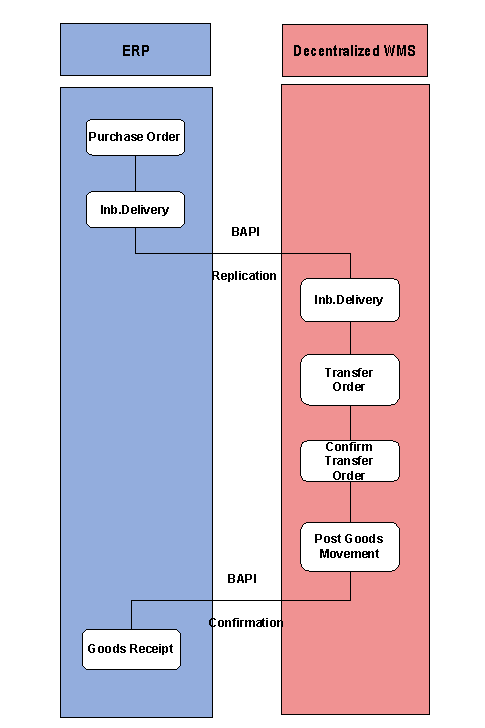
Goods Receipt Based on Purchase Orders:
You use the ERP system to create purchase orders and send them to the vendors.
To give notification of the delivery that is due, the vendor returns a shipping notification that is recorded in the ERP system as an inbound delivery.
The inbound delivery is distributed to the WMS using the BAPI
InboundDelivery.SaveReplica,
and there it represents the request to the warehouse to put away or pick goods.When the vendor delivers the goods, a transfer order is generated in the WMS, which is then used to put the goods away.
After the transfer order is confirmed, goods receipt is posted for the inbound delivery. This clears the interim storage bin.
On the basis of this activity, the confirmation to the ERP system via the BAPI
InboundDelivery.ConfirmDecentral
is initiated.The goods receipt posting for the inbound delivery is automatically posted in the ERP system (in inventory management) when the verification is recorded.
 Note
NoteAn inbound delivery based on a purchase order can be created in different ways, depending on the confirmation control key in purchasing. If the vendor usually sends a shipping notification, the inbound delivery is created when the shipping notification is recorded in the system. In all other cases, you have the option of creating inbound deliveries automatically using collective processing.
End of the note.
Partial Goods Receipts for Inbound Deliveries:
You can post partial goods receipts for an inbound delivery in the decentralized WM system and can confirm them to the ERP system. Partial quantities that have been put away are therefore entered in a timely manner in Inventory Management in the ERP system. A goods receipt can also be posted for existing remaining quantities of an inbound delivery.
The goods receipt for an inbound delivery is automatically completed as soon as the last partial goods receipt has been confirmed.
You can post partial goods receipts
when confirming individual transfer orders and transfer order items.
when confirming entire handling units.
If the partial goods receipts do not contain handling units, you can also work with the delivery monitor when posting them. You can also post partial goods receipts when processing customer returns.
If you want to post partial goods receipts, choose the value
4 - Do not take putaway qty as delivery qty, but post GR
in the
Copy Stock Quantity
field (
Control
group box). This indicator ensures that the system does not adjust the delivery quantity in the inbound delivery to the actual putaway quantity when partial goods receipts are posted.
For more information about posting partial goods receipts, see the documentation Post Partial Goods Receipt for Inbound Delivery .
 Caution
The reversal function for posted partial goods receipts is not active. You cannot delete goods movements in the decentralized WM system or in the ERP system. Reversals are only possible by creating outbound deliveries in the ERP system and then posting a goods issue.