 Chart of Accounts List
A chart of accounts list contains all charts of accounts that can be used in a given client.
You enter the charts of accounts you require for your company in this list. To do this, in Customizing, choose 
Financial Accounting (New)

General Ledger Accounting (New)
Master Data
G/L Accounts
Preparations
Edit Chart of Accounts List
 .
.
You can use as many charts of accounts as you require within a client. Various characteristics of the individual company codes could influence how you want to set up the chart of accounts, such as the following:
Location (country)
Branch
Corporate structure
Corporate size
Legal requirements
However, if a different grouping of the chart of accounts is not required, a common chart of accounts can be used by more than one company code.
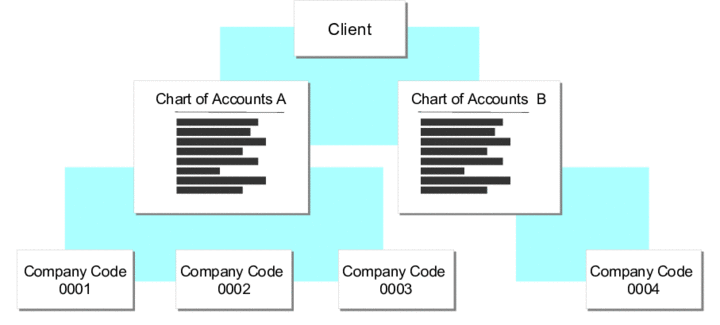
Structuring charts of a accounts within a client
You must assign one chart of accounts to each company code. You therefore need to define at least one chart of accounts for your company.
If you are using cost and revenue accounting, the chart of accounts assigned to a controlling area must be the same as the chart of accounts of the company codes assigned to the controlling area.
Structure
If you enter a chart of accounts in the chart of accounts list, note the importance of the following settings:
Maintenance language
The chart of accounts is created and changed in one language, the maintenance language. This means that the names of the G/L accounts are created and changed in the maintenance language. If the chart of accounts is used by multiple company codes using different languages, you can translate the account names into the required languages.
Group chart of accounts
You can assign an alternative group chart of accounts to the chart of accounts.
For more information, see Chart of Accounts.
Account number length
You can define the length of G/L account numbers. The maximum is 10 characters.
Internally, account numbers are always 10 characters long. Purely numeric account numbers are automatically filled out with zeroes from the left. Alphanumeric account numbers are filled out with spaces from the right.