 The Database Table for the Time Sheet (CATSDB)
Definition
The database table for the Time Sheet (CATSDB) contains all the data that has been recorded using the Time Sheet.
Use
As soon as a user has entered and saved data in the time sheet, the system writes the record to table CATSDB. When the records have the processing status 30 (
Approved
) or 60 (
Canceled
), the system writes them to the relevant
interface tables
in
Human Resources
,
Controlling
,
Plant Maintenance/Customer Service
,
Project System
, and
Materials Management,
based on the
working time attributes that have been entered.
Structure
Listed below are important fields which are filled for each record regardless of its working time attributes or in the case of the reference counter, can be filled:
Personnel number
Counter
Each record that is stored in table CATSDB is assigned a counter. The counter is assigned by the system and is 12 digits long.
Reference counter
If a record with the processing status 30 (
Approved
) is changed, the system also assigns it a reference counter. The reference counter is also 12 digits long.
A reference counter is assigned as follows: The original record is retained and its processing status is changed from 30 (
Approved
) to 50 (
Changed after approval
) or 60 (
Canceled
). At the same time, the system creates a new record to reflect the changes. The new record is assigned the processing status 10 (
In process
), 20 (
Released
), or 30 (
Approved
), depending on your profile settings. The new record is assigned a reference counter to link it to the original record, which now has the status 50 or 60. The reference counter corresponds to the counter of the original record.
Document number
As soon as a record has the processing status 30 (
Approved
), the system assigns it a document number. The document number is assigned sequentially and is 10 digits long. The document number represents the key for identifying the record, even after it has been transferred to the target components.
In addition, the system also provides information on the person who created the record, when the record was created, and, if necessary, on the person who changed the record and when it was changed. You can also see whether a short or long text exists for the record.
Connections between the processing status, counter, reference counter, and document number
The four graphics below show in detail the connections between the processing status, counter, reference counter, and document number. The graphics illustrate the processes that take place in table CATSDB when a record is created or changed, according to the settings for the data entry profile. To make the graphics clearer, the field values for the counter, reference counter, and document number are shown in a shorter form.
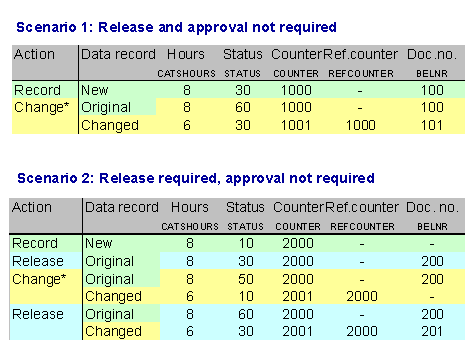
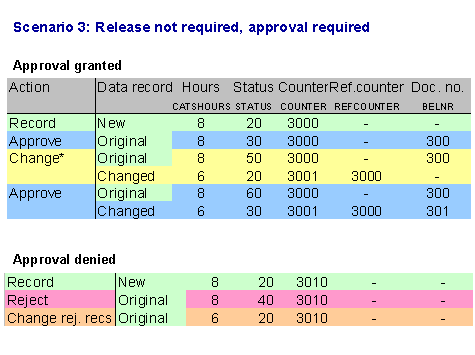
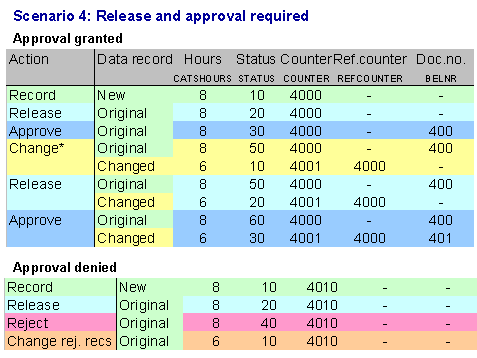
*If a record is canceled, the number of hours it contains is changed to zero. Therefore, when a record is canceled, the same processes are started in table CATSBD as if the record had been changed.