 Geographical Media Product Listing/Exclusion in Contract
Use
You can use the functions for
geographical media product listing
and
geographical media product exclusion
to allow (list) or exclude media products for contract processing for specific geographical areas.
To do this, you specify the areas (geographical units) in which the individual media products can be sold and those in which they cannot be sold. (See
Prerequisites
.) The procedure for geographical media product listing and exclusion in contract processing is as follows:
Enter the customer in the contract (sold-to party, ship-to party)
Enter the media product in the contract item (and confirm your entry)
Automatic checkby the system whether or not the media product is listed or excluded for the geographical area for the customer. If this is not the case, the system displays the message indicating that listing or exclusion is missing.
The following diagram illustrates the role of the geographical assignment between the media product and the customer for media product listing and exclusion.
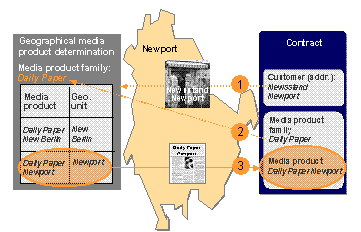

If geographical media product listing and exclusion reference the
ship-to party
partner role, the ship-to party cannot change a contract item manually.
Integration
The functions for
geographical media product listing and exclusion
in Media Product Sales and Distribution are based on the standard SAP functions
material listing
and
material exclusion
.
Both material listing and material exclusion are performed using the condition technique, which is set up in the Customizing settings for the Logistics Execution System (LES). The field
Geographical Unit
(GEOUNIT) has been added to the appropriate field catalogs so that material listing and exclusion can be used for geographical areas in Media Product Sales and Distribution.
Prerequisites
The condition technique must be set up in Customizing for the LES in such a way that the condition records for material listing and exclusion can be created for specific geographical areas.
The following gives you an
example of a possible basic setup:
Choose
Logistics Execution
→
Shipping
→
Basic Shipping Functions
→
Listing/Exclusion
in the IMG.The system displays the possible settings in a dialog box.
Maintain allowed fields for listing/exclusion
The field GEOUNIT is already entered in the field catalog (you do not need to take any action here).
Maintain condition tables for listing/exclusion
Create a new condition table for listing and exclusion, for example “950”. Choose the fields
Material Entered
(MATWA) and
Geographical Unit
(GEOUNIT).
Maintain access sequences for listing/exclusion
Create a new access sequence for listing and one for exclusion, for example “A003” (
Listing with Geo. Unit
) and “B003” (
Exclusion with Geo. Units
).
Under
Accesses
, enter table “950” (material entered/geographical unit) in each case.
Maintain listing/exclusion types Create a new condition type, for example “A003”, for listing and assign it the access sequence “A003”, created previously. Create a new condition type for exclusion, for example “B003”, and assign it the access sequence “A003”, created previously.
Procedures for maintaining listing/exclusion
Create a new procedure for listing (if this does not already exist), for example “A00001”, and enter the new condition type “A003” in the procedure.
Create a new procedure for exclusion (if this does not already exist), for example “B00001”, and enter the new condition type “B003” in the procedure.
Activate listing/exclusion by sales document type
Assign the procedure “A00001” for listing and “B00001” for exclusion to the sales document type “JWK1” (media contract).
Activities
You can use the functions below to set up geographical media product listing and exclusion. The functions can be accessed as described.
Function |
Description |
Menu path |
|---|---|---|
Createcondition records |
Enter the following data for the listing or exclusion type with a geographical assignment (see
Media product under
Geographical unit in the column
|
|
Changeor display condition records |
This function allows you to access condition records for an interval of geographical units for each listing or exclusion type for a media product and change or display them. |
|
Ambiguity checkon geographical assignment |
Here, you can check whether the geographical units overlap in the condition records created for material listing or exclusion. |
|