 Calculated Key Figures
Using the basic key figures in the database (see Creating an Aspect ), you can create further key figures (derived or calculated key figures). Unlike basic key figures, the value of a calculated key figure is not saved in the database. Instead it is calculated by the system whenever you execute a report containing this key figure.
 Example
If you have defined the basic key figures Sales revenue and Employees in an aspect, you can define the sales revenue per employee with the formula Sales revenue/Employees .
Key figure formulas can comprise the basic key figures of that aspect, constants and existing defined key figures in the aspect, i.e. you can build up tree-like key figure hierarchies (see diagram below). In the presentation there is no distinction between basic key figures and derived key figures.
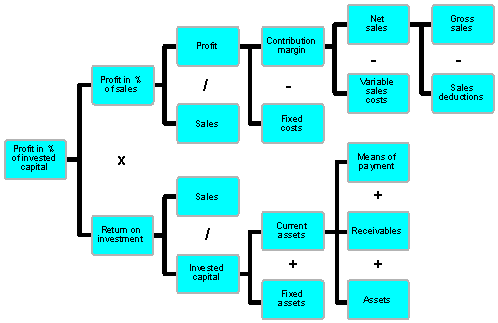
Each derived key figure has a unique name, valid in all aspects. Furthermore, each key figure is assigned to a specific aspect because it can be split into the basic key figures of that aspect. However, if all these basic key figures exist in a second aspect, the derived key figure can also be used in the second aspect. You can create derived key figures for a view aspect, and use basic key figures (from the aspects which form the view aspect) in the formulas. The procedure for defining key figures in an aspect and in a view aspect is identical.
For information on creating and editing calculated key figures see Maintaining Calculated Key Figures See also Displaying and Deleting Calculated Key Figures .