Hierarchy of Ports
Use
The ports in a graphics proxy are arranged as a hierarchy. This hierarchy determines where the graphics proxy looks for a customizing object if it does not find it at the port where it expects to find it.
Integration
The application creates the customizing object and transfers it to the graphics proxy specifying the port to which the customizing object is to be assigned.
Features
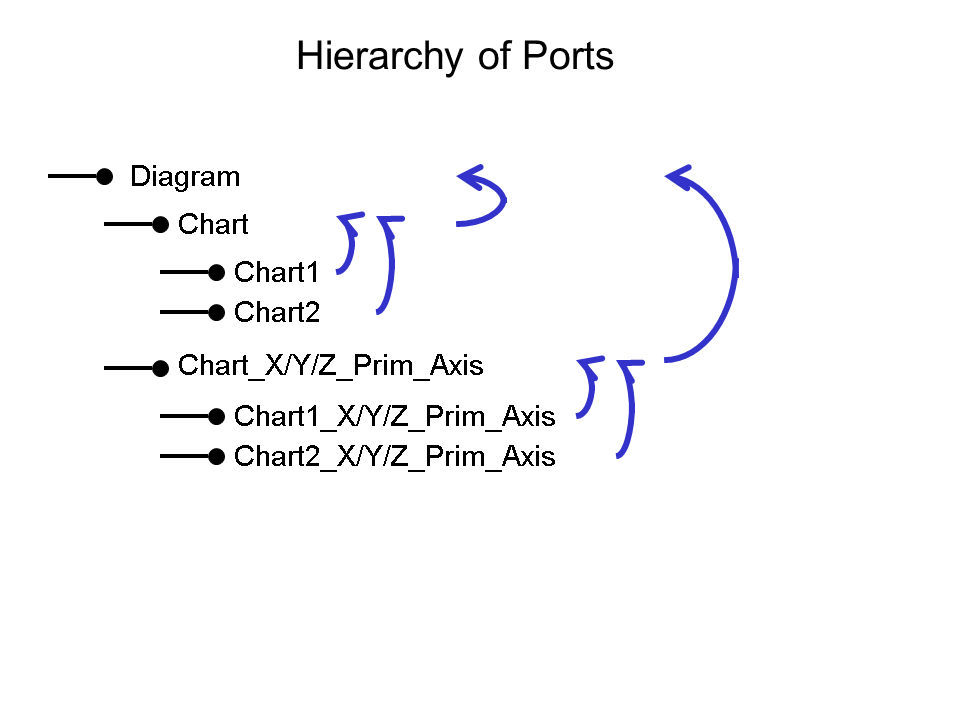
The arrows refer to where the graphics proxy looks for a customizing object if it cannot find it at the port where it last looked for it.
For example, the application assigns the customizing object containing attributes for the axis to the port CHART_X_PRIM_AXIS. The graphics proxy first looks for the customizing object at the most specific port, say, CHART1_X_PRIM_AXIS and since it cannot find it there it looks at the next most general port CHART_X_PRIM_AXIS where it finds it.