Customizing: From Application to Graphic
Use
The application can create a customizing object, then change various attributes in this object and assign the object to a port in the graphics proxy. Once the graphics proxy has been activated the graphic is displayed with the visualization attributes specified in the customizing object.
Prerequisites
In this case the customizing object is not loaded from the database and does not have to be saved to the database.
Process
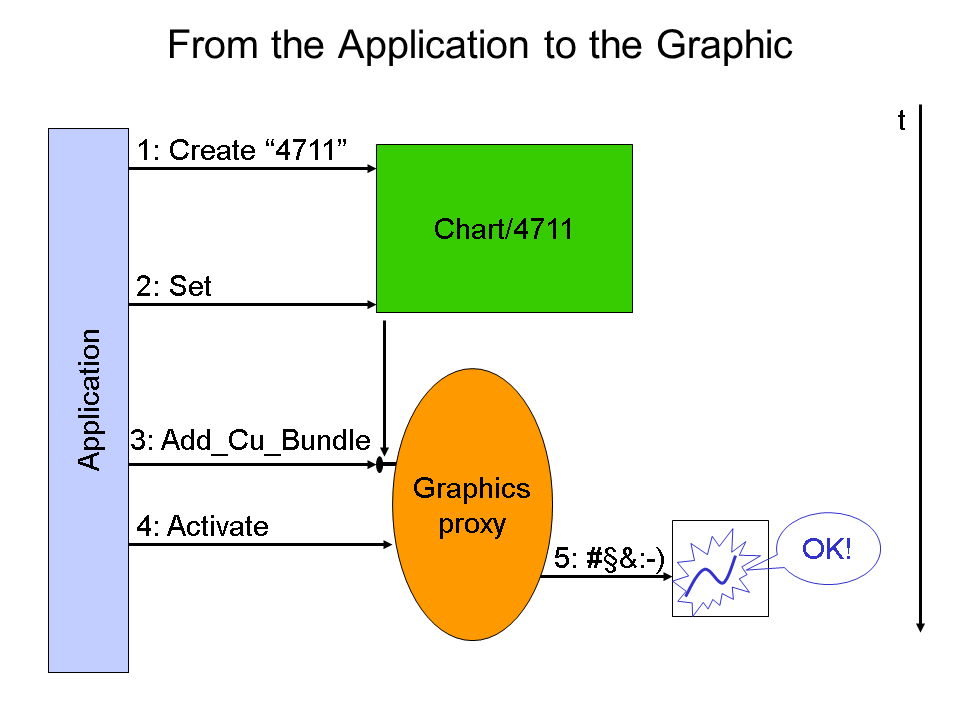
The graphic shows what happens when the application creates customizing objects, changes attributes and transfers the customizing data to the graphic. The order of events can be read vertically down the graphic:
-
The application creates the customizing object. In this example of a drawing area it has the ID 4711.
CREATE OBJECT <instance of CL_CU_DRAWING_AREA>
EXPORTING INSTANCE_ID = "4711".
-
The application can change individual values, for example the title of the drawing area.
CALL METHOD <instance of CL_CU_DRAWING_AREA > IF_CUSTOMIZING~SET
EXPORTING ATTR_ID = CL_CU_DRAWING_ AREA=> CO_TITLE
VALUE = "This is the new title".
-
Using the method ADD_CU_BUNDLE the application notifies the graphics proxy about the customizing object and at which port it is to be used.
CALL METHOD <instance of graphics proxy >
IF_GRAPHIC_PROXY~ADD_CU_BUNDLE
EXPORTING PORT = IF_GRAPHIC_ PROXY=> CO_PORT...
BUNDLE = <instance of CL_CU_DRAWING_AREA>
IMPORTING RETVAL = <return value>
-
After all the customizing steps have been completed the graphics proxy has to be activated.
CALL METHOD <instance of graphics proxy > ACTIVATE
IMPORTING RETVAL = <return value>
-
The graphic is displayed with the display attributes specified in the customizing object. The label 5:#§&:-) is to indicate that the method call is product-specific.