Creating an Instance of a BSP Callable Object
Use
To use the BSP application in a business process modeled with Guided Procedures (GP), you must register the application as a callable object. This creates an instance of the BSP callable object, which you can then activate and execute.
Prerequisites
- To be able to work with the GP design time, you must be assigned to portal role GP Business Expert, or have the relevant permissions.
- The logical destination and portal alias for the system where your BSP application resides must be configured. For more information about RFC connectivity, see Maintaining RFC Destinations . For more information about portal aliases, see Managing System Aliases .
Procedure
- Launch GP design time, as described in Launching Guided Procedures (GP) Design Time .
- Choose Create Callable Object from the contextual panel.
The first screen Basic Data is displayed.
- Enter the following data as shown in the example:
- Type - select User Interface → Business Server Page (BSP)
- Name - for example, Display Pictogram
- Description - for example, Display Pictogram
- Original Language - selectEnglish
- Location - select a folder to store the callable object
Basic Data

- Choose Next
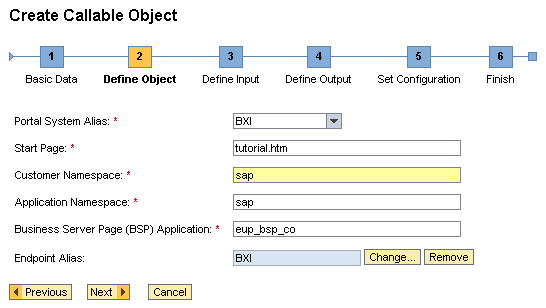
Enter the required parameters as follows:
- Portal System Alias- select the portal alias for the system where application EUP_BSP_CO resides
- Start Page- enter tutorial.htm
- Customer Namespace- enter the reserved customer namespace for your applications, or leave the default
- Application Namespace- enter the namespace for the BSP application (if any)
- Business Server Page (BSP) Application- enter EUP_BSP_CO
- Endpoint Alias- select the RFC destination for the system where the BSP application resides
Define Object
- Choose Next.
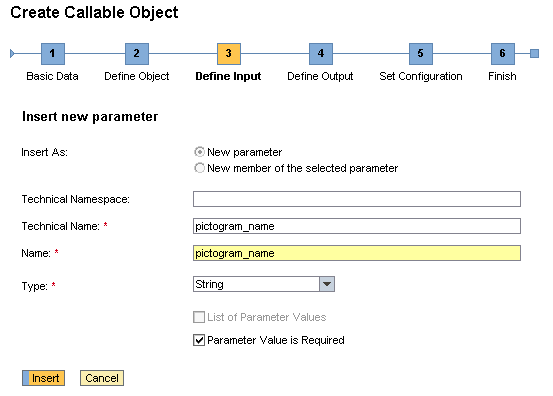
Define the input parameters. You need to insert parameter pictogram_name for this BSP application as shown in the example.
Insert Input Parameters
- Choose Next.
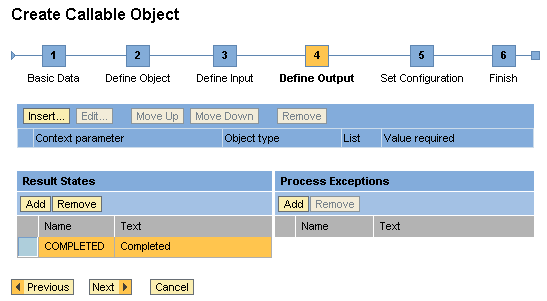
Add a result state COMPLETED , as shown in the example.
Insert Output Parameters
- Choose Next.
Enable the option Render a complete button for the callable object.
- Choose Next and then Finish and Open.
The design time for the callable object opens.
- To make the callable object available for use in processes, choose Activate Callable Object.
Result
You can attach the BSP callable object to an action, and use it in a GP process.