WDCOApproveItems
Definition
A Web Dynpro component that provides information for the ordered items and their total price, and enables the action processor to approve or reject the order.
Use
This component is displayed after the purchaser has completed the order in the Order Items step (see the diagram of the Order Office Material process in Scenario: Order Office Material ).
Structure
The following aspects of the component's structure are relevant for its implementation:
- Basic data (such as name, package, and so on)
- Component controller
- Interface controller
- User interface
Basic Data
|
Name |
WDCOApproveItems |
|
Package |
com.sap.caf.eu.gp.example.ordermat.wdco.approveitems |
|
Implemented Interfaces |
IGPWebDynproCO (com.sap.caf.eu.gp.co.webdynpro) |
|
Used Web Dynpro Components |
CContext (com.sap.caf.eu.gp.example.ordermat.wdco) |
Component Controller
The WDCOApproveItems component controller implements the functionality that the component provides.
Properties
The interface controllers of the following components are required:
- CContext
- WDCOApproveItems
Component Controller: Properties

Context
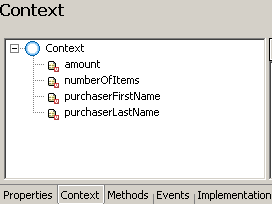
The context of the component controller contains the following value attributes:
- amount
- numberOfItems
- purchaserFirstName
- purchaserLastName
Component Controller: Context
Methods
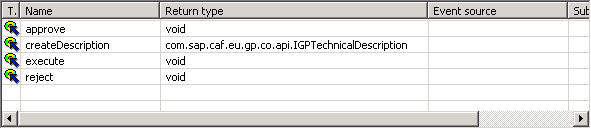
The following methods are declared:
- approve() - the method is used in the implementation of the onActionApprove() event in view VApproveItems (see section User Interface)
- reject() - the method is used in the implementation of the onActionReject() event in view VApproveItems (see section User Interface)
- createDescription(java.util.Locale locale) - the method is used in the implementation of the getDescription() method in the interface controller (see section Interface Controller)
- execute(com.sap.caf.eu.gp.context.api.IGPExecutionContext context) - the method is used in the implementation of the execute() method in the interface controller (see section Interface Controller)
Component Controller: Methods
Implementation
The implementation of the component controller implies adding the relevant logic in the methods that are declared:
- Implementing method createDescription()
In this method, the basic data, the input and output parameters, and the result states for the callable objects are defined.
The implementation of the method is analogous to the implementation of the createDescription() method in the WDCODisplaySelectItems component controller. For more information, see WDCODisplaySelectItems .
The following aspects are specific to the method implementation in this component:
- Some of the parameters are defined with multiplicity 1…1. The multiplicity implies that the parameters are not lists, and are required.
- Two result states - RESULT_STATE_APPROVED and RESULT_STATE_REJECTED, are declared for the callable object. They are used in the implementation of the approve() and reject() methods respectively. At runtime, the process flow is defined by the result state reached - if it is RESULT_STATE_REJECTED, the Order Items action is displayed; otherwise, a confirmation mail is sent to the purchaser.
Method createDescription()
publiccom.sap.caf.eu.gp.co.api.IGPTechnicalDescription createDescription( java.util.Locale locale ) {
//@@begin createDescription() GPWebDynproResourceAccessor resourceAccessor = new GPWebDynproResourceAccessor(m_TextAcc); IGPTechnicalDescription technicalDescription = GPCallableObjectFactory.createTechnicalDescription( "CO_TEXT", "CO_DESC", resourceAccessor, locale); try {
//INPUT: //get root input IGPStructureInfo input = technicalDescription.getInputStructureInfo(); //add item structure to root input IGPStructureInfo itemsStructureIn = input.addStructure(CContextInterface.STRUCTURE_ITEMS); itemsStructureIn.setMultiplicity(IGPStructureInfo.MULITIPLICITY_0_N); //add attributes to item structure itemsStructureIn.addAttribute(CContextInterface.PARAM_ORDER_NUMBER, IGPAttributeInfo.BASE_STRING); itemsStructureIn.addAttribute(CContextInterface.PARAM_NAME, IGPAttributeInfo.BASE_STRING); itemsStructureIn.addAttribute(CContextInterface.PARAM_UNIT, IGPAttributeInfo.BASE_STRING); itemsStructureIn.addAttribute(CContextInterface.PARAM_CURRENCY, IGPAttributeInfo.BASE_STRING); itemsStructureIn.addAttribute(CContextInterface.PARAM_PRICE, IGPAttributeInfo.BASE_DOUBLE); itemsStructureIn.addAttribute(CContextInterface.PARAM_QUANTITY, IGPAttributeInfo.BASE_SIGNED_INT); //add parameter purchaserFirstName IGPAttributeInfo attributeInfoUserName = input.addAttribute(CContextInterface.PARAM_PURCHASER_NAME, IGPAttributeInfo.BASE_STRING); attributeInfoUserName.setMultiplicity(IStructureInfo.MULITIPLICITY_1_1); //add parameter purchaserLastName IGPAttributeInfo attributeInfoUserFirstName = input.addAttribute(CContextInterface.PARAM_PURCHASER_FIRST_NAME, IGPAttributeInfo.BASE_STRING); attributeInfoUserFirstName.setMultiplicity(IStructureInfo.MULITIPLICITY_1_1); } catch (GPInvocationException e) {
String localizedMessage = m_TextAcc.getText("ERROR_CREATING_TECHNICAL_DESC");
wdThis.wdGetWDCOApproveItemsInterfaceController().wdFireEventTechnicalException(new GPTechnicalCallableObjectException(logger, localizedMessage, e)); } //result states IGPResultStateInfo approved = technicalDescription.addResultState(RESULT_STATE_APPROVED); approved.setDescriptionKey("RESULTSTATE_APPROVED_DESC");
IGPResultStateInfo rejected = technicalDescription.addResultState(RESULT_STATE_REJECTED); rejected.setDescriptionKey("RESULTSTATE_REJECTED_DESC");
return technicalDescription; //@@end } |
- Implementing method execute()
The frawework calls this method when the callable object is executed as a part of a process at runtime.The input data is retrieved and the values are set in the component controller's context.
Method execute()
publicvoid execute( com.sap.caf.eu.gp.context.api.IGPExecutionContext context ) {
//@@begin execute() m_context = context; try {
//get root input structure IGPStructure input = m_context.getInputStructure(); //get input structure "items" of type list Collection inputParams = input.getStructures(CContextInterface.STRUCTURE_ITEMS); double amount = 0; String amountAsString = null; int numberOfItems = 0; //process input structure for (Iterator iter = inputParams.iterator(); iter.hasNext();) {
IGPStructure structure = (IGPStructure) iter.next(); double price = structure.getAttributeAsDouble(CContextInterface.PARAM_PRICE); int quantity = structure.getAttributeAsInt(CContextInterface.PARAM_QUANTITY); amount = amount + (price * quantity); numberOfItems = numberOfItems + quantity; } //format price for ui amountAsString = new DecimalFormat("#0.00").format(amount);
IPublicWDCOApproveItems.IContextElementcurrentContextElement = wdContext.currentContextElement(); currentContextElement.setAmount(amountAsString); currentContextElement.setNumberOfItems(numberOfItems); //process root parameter "purchaserLastName" currentContextElement.setPurchaserLastName(input.getAttributeAsString(CContextInterface.PARAM_PURCHASER_NAME)); //process root parameter "purchaserFirstName" currentContextElement.setPurchaserFirstName(input.getAttributeAsString(CContextInterface.PARAM_PURCHASER_FIRST_NAME)); } catch (GPInvocationException e) {
String localizedMessage = m_TextAcc.getText("ERROR_PROCEEDING_PARAMETERS");
wdThis.wdGetWDCOApproveItemsInterfaceController().wdFireEventTechnicalException(new GPTechnicalCallableObjectException(logger, localizedMessage, e)); } //@@end } |
- Implementing method approve()
This method sets the result state of the callable object to RESULT_STATE_APPROVED, and indicates that the execution of the callable object is completed by calling the execution context's method processingComplete() .
If the callable object defined output parameters, you would have used this method to set their values as well.
Method approve()
publicvoid approve( ) {
//@@begin approve() try {
m_context.setResultState(RESULT_STATE_APPROVED); m_context.processingComplete(); } catch (GPInvocationException e) {
String localizedMessage = m_TextAcc.getText("ERROR_SETTING_RESULTSTATE");
wdThis.wdGetWDCOApproveItemsInterfaceController().wdFireEventTechnicalException(new GPTechnicalCallableObjectException(logger, localizedMessage, e)); } catch (GPEngineException e) {
String localizedMessage = m_TextAcc.getText("ERROR_INTERNAL");
wdThis.wdGetWDCOApproveItemsInterfaceController().wdFireEventTechnicalException(new GPTechnicalCallableObjectException(logger, localizedMessage, e)); } //@@end } |
- Implementing method reject()
This method sets the result state of the callable object to RESULT_STATE_REJECTED, and indicates that the execution of the callable object is completed by calling the execution context's method processingComplete() .
Method reject()
publicvoid reject( ) {
//@@begin reject() try {
m_context.setResultState(RESULT_STATE_REJECTED); m_context.processingComplete(); } catch (GPInvocationException e) {
String localizedMessage = m_TextAcc.getText("ERROR_SETTING_RESULTSTATE");
wdThis.wdGetWDCOApproveItemsInterfaceController().wdFireEventTechnicalException(new GPTechnicalCallableObjectException(logger, localizedMessage, e)); } catch (GPEngineException e) {
String localizedMessage = m_TextAcc.getText("ERROR_INTERNAL");
wdThis.wdGetWDCOApproveItemsInterfaceController().wdFireEventTechnicalException(new GPTechnicalCallableObjectException(logger, localizedMessage, e)); } //@@end } |
Interface Controller
The implementation of the interface controller is analogous to the one described for the WDCODisplaySelectItems component. For more information, see WDCODisplaySelectItems .
User Interface
The user interface of the component is implemented in view VApproveItems. The view is embedded in WebDynproCO that has been created when adding the implemented interface.
Properties
The WDCOApproveItems component controller is required for the implementation of the user interface part.
Context
The following value attributes are defined in the view's context, and are mapped to the relevant attributes in the component controller's context:
- amount
- numberOfItems
- purchaserFirstName
- purchaserLastName
In addition, an attribute orderText is defined, which is used for specific implementation purposes, as described in the Implementation section below.
Actions
The following actions are defined for this view:
- Approve
- Reject
The action usage is described in the Layout section below. The implementation of the event handlers is further shown in the Implementation section.
Layout
The view's layout includes the following UI elements:
- Header - contains the heading of the page.
- TextView - the text in the text view is dynamically set in the wdDoModifyView() method using the orderText context attribute.
- Buttons:
- Approve Order - the button references the Approve action in its Event property, so that the relevant event handler is invoked when the button is chosen. The event handler implementation is described in the Implementation section below.
- Reject Order - the button references the Reject action in its Event property, so that the relevant event handler is invoked when the button is chosen. The event handler implementation is described in the Implementation section below.
Implementation
In the Implementation tabstrip the following methods are implemented:
- wdDoModifyView()
The method sets the value of the orderText context attribute when the page is loaded. The text is localized using the component's message pool.
The parameters to be replaced in the text are provided in an object array. These are the purchaser's first and last name, the ordered items number, and the total price. They are retrieved from the component's context. In the process flow, the values of the input parameters are taken from the previously executed callable object (Order Items) by means of parameter mapping.
Method wdDoModifyView()
publicstatic void wdDoModifyView(IPrivateVApproveItems wdThis, IPrivateVApproveItems.IContextNode wdContext, com.sap.tc.webdynpro.progmodel.api.IWDView view, boolean firstTime) {
//@@begin wdDoModifyView //create and set text for text view String amountAsString = wdContext.currentContextElement().getAmount(); String purchaserName = wdContext.currentContextElement().getPurchaserLastName(); String purchaserFirstName = wdContext.currentContextElement().getPurchaserFirstName(); String textOrder = null; //if purchaserFirstName is not filled forward empty string if(purchaserFirstName == null){
purchaserFirstName = ""; } Object[] objArray = new Object[]{
purchaserFirstName, purchaserName, new Integer(wdContext.currentContextElement().getNumberOfItems()), amountAsString}; textOrder = wdThis.wdGetAPI().getComponent().getTextAccessor().getText(TEXT_ORDER, objArray); wdContext.currentContextElement().setOrderText(textOrder); //@@end } |
- onActionApprove()
The required behaviour of the event handler is to set the result state to RESULT_STATE_APPROVED and to complete the execution of the callable object. For that purpose, it calls the approve() method of the component controller.
Method onActionApprove()
publicvoid onActionApprove(com.sap.tc.webdynpro.progmodel.api.IWDCustomEvent wdEvent ) {
//@@begin onActionApprove(ServerEvent) wdThis.wdGetWDCOApproveItemsController().approve(); //@@end } |
- onActionReject()
The required behaviour of the event handler is to set the result state to RESULT_STATE_REJECTED and complete the execution of the callable object. For that purpose, it calls the reject() method of the component controller.
Method onActionReject()
publicvoid onActionReject(com.sap.tc.webdynpro.progmodel.api.IWDCustomEvent wdEvent ) {
//@@begin onActionReject(ServerEvent) wdThis.wdGetWDCOApproveItemsController().reject(); //@@end } |
Integration
For more information about the component's usage in the process, see Approve Items .