Defining Screen Enhancements
For general information on how to define Business Add-Ins, see Defining Business Add-Ins.
- Create the following methods.

The methods PUT_DATA_TO_SCREEN and GET_DATA_FROM_SCREEN are required for data transport. These methods are called from within the program of the application at PBO or PAI (see below).
You could create the methods with the following parameters for the example we have used.
Method:
Parameter:
Type:
Reference type:
PUT_DATA_TO_SCREEN
FLIGHT
IMPORTING
SFLIGHT
GET_DATA_FROM_SCREEN
FLIGHT
EXPORTING
SFLIGHT
- Create an instance attribute in the interface. This attribute is used for passing data.

- Write the code for the call of the screen enhancement in the program of the application:
Top Include:
DATA: program Type program, dynpro Type dynnr. exit type ref to if_ex_badi_screen
The variable for the object reference is created using data and typed to the interface.
Time PBO:
MODULE initialize OUTPUT.CLEAR: sflight, ok_code. IF exit IS INITIAL. CALL METHOD cl_exithandler=>get_instance CHANGING instance = exit. ENDIF. CALL METHOD cl_exithandler=>set_instance_for_subscreens EXPORTING instance = exit.ENDMODULE.
The factory method is used to create an instance of the adapter class. You then declare the instance using the public static method SET_INSTANCE_FOR_SUBSCREEN to allow the data for display on the screen to be used in the function group of the user or in the module pool.
MODULE data_for_subscreen OUTPUT. program = sy-repid. dynpro = sy-dynnr. CALL METHOD cl_exithandler=>get_prog_and_dynp_for_subscr EXPORTING exit_name = 'BADI_SCREEN' calling_program = program calling_dynpro = dynpro subscreen_area = 'SUB' IMPORTING called_program = program called_dynpro = dynpro. CALL METHOD exit->put_data_to_screen EXPORTING flight = sflight EXCEPTIONS reserved = 01.ENDMODULE.
Zeitpunkt PAI:
MODULE user_command_0200 INPUT. CASE save_ok. WHEN 'BACK'. SET SCREEN 100. WHEN 'SAVE'. PERFORM save_flights. WHEN '+EXT'. CALL METHOD exit->get_data_from_screen IMPORTING flight = sflight EXCEPTIONS reserved = 01. ENDCASE.ENDMODULE.
The method GET_PROG_AND_DYNP_FOR_SUBSCR and the input/output parameters specified above are used to determine the name of the customer program and the name of the subscreen. The method PUT_DATA_TO_SCREEN called at PBO time as well as the method GET_DATA_FROM_SCREEN called at PAI time are used to transport the data to be displayed. These methods are implemented by the user.
method IF_EX_BADI_SCREEN~PUT_DATA_TO_SCREEN . me->if_ex_badi_screen~flight = flight.endmethod.
method IF_EX_BADI_SCREEN~GET_DATA_FROM_SCREEN . flight = me->if_ex_badi_screen~flight.endmethod.
The data to be displayed is assigned in the methods PUT_DATA_TO_SCREEN and GET_DATA_FROM_SCREEN using the interface attribute FLIGHT.
- In the Screen Painter, create a subscreen area on the screen of the calling program, and assign the name 'SUB' to it. For more information on how to create subscreens, see Subscreens.
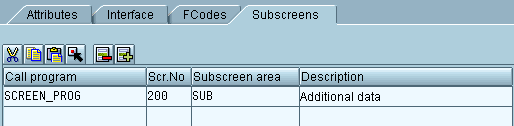
- In the BAdI Builder, choose the Subscreens tab, and enter the calling program, the screen number, and the subscreen area.
See also:
Implementing Screen Enhancements