 Deployment Options for Employee Self-Service (WDA)
For the Employee Self-Service
(WDA) role, the following deployment options are available:
Prerequisites
See the documentation for each deployment option. The links above inform you where the documentation for each deployment option is located in the SAP library.
Features
The following features characterize the different deployment options:
Both deployment options use the same technological basis, Web Dynpro ABAP applications in the backend system.
The repository for building the menu structure for both deployment options is located in the backend, but a different functionality is used:
The standard SAP Role Maintenance transaction
PFCG
is used for the menu of the ESS (WDA) role that is displayed in SAP NetWeaver Business Client for HTML.For more information, see Configuration of the Role Menu for ESS (WDA) in SAP NWBC
The ABAP Launchpad Customizing transaction
LPD_CUST
is used for the menu of the ESS (WDA) role that is displayed in the SAP NetWeaver Portal.For more information, see Configuration of the Role Menu for ESS (WDA) in SAP Portal
The role object for each deployment option is found in different locations:
The role for ESS (WDA) in SAP NetWeaver Business Client for HTML is a composite role that is created with transaction
PFCG
, together with the menu structure for the role.The role for ESS (WDA) in the SAP NetWeaver Portal is a portal content object that is delivered with the
Business Package for Employee Self-Service (WDA)
.
For more information, see Roles in Employee Self-Service (WDA)
Both deployment options make use of the Object Based Navigation (OBN)
For more information, see Application-to-Application Navigation Concept in Employee Self-Service (WDA)
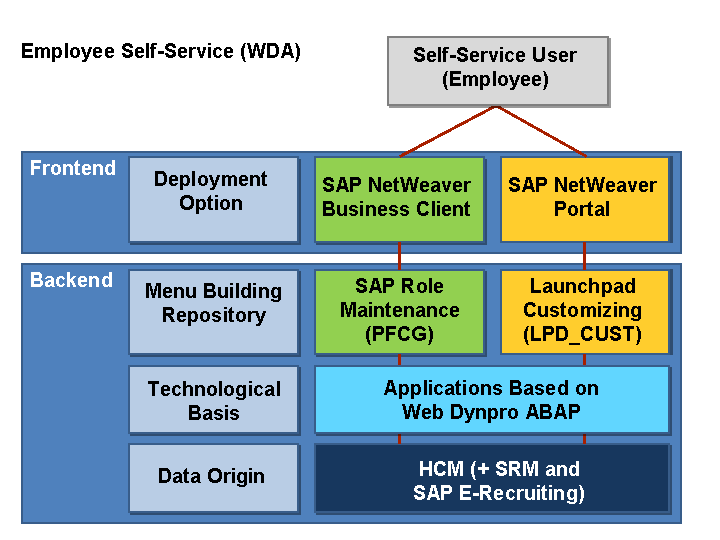
Figure 1: Overview of the ESS (WDA) Deployment Options
The
More Information
For more information about the general deployment options for Employee Self-Service
as of SAP Enhancement Package 5 for SAP ERP 6.0, see SAP Note 1450179 .
.