Editing Whitelists and No-Log Lists (CORS)
Modify HTTP whitelists and no-log lists for the context type CORS.
Context
Cross-origin resource sharing (CORS) is a concept for managing queries sent to a server from a domain other than the domain of the web page that originally sent the query. CORS defines the way a web page interacts with the server to determine whether cross-origin queries are permitted or not.
CORS queries can be sent in two different ways:-
CORS as simple query
A simple query uses the methods GET, HEAD, or POST. It contains the header Origin, which specifies the original domain of the query, for example http://example.com. As a response, the server sends an Access Control Allow Origin header.
- CORS as Preflight query
A Preflight query, on the other hand, uses the method OPTIONS and an Origin header to send an HTTP call first. This checks whether the query in question can be sent securely.
OPTIONS /
Host: destination.com
Origin: http://example.com
The server always responds with an Access Control Allow Origin header and also specifies which methods are permitted (if defined).
Access-Control-Allow-Origin: http://example.com
Access-Control-Allow-Methods: GET, HEAD
Only the following response headers are generally accessible in a CORS query:
| Cache Control | Content Type | Last Modified |
| Content Language | Expires | Pragma |
Prerequisites
To be able to use this function, CORS Support must be activated in your ABAP system.
CORS is deactivated in the system when it is delivered. To activate CORS, go to transaction RZ11 and set th system parameter icf/cors_enabled to 1 (the default is 0).
Procedure
To modify HTTP whitelists and no-log lists for the context type CORS, execute the following steps:
- In the UCON HTTP whitelist tool (transaction
 UCONCOCKPIT
  HTTP Whitelist Scenario
 ), choose the context type Cross-Origin Resource Sharing (Select Context Type Execute Selection or double click the context type).
 - In the Logged HTTP Whitelist Checks screen area, choose To Whitelist for a selected log entry to add a corresponding URL pattern to the whitelist. A dialog box appears containing the data of the selected service path and the associated original host name.
- In the <Allowed Methods> section, select methods to specify for which HTTP methods the pattern is valid. The following methods can be selected:
CONNECT HEAD POST DELETE OPTIONS PUT GET PATCH TRACE 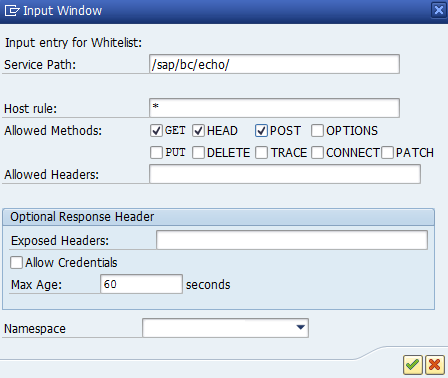
- In the <Allowed Headers> fields, specify whether further headers are allowed in a query. If they are, enter them separated by commas.
- In the <Optional Response Header> frame, you can specify whether additional <exposed headers> are made accessible (separated by commas) and (in the case of Preflight queries) whether user logon data is allowed (<Allow Credentials>). For Preflight queries, you can also specify the maximum number of seconds (<Max. Age>) in which the response can be cached (the default is 60).
- Confirm your entries by choosing ENTER. The entry you added appears in the Whitelist area on the top right of the screen.

- Repeat the steps above to add a log entry to the no-log list by choosing To No-Log List.
The entry you added appears in the No-Log List area on the bottom right of the screen.
- You can add entries manually as well as edit or delete existing entries in both the whitelist and the no-log list.
- Choose Save to activate changes to the whitelist or no-log list.