Mix Planning
Purpose
You can use the
mix planning
functions to plan and create mixes for media issues.
An issue mix can include the following inserts, which are delivered together with the media issue:
Ad inserts (for example ad pre-prints, CDs or product samples), from Advertising Management ad insert orders, if applicable
Media issues, for example regular inserts or components of a media product
Other materials
Process Flow
Note that use of the mix planning function is optional.
 Note
Note
If you are not using mixes, you do not need to use this function.
The results of mix planning are used by order generation in
Media Product Sales and Distribution
or
Press Distribution.
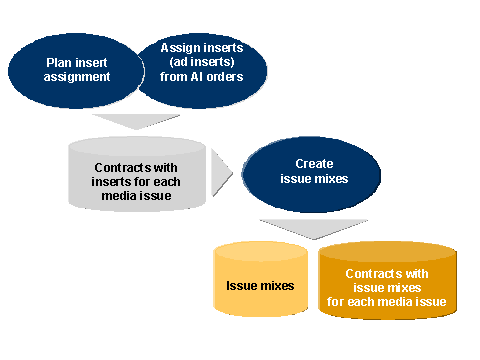
The procedure for mix planning is as follows:
Assign inserts to contracts
You can use the following functions to do this:
Insert planning (dialog function for assigning inserts manually)
Assignment of inserts from ad insert orders in Advertising Management (mass processing function)
Create issue mixes
This function creates issue mixes (alternative bills of material for the media issue) based on the planned insert assignment and assigns them to the contracts.
The following diagram illustrates the process and functions for mix planning.