Virus Scan Interface
Use
You can use the virus scan interface to include external virus scanners in the SAP system to increase the security of your system. In this way, you can use a high-performance integration solution to scan documents that are being processed by applications for viruses. This applies both to applications delivered by SAP and to your own customer developments, such as for data transfers across networks or when exchanging documents using interfaces.
The interface consists of two parts: An external part for the certified anti-virus products from various vendors, and an internal part with which you can integrate the virus scan function into your own application (see also SAP Note 786179  ).
).
You can see the certified products for the interface (NW-VSI) at the following locations:
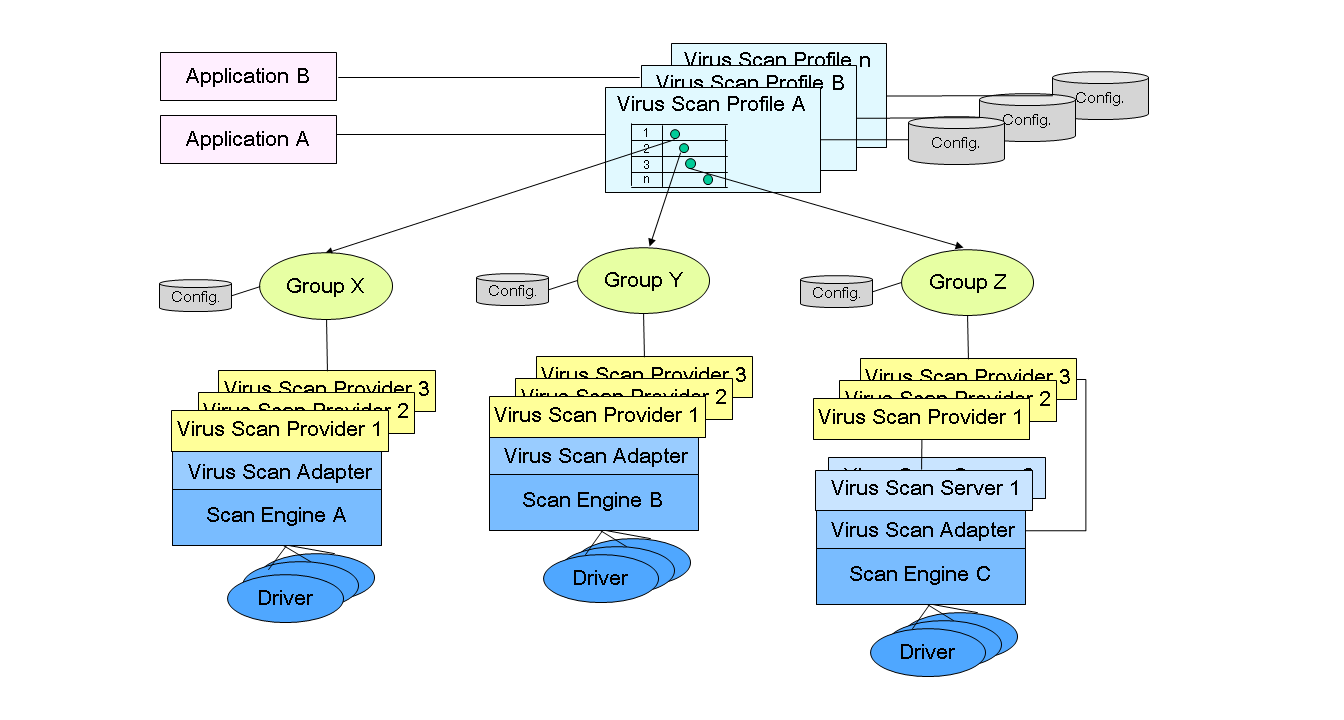
The graphic below shows an integrated ABAP/Java installation. You can, however, also use the Virus Scan Interface for ABAP-only or Java-only installations.
In the graphic, application A uses virus scan profile A to access group X in the first step, group Y in the second step, and group Z in the third step. Each group in the figure represents the anti-virus software of a particular vendor. In the case of group Z, one of the Virus Scan Providers in the group delivered by SAP is selected by load balancing using the Virus Scan Server and uses the external vendor's certified Virus Scan Adapter to access the vendor's anti-virus software. This software then scans the data transferred by application A for viruses. In the case of group Y, there are Virus Scan Providers with and without Virus Scan Servers, which all access the anti-virus software of the external vendor using the vendor's certified Virus Scan Adapter. the case of group Z, the Virus Scan Providers simply combine the certified Virus Scan Adapters of the external vendor with which the anti-virus software is accessed.
Virus Scan Interface