 Creating and Editing Commercial Paper
Procedure
From the SAP Easy Access menu for the
Transaction Manager
, choose
Money Market
→
Trading
→
Create Financial Transaction
(FTR_CREATE) or
Edit Financial Transaction
(FTR_EDIT).

Alternatively, you can choose
Trading
→
Commercial Paper Fast Entry
.(TM3F) and specify only selected transaction data.
Under
Default Financial Transaction
use the input help to select
Commercial Paper
and then enter the
Company code, Product type, Transaction type
and the
Business partner
.
You can make the following entries in the
Specifications
section:
Currency
If you do not specify a currency, the system automatically uses the currency of the company code.
Master agreement
Portfolio
Here you specify whether a transaction should be assigned and the portfolio to which it should be assigned.
If you use external number assignment, now assign a code for the transaction that identifies it uniquely within a company code. If you do not specify a value, the number will be allocated automatically by the system.
Choose
Enter
to go to the basic data screen for the transaction. Enter or change transaction data and save your transaction.
Use the pushbuttons for detailed screen information.
To use additional functions, choose
Extras
and
Environment
from the menu.
Prerequisites
You have made the settings for the transaction types for the product category
Commercial Paper
(53A) in Customizing for the
Transaction Manager
under
Money Market
→
Transaction Management
→
Transaction Types
→
Define Transaction Types
Transaction Type Number |
Transaction Type Name |
|---|---|
100 |
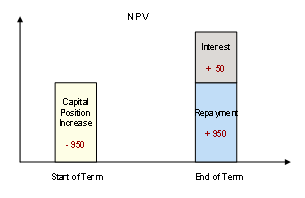
Purchase (NPV) |
101 |
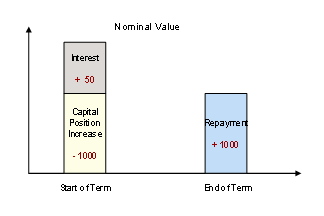
Purchase (Nominal) |
102 |
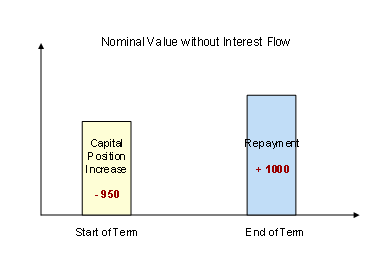
Purchase (Nominal without Interest) |
200 |
Sale (NPV) |
201 |
Sale (Nominal) |
202 |
Sale (Nominal without Interest) |
The following example for purchasing Commercial Paper shows how the system maps payment flows:
Further Notes:
You can create a money market transaction directly as a contract. A transaction becomes legally binding with the activity category
Contract
.
The activity sequence will depend on the processing category chosen in Customizing (with/without settlement).
An activity can be changed as long as it is not relevant for posting. The last activity in the activity chain is relevant for posting. When you save this activity, the transaction is given
fixed
status.
Within transaction management you can branch from each application to the Business Partner to create or change business partner data.
See also: