What's New – 2022 Releases
Find out what's new in the latest version of SAP Analytics Cloud.
Version 2022.10
SAP is pleased to announce a new version of SAP Analytics Cloud.
General
-
Within a discussion thread, a user deleted from the SAP Analytics Cloud system will appear as Deleted User.
Smart Predict
-
Predictive Planning now supports periodic and week-granularity patterns in planning model time dimensions.
Calendar
-
When data locking tasks are reopened, the lock state will now be reverted according to the new Reverted State setting the owner specifies in the Details panel when creating the task. Both manual and automatic data locking tasks apply the reverted lock state to the specified data when reopened either by the owner or when they are part of a dependency chain that reopens preceding tasks through a rejection by a reviewer.

- The option to activate the event automatically has been removed from the copy dialog for general tasks, review tasks, composite tasks, manual data locking tasks and processes. You can turn on this setting after the copy action in the Time section of the Details panel instead.
System Administration Notes
-
With the 2022.10 release of SAP Analytics Cloud, SAP Analytics Cloud agent's minimum version remains at 1.0.75, with the following exceptions:
-
If you require data acquisition from SAP ERP / SQL Database, the minimum version is 1.0.99.
-
If you require data acquisition from SAP Universe (UNX), the minimum version is 1.0.91.
-
If you require data acquisition from SAP Business Warehouse (BW), the minimum version is 1.0.233.
-
If you require data acquisition from an SAP HANA view, the minimum version is 1.0.235.
-
If you require data acquisition from File Server, you need to upgrade to version 1.0.248.
-
Note
Although it is not required, you can upgrade to the agent version 1.0.351, no matter what data acquisition type you use. Do this to take advantage of updates made to SAP Analytics Cloud agent.
For more information, see System Requirements and Technical Prerequisites.
-
-
Regarding supported features and required updates for the integration of SAP BW with SAP Analytics Cloud, refer to SAP Note 2541557
 for further details.
 -
Regarding supported features and required updates for live universe access through SAP BusinessObjects Live Data Connect with SAP Analytics Cloud, refer to SAP Note 2771921
for further details.
Version 2022.9
SAP is pleased to announce a new version of SAP Analytics Cloud.
General
-
Administrators now have a setting to turn on or off the default indexing of new acquired models in their systems.
NoteNew acquired models will now have indexing set to off by default.
Calendar
-
The option to activate the event automatically has been removed from the copy dialog for general tasks, review tasks, composite tasks, manual data locking tasks and processes. You can turn on this setting after the copy action in the Time section of the Details panel instead.
Planning
-
In the story table, you can now see and change data locking states. This enhancement also applies when the display hierarchy is different from the default hierarchy.
Mobile
-
The iOS mobile app now displays stories in Optimized View mode.
 Note
NoteNot all features and story options will be available when you enable this mode.
System Administration Notes
-
With the 2022.9 release of SAP Analytics Cloud, SAP Analytics Cloud agent's minimum version remains at 1.0.75, with the following exceptions:
-
If you require data acquisition from SAP ERP / SQL Database, the minimum version is 1.0.99.
-
If you require data acquisition from SAP Universe (UNX), the minimum version is 1.0.91.
-
If you require data acquisition from SAP Business Warehouse (BW), the minimum version is 1.0.233.
-
If you require data acquisition from an SAP HANA view, the minimum version is 1.0.235.
-
If you require data acquisition from File Server, you need to upgrade to version 1.0.248.
-
Note
Although it is not required, you can upgrade to the agent version 1.0.351, no matter what data acquisition type you use. Do this to take advantage of updates made to SAP Analytics Cloud agent.
For more information, see System Requirements and Technical Prerequisites.
-
-
Regarding supported features and required updates for the integration of SAP BW with SAP Analytics Cloud, refer to SAP Note 2541557
for further details. -
Regarding supported features and required updates for live universe access through SAP BusinessObjects Live Data Connect with SAP Analytics Cloud, refer to SAP Note 2771921
for further details.
Version 2022.8 (Quarterly Release 2, 2022)
SAP is pleased to announce a new version of SAP Analytics Cloud.
Data Acquisition, Live Data Connections, and Integration
-
You can now grant the Manage permission on the Connection object when setting up roles in the
 Security
  Roles
Roles page. Users with this permission can view, edit, share,
and delete data acquisition connections on behalf of another user
(except SAP ERP, SAP Concur, SAP Fieldglass, and Salesforce). This
permission is available in the Admin and BI Admin standard application
roles and the System Owner role.
page. Users with this permission can view, edit, share,
and delete data acquisition connections on behalf of another user
(except SAP ERP, SAP Concur, SAP Fieldglass, and Salesforce). This
permission is available in the Admin and BI Admin standard application
roles and the System Owner role.
Modeling
-
The Data Export API now supports Three Legged OAuth, which complements the Two Legged OAuth supported in the initial release. Two Legged OAuth support in the initial release allowed administrators to access and export all data from any given models in machine to machine scenarios. With Three Legged OAuth, the Data Export API now offers more flexibility for specific workflows. As an example, business users can now export smaller subsets of data while leveraging roles and data access privileges to ensure that they can only access data they have privileges for, at a model level.
Mobile
-
You can now view and interact with analytic applications in the SAP Analytics Cloud Android mobile app.

-
The Android mobile app now supports stories containing DWC and HANA Live models.

-
iOS mobile app users can now access live SAP S/4HANA On-Premise data using a standard S4 live (SAML SSO) connection.

Analytics Designer
-
When you, as an application user, leave the analytic application without publishing your planning data yet, you'll see a dialog reminding you of whether to publish it:

If you don't want to see this dialog at runtime, you can deselect Remind of publishing all data changes before leaving in the Styling panel of the canvas at design time.
SAP Analytics Cloud, add-in for Microsoft Office
-
The SAP Analytics Cloud, add-in for Microsoft Office has been updated. For a list of new features, see the What's New.
System Administration Notes
-
With the 2022.8 release of SAP Analytics Cloud, SAP Analytics Cloud agent's minimum version remains at 1.0.75, with the following exceptions:
-
If you require data acquisition from SAP ERP / SQL Database, the minimum version is 1.0.99.
-
If you require data acquisition from SAP Universe (UNX), the minimum version is 1.0.91.
-
If you require data acquisition from SAP Business Warehouse (BW), the minimum version is 1.0.233.
-
If you require data acquisition from an SAP HANA view, the minimum version is 1.0.235.
-
If you require data acquisition from File Server, you need to upgrade to version 1.0.248.
-
Note
Although it is not required, you can upgrade to the agent version 1.0.349, no matter what data acquisition type you use. Do this to take advantage of updates made to SAP Analytics Cloud agent.
For more information, see System Requirements and Technical Prerequisites.
-
-
Regarding supported features and required updates for the integration of SAP BW with SAP Analytics Cloud, refer to SAP Note 2541557
for further details. -
Regarding supported features and required updates for live universe access through SAP BusinessObjects Live Data Connect with SAP Analytics Cloud, refer to SAP Note 2771921
for further details.
General
-
SAP Analytics Cloud now supports Lithuanian in its menus, buttons, messages, and other elements of the user interface.
-
While scheduling a story, you can hit the ] key to get dynamic text prompts that can be inserted within the email subject, body, or file name. Dynamic text helps you in personalizing the story sharing experience at run time.


Data Acquisition, Live Data Connections, and Integration
-
You can now establish live data connections to SAP BPC embedded using the tunnel connection type.

-
The Data Export Service Open API has been enhanced to support the export of audit data.
Audit data consists of logging operations performed on rows in a given model with timestamps and username information.
With the support of audit data export, you'll be able to browse and select models for which you want to export audit data. You can also use filters to export only necessary data.


-
You can now grant the Manage permission on the Connection object when setting up roles in the
Security Roles page. Users with this permission can view, edit, share,
and delete data acquisition connections on behalf of another user
(except SAP ERP, SAP Concur, SAP Fieldglass, and Salesforce). This
permission is available in the Admin and BI Admin standard application
roles and the System Owner role.
Stories
-
When using acquired models created using SAP Analytics Cloud version 2021.02 or later, dynamic time calculations and variances will now display data when the page and story filters are applied on the time dimensions.

-
With this version of SAP Analytics Cloud, we are happy to announce the initial release of the Optimized Design Experience. The Optimized Design Experience provides a better story design experience with the introduction of several usability improvements. Story designers will have the ability to create new stories in the Optimized Design Experience or convert existing stories.


-
In your story tables (that have optimized presentation enabled), you now have improved performance when scrolling horizontally.
Modeling
-
It's now possible to import data to a model with measures and add new members to local dimensions, in addition to updating local dimension member properties. This improvement allows running a single import job with the new members, rather than running multiple jobs for each public dimension or maintaining local dimension members manually.

-
In the Modeler, a new toggle lets you decide whether you want to show unpublished data in the Data Foundation. You can also use the new dropdown menu and select any public or private version and update the data foundation accordingly.

-
The Data Export API now supports Three Legged OAuth, which complements the Two Legged OAuth supported in the initial release. Two Legged OAuth support in the initial release allowed administrators to access and export entire datasets from any given models in machine to machine scenarios. With Three Legged OAuth, the Data Export API now offers more flexibility for specific workflows where you’d want to export smaller subsets of data to SAP Analytics Cloud business users, while still leveraging roles and data access privileges to ensure that they only access data they have been granted at a model level.

Planning
-
You can now copy and paste directly across multiple measures with different currencies, including the source fact distribution (deep copy), not only the overall value. Transferring the overall value only is still possible via Paste Special ( CTRL+Shift+V ).

-
Date dimensions can now be customized to meet company-specific fiscal calendar requirements for reporting and planning.
This comes with several enhancements in various areas of SAP Analytics Cloud:
-
Date dimensions can now leverage the new week granularity and its week patterns like 445/454/544 or 13x4, with a 53rd week automatically accommodated by the system.
-
New/additional editing capabilities in the modeler that allow for date dimension modeling including:
-
Date members editing and special periods definition.
-
Creation of custom date properties and custom date hierarchies.
-
The new date dimension features can also be used by advanced analytical features like variance analysis and time calculations, as well as planning features like structured allocations or data actions, and many more.

-
-
In Mass Data Entry mode, you can now cut and paste cells to paste the values while deleting them from the source cells.


-
In advanced formulas, the MEMBERSET function now supports the unequal operator !=. You can use it with MEMBERSET to pick which members to exclude in your advanced formulas steps.


-
When you create a multi action parameter for a public dimension, you can now use the multi action parameter across models. This cross-model parameter can be used across models and steps within the same multi action. In the Story designer, you can either choose member selection or link the filters to assign a value to the cross-model parameter. A value only needs to be assigned one time and then it is used in steps across models.


-
You can now have a smoother data entry experience for your table by using the fluid data entry mode, in which data values entered in a fast sequence will be processed together at the same time as a batch. You don't need to wait for the system to update between entries.

-
Detailed statistics for planning operations and version size are now exposed to users.

-
You can now specify a customized planning area when editing public versions. This option will let you choose which data to put into edit mode, which can help further optimize performance or let you plan on data outside of the recommended planning area. However, publishing permissions are still required to publish data.

-
You can now control how data is disaggregated, using the data disaggregation settings in the model preferences. If you choose to disaggregate data based on data locks, locked child members will not receive values from parent members during planning. If you choose to disaggregate data based on validation rules, invalid member combinations will not receive values during planning. These settings can be applied in the model preferences.

Calendar
-
To align terms across SAP Analytics Cloud, the calendar views Calendar, Gantt, and List are now called workspaces.
-
You can now schedule data actions, multi actions, or data locks even if you don't have the appropriate permissions. Simply change the assignee from yourself to another user who has the necessary permissions and send a permission request.

Once the assignee agrees, the task can run automatically at the specified start date or start condition. If the assignee doesn't grant permission before the task starts, its status will be set to Canceled.
To let more people monitor and manage automatic calendar tasks, you can now add other users as additional owners.
-
You can now add reminders to calendar events directly from the Time section of the event's Details panel. In addition to sending reminders before the due date, you can now set reminders before the start date of the event in the new Add Reminders dialog.

-
The completion settings of calendar events have been removed. Instead, you can now select an option to automatically cancel the event on the due date directly in the Time section of the event's Details panel.

To manually complete the event at any time, you can cancel the event in the header section of the Details panel. To simplify terms, we now call this action Cancel instead of Discontinue.

The completion status of the event is changed to Canceled. The option to choose the completion status Accomplished has been removed.
-
When you create or edit processes with 7 or more direct child events, now only the first 5 will be displayed in the Hierarchy section and a link (... 2 More, for example) is added that lets you access a dialog with the complete list of direct child events.

In this dialog, you can search for events, change the status of all or individual child events, or navigate to their details.

-
The calendar wizard lets you generate tasks and processes without creating a parent process first. You can now choose if you'd like to create a parent process and generate its child events in one go, or if you prefer to use an existing process as parent.

If you choose an existing process, its values are now automatically prefilled in the wizard, like the work file, for example.
Other enhancements are:
-
In addition to the member specific filters that are applied to each child event's work file, you can add common filters that apply to the work files of all generated events.

-
You can add a description for the generated events.

-
In the preview table, you can expand or collapse the child event hierarchy.

-
-
You can now create general tasks and review tasks in the calendar. General tasks let you assign people to input planning data or do any other work, review tasks let you assign people to check the work result of other tasks or processes.

For more information, see Create General Tasks and Create Review Tasks.
New start conditions give you more flexibility: Besides defining specific start dates, you can now define that a calendar event starts when one or more other calendar events meet a certain status.


Child events can be set to start at the same time as their parent process.

Example Use Cases:
Calendar Events Sequence Purpose An automatic data locking task starts once a general task for data input has been accomplished. As soon as the assignee has submitted the data changes, the data are automatically locked. A general task for data input starts once another general task to set up a model has been accomplished. Data input can only be done after there is a model in the system. A data collection process starts once another process to define the corporate targets has been accomplished. Before collecting numbers in a planning round, the corporate targets need to be set. An automatic data action task starts once a composite task for collecting and reviewing planning data has been accomplished. As soon as the reviewer of the last review round approved the planned budget data, the data is automatically copied to the central financial model. For more information, see Define Dependencies Among Calendar Events.
Mobile
-
The iOS mobile app now displays stories in Optimized View mode.
NoteNot all features and story options will be available when you enable this mode.
-
You can now view and interact with analytic applications in the SAP Analytics Cloud Android mobile app.
-
The Android mobile app now supports stories containing DWC and HANA Live models.
-
iOS mobile app users can now access live SAP S/4HANA On-Premise data using a standard S4 live (SAML SSO) connection.
-
iOS mobile app users can now access live SAP S/4HANA On-Premise data using a standard S4 live (SAML SSO) connection.
Smart Predict
-
Time series forecasting scenarios now include the simple exponential smoothing (SES) method to avoid complex models. This method is enforced in particular for shorter time series and when facing intermittent time series.

Content Management
-
Users with permission to publish content to the Catalog can now manage access directly from the catalog card details. In the Catalog, select the catalog card to open the details dialog and then click the new Manage button to add or remove teams.

-
The Catalog now remembers the filters you've set and search terms you've entered when you sign out of SAP Analytics Cloud. The next time you sign in and return to the Catalog, you can pick up right where you left off to find the content you're looking for.

Analytics Designer
-
The application's Cascading Style Sheet (CSS) now allows for more customized settings for tab strips. As an application designer, you can now set the background color of the selected tab, width and color of the tab's bottom border, and padding of all tabs via CSS.

-
Custom widgets can now be exported to PDF when custom widget developers set supportsExport to true in the custom widget JSON file. As an application designer, you can include them in the PDF export list via Export to PDF technical component configuration or includeComponent API, so that application users can export the application with the custom widgets to PDF at runtime.

-
As an application designer, you can add a URL parameter imageCrossOrigin=useCertifications to the image's source address if it's an external URL. Therefore, when certified, application users can export this image to PDF.
-
As an application designer, you can use the getActiveSelectedMember API to get the active dimension members selected from input controls. Note that the API isn't supported for excluded members selected from input controls. For performance consideration, we recommend using it for input controls with low cardinality dimensions or turning on cascading effect to narrow down dimension members in input controls.

-
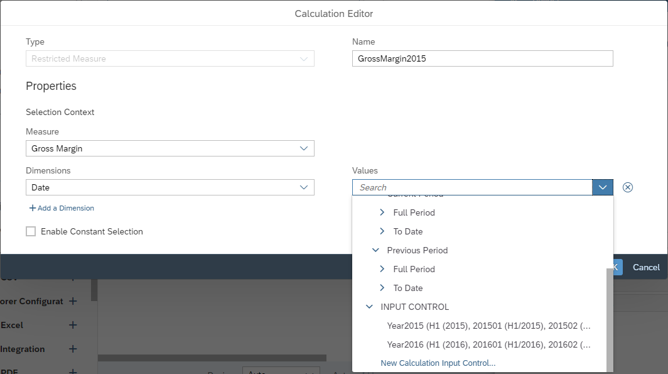
As an application designer, you can create calculation input controls based on restricted measures to compare measures of restricted dimension members within or outside hierarchies simply by filtering. Supported widgets are charts, tables, R visualizations, and value driver trees.
-
Now if you select multiple values via API such as setDimensionFilter at runtime while the filter is set to single selection mode at design time, your value selection will be ignored as it's inconsistent with the original filter selection mode.
-
You can now enable Optimized View mode for analytic applications. This feature improves the usability for filters and widget interactions as well as the performance of applications in certain scenarios. It includes the most important Analytics Designer features. Hence it provides the new features like Custom Widget Data Binding, Script APIs for sorting and ranking, and so on.

-
Application users can now save bookmarks with last changed dynamic variables values, which will override the default variable prompts settings defined at the model level. You can modify the settings in Analytic Application Details at design time.

-
At design time you can select
Performance Optimization Analyze Script Performance in Runtime from the toolbar to run the application with
the script performance popup without having to manually add the
parameter ?APP_PERFORMANCE_LOGGING=true to the
application URL. Then, when the application finishes loading, you can
press
Ctrl
+ +Shift
+ +A
or
Ctrl
+ +Shift
+ +Z
to open the popup.
-
When you, as an application user, leave the analytic application without publishing your planning data yet, you'll see a dialog reminding you of whether to publish it:
If you don't want to see this dialog at runtime, you can deselect Remind of publishing all data changes before leaving in the Styling panel of the canvas at design time.
Data Analyzer
-
You can now open Data Analyzer from the modeler to preview and validate data.

-
In Data Analyzer, both for SAP BW data sources as well as for SAP HANA data sources, the data source description is now displayed in the table header instead of the data source ID.


SAP Analytics Cloud, add-in for Microsoft Office
-
The SAP Analytics Cloud, add-in for Microsoft Office has been updated. For a list of new features, see the What's New.
System Administration Notes
-
The Performance Analysis Tool is now available to assist administrators in identifying factors that are impacting performance for specific stories, analytic applications, and other objects. Resources for troubleshooting based on the results from the Performance Analysis Tool are available in Optimize System Performance with the Analysis Tool, which also includes a decision tree to guide you through the process.

Version 2022.7
SAP is pleased to announce a new version of SAP Analytics Cloud.
Stories
-
With this version of SAP Analytics Cloud, we are happy to announce the initial release of the Optimized Design Experience. The Optimized Design Experience provides a better story design experience with the introduction of several usability improvements. Story designers will have the ability to create new stories in the Optimized Design Experience or convert existing stories.
-
In your story tables (that have optimized presentation enabled), you now have improved performance when scrolling horizontally.
Calendar
-
To align terms across SAP Analytics Cloud, the calendar views Calendar, Gantt, and List are now called workspaces.
-
You can now schedule data actions, multi actions, or data locks even if you don't have the appropriate permissions. Simply change the assignee from yourself to another user who has the necessary permissions and send a permission request.
Once the assignee agrees, the task can run automatically at the specified start date or start condition. If the assignee doesn't grant permission before the task starts, its status will be set to Canceled.
To let more people monitor and manage automatic calendar tasks, you can now add other users as additional owners.
-
You can now add reminders to calendar events directly from the Time section of the event's Details panel. In addition to sending reminders before the due date, you can now set reminders before the start date of the event in the new Add Reminders dialog.
-
The completion settings of calendar events have been removed. Instead, you can now select an option to automatically cancel the event on the due date directly in the Time section of the event's Details panel.
To manually complete the event at any time, you can cancel the event in the header section of the Details panel. To simplify terms, we now call this action Cancel instead of Discontinue.
The completion status of the event is changed to Canceled. The option to choose the completion status Accomplished has been removed.
Planning
-
In advanced formulas, the MEMBERSET function now supports the unequal operator !=. You can use it with MEMBERSET to pick which members to exclude in your advanced formulas steps.
-
When you create a multi action parameter for a public dimension, you can now use the multi action parameter across models. This cross-model parameter can be used across models and steps within the same multi action. In the Story designer, you can either choose member selection or link the filters to assign a value to the cross-model parameter. A value only needs to be assigned one time and then it is used in steps across models.
-
You can now have a smoother data entry experience for your table by using the fluid data entry mode, in which data values entered in a fast sequence will be processed together at the same time as a batch. You don't need to wait for the system to update between entries.
-
Detailed statistics for planning operations and version size are now exposed to users.
-
You can now specify a customized planning area when editing public versions. This option will let you choose which data to put into edit mode, which can help further optimize performance or let you plan on data outside of the recommended planning area. However, publishing permissions are still required to publish data.
-
You can now control how data is disaggregated, using the data disaggregation settings in the model preferences. If you choose to disaggregate data based on data locks, locked child members will not receive values from parent members during planning. If you choose to disaggregate data based on validation rules, invalid member combinations will not receive values during planning. These settings can be applied in the model preferences.
Modeling
-
It's now possible to import data to a model with measures and add new members to local dimensions, in addition to updating local dimension member properties. This improvement allows running a single import job with the new members, rather than running multiple jobs for each public dimension or maintaining local dimension members manually.
-
In the Modeler, a new toggle lets you decide whether you want to show unpublished data in the Data Foundation. You can also use the new dropdown menu and select any public or private version and update the data foundation accordingly.
-
The Data Export API now supports Three Legged OAuth, which complements the Two Legged OAuth supported in the initial release. Two Legged OAuth support in the initial release allowed administrators to access and export entire datasets from any given models in machine to machine scenarios. With Three Legged OAuth, the Data Export API now offers more flexibility for specific workflows where you’d want to export smaller subsets of data to SAP Analytics Cloud business users, while still leveraging roles and data access privileges to ensure that they only access data they have been granted at a model level.
Analytics Designer
-
As an application designer, you can use the getActiveSelectedMember API to get the active dimension members selected from input controls. Note that the API isn't supported for excluded members selected from input controls. For performance consideration, we recommend using it for input controls with low cardinality dimensions or turning on cascading effect to narrow down dimension members in input controls.
-
As an application designer, you can create calculation input controls based on restricted measures to compare measures of restricted dimension members within or outside hierarchies simply by filtering. Supported widgets are charts, tables, R visualizations, and value driver trees.
-
Now if you select multiple values via API such as setDimensionFilter at runtime while the filter is set to single selection mode at design time, your value selection will be ignored as it's inconsistent with the original filter selection mode.
-
You can now enable Optimized View mode for analytic applications. This feature improves the usability for filters and widget interactions as well as the performance of applications in certain scenarios. It includes the most important Analytics Designer features. Hence it provides the new features like Custom Widget Data Binding, Script APIs for sorting and ranking, and so on.
-
Application users can now save bookmarks with last changed dynamic variables values, which will override the default variable prompts settings defined at the model level. You can modify the settings in Analytic Application Details at design time.
-
At design time you can select
Performance Optimization Analyze Script Performance in Runtime from the toolbar to run the application with
the script performance popup without having to manually add the
parameter ?APP_PERFORMANCE_LOGGING=true to the
application URL. Then, when the application finishes loading, you can
press
Ctrl
+ +Shift
+ +A
or
Ctrl
+ +Shift
+ +Z
to open the popup.
System Administration Notes
-
With the 2022.7 release of SAP Analytics Cloud, SAP Analytics Cloud agent's minimum version remains at 1.0.75, with the following exceptions:
-
If you require data acquisition from SAP ERP / SQL Database, the minimum version is 1.0.99.
-
If you require data acquisition from SAP Universe (UNX), the minimum version is 1.0.91.
-
If you require data acquisition from SAP Business Warehouse (BW), the minimum version is 1.0.233.
-
If you require data acquisition from an SAP HANA view, the minimum version is 1.0.235.
-
If you require data acquisition from File Server, you need to upgrade to version 1.0.248.
-
Note
Although it is not required, you can upgrade to the agent version 1.0.347, no matter what data acquisition type you use. Do this to take advantage of updates made to SAP Analytics Cloud agent.
For more information, see System Requirements and Technical Prerequisites.
-
-
Regarding supported features and required updates for the integration of SAP BW with SAP Analytics Cloud, refer to SAP Note 2541557
for further details. -
Regarding supported features and required updates for live universe access through SAP BusinessObjects Live Data Connect with SAP Analytics Cloud, refer to SAP Note 2771921
for further details.
Version 2022.6
SAP is pleased to announce a new version of SAP Analytics Cloud.
Data Acquisition, Live Data Connections, and Integration
-
The Data Export Service Open API has been enhanced to support the export of audit data.
Audit data consists of logging operations performed on rows in a given model with timestamps and username information.
With the support of audit data export, you'll be able to browse and select models for which you want to export audit data. You can also use filters to export only necessary data.
Stories
-
When using acquired models created using SAP Analytics Cloud version 2021.02 or later, dynamic time calculations and variances will now display data when the page and story filters are applied on the time dimensions.
Content Management
-
The Catalog now remembers the filters you've set and search terms you've entered when you sign out of SAP Analytics Cloud. The next time you sign in and return to the Catalog, you can pick up right where you left off to find the content you're looking for.
System Administration Notes
-
With the 2022.6 release of SAP Analytics Cloud, SAP Analytics Cloud agent's minimum version remains at 1.0.75, with the following exceptions:
-
If you require data acquisition from SAP ERP / SQL Database, the minimum version is 1.0.99.
-
If you require data acquisition from SAP Universe (UNX), the minimum version is 1.0.91.
-
If you require data acquisition from SAP Business Warehouse (BW), the minimum version is 1.0.233.
-
If you require data acquisition from an SAP HANA view, the minimum version is 1.0.235.
-
If you require data acquisition from File Server, you need to upgrade to version 1.0.248.
-
Note
Although it is not required, you can upgrade to the agent version 1.0.345, no matter what data acquisition type you use. Do this to take advantage of updates made to SAP Analytics Cloud agent.
For more information, see System Requirements and Technical Prerequisites.
-
-
Regarding supported features and required updates for the integration of SAP BW with SAP Analytics Cloud, refer to SAP Note 2541557
for further details. -
Regarding supported features and required updates for live universe access through SAP BusinessObjects Live Data Connect with SAP Analytics Cloud, refer to SAP Note 2771921
for further details.
Version 2022.5
SAP is pleased to announce a new version of SAP Analytics Cloud.
General
-
While scheduling a story, you can hit the ] key to get dynamic text prompts that can be inserted within the email subject, body, or file name. Dynamic text helps you in personalizing the story sharing experience at run time.
Data Acquisition, Live Data Connections, and Integration
-
You can now establish live data connections to SAP BPC embedded using the tunnel connection type.
Planning
-
You can now create general tasks and review tasks in the calendar. General tasks let you assign people to input planning data or do any other work, review tasks let you assign people to check the work result of other tasks or processes.
For more information, see Create General Tasks and Create Review Tasks.
New start conditions give you more flexibility: Besides defining specific start dates, you can now define that a calendar event starts when one or more other calendar events meet a certain status.
Child events can be set to start at the same time as their parent process.
Example Use Cases:
Calendar Events Sequence Purpose An automatic data locking task starts once a general task for data input has been accomplished. As soon as the assignee has submitted the data changes, the data are automatically locked. A general task for data input starts once another general task to set up a model has been accomplished. Data input can only be done after there is a model in the system. A data collection process starts once another process to define the corporate targets has been accomplished. Before collecting numbers in a planning round, the corporate targets need to be set. An automatic data action task starts once a composite task for collecting and reviewing planning data has been accomplished. As soon as the reviewer of the last review round approved the planned budget data, the data is automatically copied to the central financial model. For more information, see Define Dependencies Among Calendar Events.
System Administration Notes
-
With the 2022.5 release of SAP Analytics Cloud, SAP Analytics Cloud agent's minimum version remains at 1.0.75, with the following exceptions:
-
If you require data acquisition from SAP ERP / SQL Database, the minimum version is 1.0.99.
-
If you require data acquisition from SAP Universe (UNX), the minimum version is 1.0.91.
-
If you require data acquisition from SAP Business Warehouse (BW), the minimum version is 1.0.233.
-
If you require data acquisition from an SAP HANA view, the minimum version is 1.0.235.
-
If you require data acquisition from File Server, you need to upgrade to version 1.0.248.
-
Note
Although it is not required, you can upgrade to the agent version 1.0.345, no matter what data acquisition type you use. Do this to take advantage of updates made to SAP Analytics Cloud agent.
For more information, see System Requirements and Technical Prerequisites.
-
-
Regarding supported features and required updates for the integration of SAP BW with SAP Analytics Cloud, refer to SAP Note 2541557
for further details. -
Regarding supported features and required updates for live universe access through SAP BusinessObjects Live Data Connect with SAP Analytics Cloud, refer to SAP Note 2771921
for further details.
Version 2022.4
SAP is pleased to announce a new version of SAP Analytics Cloud.
Planning
-
Date dimensions can now be customized to meet company-specific fiscal calendar requirements for reporting and planning.
This comes with several enhancements in various areas of SAP Analytics Cloud:
-
Date dimensions can now leverage the new week granularity and its week patterns like 445/454/544 or 13x4, with a 53rd week automatically accommodated by the system.
-
New/additional editing capabilities in the modeler that allow for date dimension modeling including:
-
Date members editing and special periods definition.
-
Creation of custom date properties and custom date hierarchies.
-
The new date dimension features can also be used by advanced analytical features like variance analysis and time calculations, as well as planning features like structured allocations or data actions, and many more.
-
-
In Mass Data Entry mode, you can now cut and paste cells to paste the values while deleting them from the source cells.
Analytics Designer
-
Custom widgets can now be exported to PDF when custom widget developers set supportsExport to true in the custom widget JSON file. As an application designer, you can include them in the PDF export list via Export to PDF technical component configuration or includeComponent API, so that application users can export the application with the custom widgets to PDF at runtime.
-
As an application designer, you can add a URL parameter imageCrossOrigin=useCertifications to the image's source address if it's an external URL. Therefore, when certified, application users can export this image to PDF.
Data Analyzer
-
In data analyzer, both for SAP BW data sources as well as for SAP HANA data sources, the data source description is now displayed in the table header instead of the data source ID.
Content Management
-
Users with permission to publish content to the Catalog can now manage access directly from the catalog card details. In the Catalog, select the catalog card to open the details dialog and then click the new Manage button to add or remove teams.
SAP Analytics Cloud, add-in for Microsoft Office
-
The SAP Analytics Cloud, add-in for Microsoft Office has been updated. For a list of new features, see the What's New.
System Administration Notes
-
With the 2022.4 release of SAP Analytics Cloud, SAP Analytics Cloud agent's minimum version remains at 1.0.75, with the following exceptions:
-
If you require data acquisition from SAP ERP / SQL Database, the minimum version is 1.0.99.
-
If you require data acquisition from SAP Universe (UNX), the minimum version is 1.0.91.
-
If you require data acquisition from SAP Business Warehouse (BW), the minimum version is 1.0.233.
-
If you require data acquisition from an SAP HANA view, the minimum version is 1.0.235.
-
If you require data acquisition from File Server, you need to upgrade to version 1.0.248.
-
Note
Although it is not required, you can upgrade to the agent version 1.0.345, no matter what data acquisition type you use. Do this to take advantage of updates made to SAP Analytics Cloud agent.
For more information, see System Requirements and Technical Prerequisites.
-
-
Regarding supported features and required updates for the integration of SAP BW with SAP Analytics Cloud, refer to SAP Note 2541557
for further details. -
Regarding supported features and required updates for live universe access through SAP BusinessObjects Live Data Connect with SAP Analytics Cloud, refer to SAP Note 2771921
for further details.
Version 2022.3
SAP is pleased to announce a new version of SAP Analytics Cloud.
General
-
SAP Analytics Cloud now supports Lithuanian in its menus, buttons, messages, and other elements of the user interface.
Planning
-
When you create or edit processes with 7 or more direct child events, now only the first 5 will be displayed in the Hierarchy section and a link (... 2 More, for example) is added that lets you access a dialog with the complete list of direct child events.
In this dialog, you can search for events, change the status of all or individual child events, or navigate to their details.
-
The calendar wizard lets you generate tasks and processes without creating a parent process first. You can now choose if you'd like to create a parent process and generate its child events in one go, or if you prefer to use an existing process as parent.
If you choose an existing process, its values are now automatically prefilled in the wizard, like the work file, for example.
Other enhancements are:
-
In addition to the member specific filters that are applied to each child event's work file, you can add common filters that apply to the work files of all generated events.
-
You can add a description for the generated events.
-
In the preview table, you can expand or collapse the child event hierarchy.
-
-
You can now copy and paste directly across multiple measures with different currencies, including the source fact distribution (deep copy), not only the overall value. Transferring the overall value only is still possible via Paste Special ( CTRL+Shift+V ).
Smart Predict
-
Time series forecasting scenarios now include the simple exponential smoothing (SES) method to avoid complex models. This method is enforced in particular for shorter time series and when facing intermittent time series.
Analytics Designer
-
The application's Cascading Style Sheet (CSS) now allows for more customized settings for tab strips. As an application designer, you can now set the background color of the selected tab, width and color of the tab's bottom border, and padding of all tabs via CSS.
Data Analyzer
-
You can now open data analyzer from the modeler to preview and validate data.
System Administration Notes
-
With the 2022.3 release of SAP Analytics Cloud, SAP Analytics Cloud agent's minimum version remains at 1.0.75, with the following exceptions:
-
If you require data acquisition from SAP ERP / SQL Database, the minimum version is 1.0.99.
-
If you require data acquisition from SAP Universe (UNX), the minimum version is 1.0.91.
-
If you require data acquisition from SAP Business Warehouse (BW), the minimum version is 1.0.233.
-
If you require data acquisition from an SAP HANA view, the minimum version is 1.0.235.
-
If you require data acquisition from File Server, you need to upgrade to version 1.0.248.
-
Note
Although it is not required, you can upgrade to the agent version 1.0.345, no matter what data acquisition type you use. Do this to take advantage of updates made to SAP Analytics Cloud agent.
For more information, see System Requirements and Technical Prerequisites.
-
-
Regarding supported features and required updates for the integration of SAP BW with SAP Analytics Cloud, refer to SAP Note 2541557
for further details. -
Regarding supported features and required updates for live universe access through SAP BusinessObjects Live Data Connect with SAP Analytics Cloud, refer to SAP Note 2771921
for further details.
Version 2022.2 (Quarterly Release 1, 2022)
SAP is pleased to announce a new version of SAP Analytics Cloud.
General
-
It's now possible to add additional hierarchies to the account dimension of your models. You can either model your hierarchies manually in SAP Analytics Cloud data modeling or directly import from your source system. This brings you not only more capabilities in data modeling but allows also for more flexibility in designing your planning and analytical assets, in Stories as well as in Analytics Designer.
Multiple account hierarchies are useful if you want to aggregate the values of your accounts differently according to your planning and analytical needs. You could, for instance, create dedicated hierarchies for specific accounting standards (for example, IFRS versus non-IFRS). Or you could define hierarchies that are only for specific reports (for example, OPEX versus Profit & Loss report) while others are used in planning processes to collect data.
Planning-specific features, such as Validation Rules or Data Actions, are capable of consuming multiple account hierarchies and will benefit from this feature as well.

Stories
-
You can now use SAP Analytics Cloud to save BW Query variants.

-
You can now manually export stories to PDF format from Optimized View Mode. You have these export options:
-
Insert Appendix
-
Export All Pages OR Range

-
Mobile
-
The Android App now supports proxy settings pushed through MDM tools.

SAP Analytics Cloud, add-in for Microsoft Office
-
The SAP Analytics Cloud, add-in for Microsoft Office has been updated. For a list of new features, see the What's New.
System Administration Notes
-
With the 2022.2 release of SAP Analytics Cloud, SAP Analytics Cloud agent's minimum version remains at 1.0.75, with the following exceptions:
-
If you require data acquisition from SAP ERP / SQL Database, the minimum version is 1.0.99.
-
If you require data acquisition from SAP Universe (UNX), the minimum version is 1.0.91.
-
If you require data acquisition from SAP Business Warehouse (BW), the minimum version is 1.0.233.
-
If you require data acquisition from an SAP HANA view, the minimum version is 1.0.235.
-
If you require data acquisition from File Server, you need to upgrade to version 1.0.248.
-
Note
Although it is not required, you can upgrade to the agent version 1.0.345, no matter what data acquisition type you use. Do this to take advantage of updates made to SAP Analytics Cloud agent.
For more information, see System Requirements and Technical Prerequisites.
-
-
Regarding supported features and required updates for the integration of SAP BW with SAP Analytics Cloud, refer to SAP Note 2541557
for further details. -
Regarding supported features and required updates for live universe access through SAP BusinessObjects Live Data Connect with SAP Analytics Cloud, refer to SAP Note 2771921
for further details.
General
-
When sharing content with other users, the Email new recipients check box is now unchecked by default. Also, an administrator can now disable sharing to All Users.

-
You can now use the bursting functionality in scheduling to share unique and personalized content with individual recipients.
-
You can now configure the logo that appears in the application shell bar.

-
It's now possible to add additional hierarchies to the account dimension of your models. You can either model your hierarchies manually in SAP Analytics Cloud data modeling or directly import from your source system. This brings you not only more capabilities in data modeling but allows also for more flexibility in designing your planning and analytical assets, in Stories as well as in Analytics Designer.
Multiple account hierarchies are useful if you want to aggregate the values of your accounts differently according to your planning and analytical needs. You could, for instance, create dedicated hierarchies for specific accounting standards (for example, IFRS versus non-IFRS). Or you could define hierarchies that are only for specific reports (for example, OPEX versus Profit & Loss report) while others are used in planning processes to collect data.
Planning-specific features, such as Validation Rules or Data Actions, are capable of consuming multiple account hierarchies and will benefit from this feature as well.
Data Acquisition, Live Data Connections, and Integration
-
Performance of data acquisition from S/4HANA has been greatly improved in this release.

Stories
-
You can now use SAP Analytics Cloud to save BW Query variants.
-
You can now manually export stories to PDF format from Optimized View Mode. You have these export options:
-
Insert Appendix
-
Export All Pages OR Range
-
Modeling
-
For story users, support has been added to the new model for identifying missing currency conversion rates:
-
There is improved conversion error handling for new models with currency conversion.
-
Users can trigger a missing rate analysis with required parameters directly from an error pop-up in stories.
-
Conversion errors in tables based on new models are now logged in the rate table's conversion error log.

-
Planning
-
You can now type values in value driver trees using the number keys on your keyboard. You can also use the arrow keys to quickly increase or decrease values or use the +/-/* keys to input a mathematical function.

-
When pasting cells from a table or an external spreadsheet, you can now paste unbooked cells to booked cells to delete values.

-
When you create or edit calendar events with many people involved, now only the first 5 people are displayed in the respective People sections, and a link is added that lets you access a dialog with the complete list of owners, assignees, reviewers, or viewers. In this dialog, you can search for people, add or remove people, or move reviewers to a different review round.

-
Upon activation of a calendar process, people who are involved in the process as well as its child events will now receive only one notification instead of notifications for each event. The email notification contains a list of all events that are relevant for the user and specifies their roles.
-
In advanced formulas, you can now define the scope of a linked model, just like what you normally do for the default model, by using MODEL…ENDMODEL statement. In combination with the definition of the linked model scope, dimensions existing only in the linked model but not in the default model (missing dimensions) can be omitted in the definition of the LINK function.
After the linked model scope is defined:-
You can use the LINK function to return a certain range of data from the linked model and redirect the calculation scope of the default model by using attributes of dimensions from the linked model in the DATA function.
-
You can use dimensions from a linked model in the IF or FOREACH scope.

-
-
We have extended the data entry experience of Mass Data Entry mode. All calculations that have been created via 'add column' and/or 'add row' and have been modeled using the formula bar are affected. While performing data entries in Mass Data Entry mode, all previously mentioned calculations will update accordingly within Mass Data Entry mode. This allows planners to see data changes even before data has been processed/submitted by Mass Data Entry Mode.
Smart Predict
-
In the explanation of time series forecasting models, the impact of the influencers is now clearly separated from the impact of trend and cycles.

-
When influencers are used, multiple linear trends can now be detected. This further improves the handling of disrupted time series.

-
You can now add predictive steps to your multi actions to create time series forecasts. A predictive step can retrain a predictive model based on the freshest state of your data and can then write a time series forecast to a version.

Mobile
-
The iOS mobile app now supports iOS 15 and iPadOS 15.
-
iOS mobile app users can now filter, view details, and designate items as favorites in the Catalog tab.

-
The Android mobile app now supports Android 12.
-
The SAP Analytics Cloud iOS SDK now supports Xcode 13.

-
The Android App now supports proxy settings pushed through MDM tools.
Content Management
-
You can now publish insights to the Catalog.

-
When exporting content from your tenant using the
Transport Export Content Network Storage option, you can now select the workspace's root folder and
its content. Check out our video for a deeper dive on how to export and move workspace
content between your tenants.
for a deeper dive on how to export and move workspace
content between your tenants.
Analytics Designer
-
As an application designer, you can now use the API getWidgetApi() to request a list of all widgets of a specific type listed by the new type ENUM "WidgetType".
-
As an application designer, you can now enable specific widgets to be hidden in runtime when the screen width is smaller than a certain threshold, by responsive rules configuration in flow layout panels.

-
It is now possible to use the navigation panel for analytic applications that run on bigger mobile devices like tablets and iPads. Smaller mobile devices, like smart phones, are not fully supported for the time being.

-
At design time, you'll receive performance optimization tips when your analytic application design may potentially affect runtime performance. The related best practices include:
-
Collapsing input controls
-
Manually setting Top N
-
Keeping images small

-
-
The linked analysis diagram has been renamed to linked widgets diagram as it can now visualize more than linked analysis and filter line relationships. You can have a graphic view of relationships among input controls, namely cascading effects, and do related settings directly on the diagram.

-
Blending is now available in analytics designer. As an application designer, you can join a primary data source with secondary data sources that contain common dimensions. You can, therefore, create charts and tables with a blended data source, as well as filters that can simultaneously update all the charts and tables with a linked dimension. You can also leverage APIs for blended charts or tables, while they work only on the primary data source.

-
As an application user, you can now view, filter, and search for all the subscribed data change insights across analytic applications on your SAP Analytics Cloud home screen.

-
As a developer of custom widgets, you can now create custom data types.

Data Analyzer
-
As a story user, you can now open data analyzer from a table via the actions menu item Open Data Analyzer.
To be able to use this action menu item, first it has to be enabled by one of the following options:
- Enable data analyzer on a table via the builder panel (by checking the property Enable Data Analyzer).
- Enable data analyzer for all tables via the Story Details dialog (by selecting the property Enable Data Analyzer for all Tables).

-
It is now possible for data analyzer users to select or deselect all measures in the builder panel.

-
As a data analyzer user, you can now keep the last saved values for dynamic variables in your insight and make the variable prompt dialog come up necessarily when opening your insight.

SAP Analytics Cloud, add-in for Microsoft Office
-
The SAP Analytics Cloud, add-in for Microsoft Office has been updated. For a list of new features, see the What's New.
System Administration Notes
- Several improvements have been made when data
changes are logged:
- If data audit is enabled in the modeler, a log entry with activity “Create” is generated.
- If data audit is disabled in the modeler, a log entry with activity “Delete” is generated (together with the information on how many rows were deleted).
- If in the Data Changes dialog, some audit entries were deleted, a log entry with activity “Data Change” is generated, together with some deletion information.
- When a private version is published, a log entry with activity “Data Change” is created, along with some publishing information.
- When facts are deleted in the modeler, a log entry with activity “Data Change” is created, along with some deletion information.
Version 2022.1
SAP is pleased to announce a new version of SAP Analytics Cloud.
Modeling
-
For story users, support has been added to the new model for identifying missing currency conversion rates:
-
There is improved conversion error handling for new models with currency conversion.
-
Users can trigger a missing rate analysis with required parameters directly from an error pop-up in stories.
-
Conversion errors in tables based on new models are now logged in the rate table's conversion error log.
-
Planning
-
In advanced formulas, you can now define the scope of a linked model, just like what you normally do for the default model, by using MODEL…ENDMODEL statement. In combination with the definition of the linked model scope, dimensions existing only in the linked model but not in the default model (missing dimensions) can be omitted in the definition of the LINK function.
After the linked model scope is defined:-
You can use the LINK function to return a certain range of data from the linked model and redirect the calculation scope of the default model by using attributes of dimensions from the linked model in the DATA function.
-
You can use dimensions from a linked model in the IF or FOREACH scope.
-
-
We have extended the data entry experience of Mass Data Entry mode. All calculations that have been created via 'add column' and/or 'add row' and have been modeled using the formula bar are affected. While performing data entries in Mass Data Entry mode, all previously mentioned calculations will update accordingly within Mass Data Entry mode. This allows planners to see data changes even before data has been processed/submitted by Mass Data Entry Mode.

Mobile
-
The SAP Analytics Cloud iOS SDK now supports Xcode 13.
Smart Predict
-
When influencers are used, multiple linear trends can now be detected. This further improves the handling of disrupted time series.
-
You can now add predictive steps to your multi actions to create time series forecasts. A predictive step can retrain a predictive model based on the freshest state of your data and can then write a time series forecast to a version.
Content Management
-
When exporting content from your tenant using the
Transport Export Content Network Storage option, you can now select the workspace's root folder
and its content. Check out our video for a deeper dive on how to export and move workspace
content between your tenants.
Analytics Designer
-
Blending is now available in analytics designer. As an application designer, you can join a primary data source with secondary data sources that contain common dimensions. You can, therefore, create charts and tables with a blended data source, as well as filters that can simultaneously update all the charts and tables with a linked dimension. You can also leverage APIs for blended charts or tables, while they work only on the primary data source.
-
As an application user, you can now view, filter, and search for all the subscribed data change insights across analytic applications on your SAP Analytics Cloud home screen.
-
As a developer of custom widgets, you can now create custom data types.
Data Analyzer
-
As a data analyzer user, you can now keep the last saved values for dynamic variables in your insight and make the variable prompt dialog come up necessarily when opening your insight.
System Administration Notes
-
With the 2022.1 release of SAP Analytics Cloud, SAP Analytics Cloud agent's minimum version remains at 1.0.75, with the following exceptions:
-
If you require data acquisition from SAP ERP / SQL Database, the minimum version is 1.0.99.
-
If you require data acquisition from SAP Universe (UNX), the minimum version is 1.0.91.
-
If you require data acquisition from SAP Business Warehouse (BW), the minimum version is 1.0.233.
-
If you require data acquisition from an SAP HANA view, the minimum version is 1.0.235.
-
If you require data acquisition from File Server, you need to upgrade to version 1.0.248.
-
Note
Although it is not required, you can upgrade to the agent version 1.0.343, no matter what data acquisition type you use. Do this to take advantage of updates made to SAP Analytics Cloud agent.
For more information, see System Requirements and Technical Prerequisites.
-
-
Regarding supported features and required updates for the integration of SAP BW with SAP Analytics Cloud, refer to SAP Note 2541557
for further details. -
Regarding supported features and required updates for live universe access through SAP BusinessObjects Live Data Connect with SAP Analytics Cloud, refer to SAP Note 2771921
for further details.
-
For information on new features introduced in versions of SAP Analytics Cloud from 2021, see 2021 Releases.